
 Nila Kartika Wati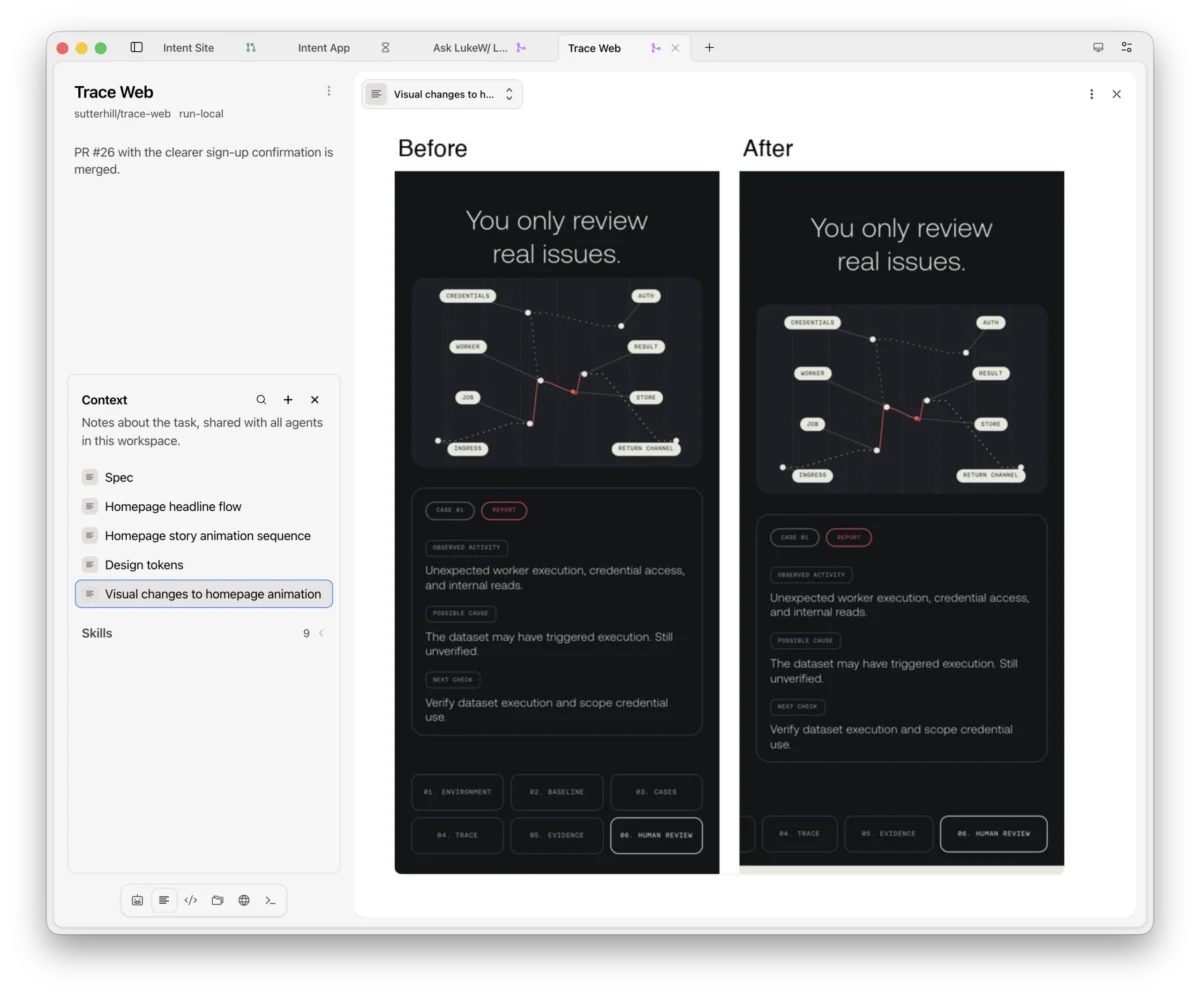
In the rapidly evolving ecosystem of AI-powered software, we have moved past the era of the singular, monolithic chatbot. We are now entering an age of complex, tiered autonomy where agents manage agents, who in turn orchestrate an even larger workforce of sub-agents. As this architecture scales, the traditional linear chat interface—once the gold standard for human-AI interaction—is proving fundamentally inadequate.
When software development involves a recursive chain of autonomous agents, tracking progress via a single, vertical thread of text creates a "visibility black hole." Users find themselves struggling to discern what agents are planning, what tasks have reached completion, and how to effectively intervene to steer outcomes. The industry is reaching a consensus: to manage the next generation of AI software, we require entirely new ways of visualizing digital labor.
The Management Fallacy: Moving Beyond the Inbox
When developers and product managers first contemplate how to monitor agent activity, they instinctively reach for familiar management metaphors: the inbox, the Kanban board, the task list, or the monitoring dashboard. These interfaces are designed to answer a singular, urgent question: "What are my agents doing right now?"
While these patterns provide a snapshot of activity, they are largely retrospective and reductive. They treat agent labor as a sequence of ticket-based tasks rather than a continuous, collaborative process. Last year, industry analysts identified several core "agent management interface patterns," including calendars and task lists, as the primary vehicles for oversight. However, current trends suggest that while these static views capture the what, they fail to capture the why or the how.
To truly manage complex agent systems, we need dynamic, context-aware views that evolve alongside the software being built. The limitation of current tools lies in their rigidity; they offer a one-size-fits-all view of a process that is inherently fluid and hierarchical.
Intent: A New Paradigm for Agent Coordination
Recognizing this critical gap, the development team behind Intent, a large-scale agent coordination tool, has shifted the focus from simple task tracking to an integrated, document-centric workspace. The core philosophy of Intent is that information should not be siloed within a chat log; instead, it should be rendered in the format best suited for human consumption.
In Intent, users create "notes"—dynamic, multi-functional documents that act as a canvas for the agent-human relationship. By allowing for an infinite number of these notes, the platform enables developers to summon specific visualizations tailored to the current phase of the project.
Visualizing Intent: Architecture and Logic
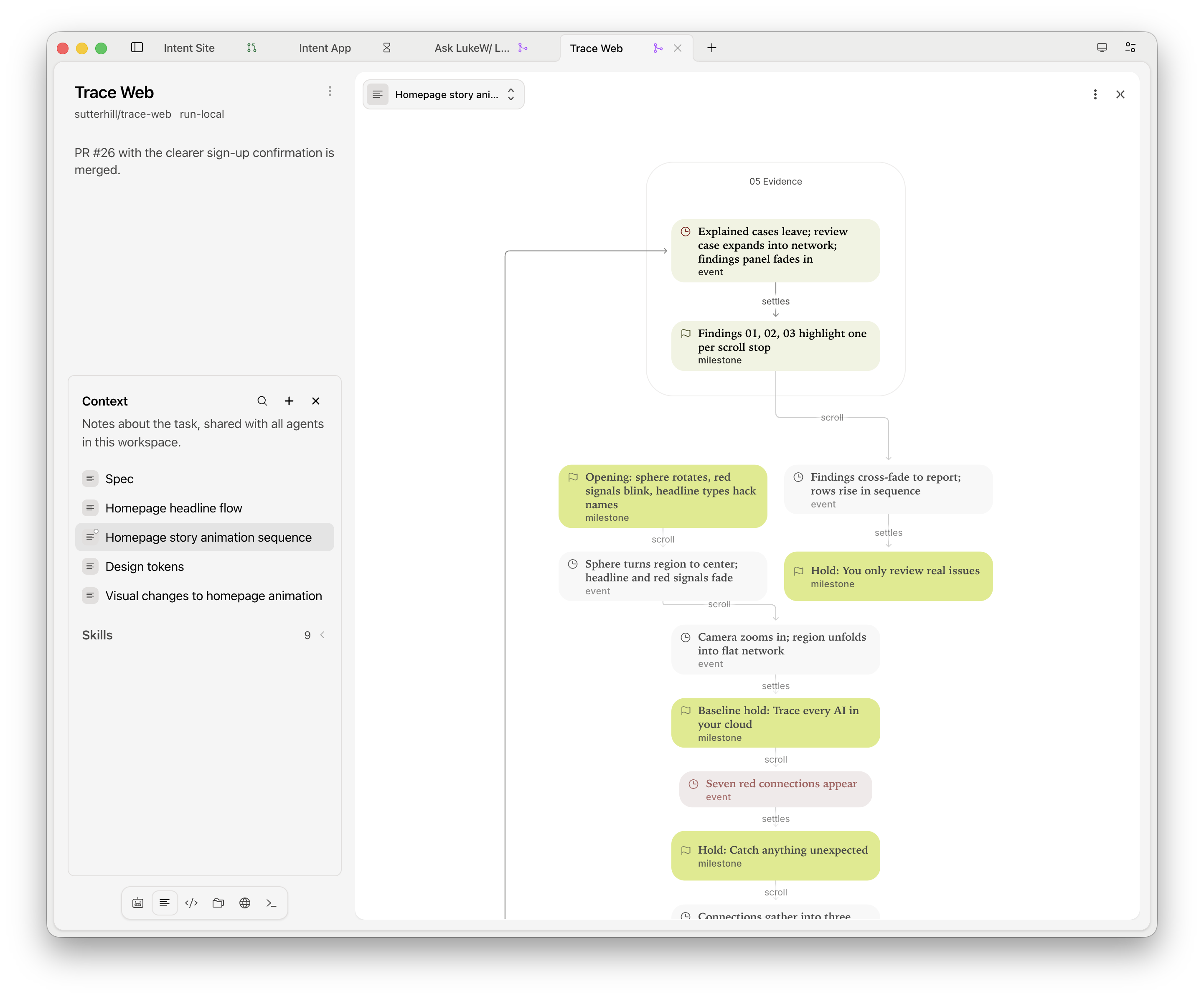
Before an agent spends expensive compute tokens on a task, the user needs to understand the strategy. Intent allows agents to generate complex visual artifacts—architecture maps, flowcharts, sequence diagrams, and state machines—directly within the workspace.
These are not mere static images. Intent provides "stepped walk-throughs," a feature that guides the human operator through a complex diagram one stage at a time. Each step is accompanied by contextual explanations and highlights of relevant architectural components. If a user needs to verify a specific logic gate or data flow, they can click on a reference box to drill down into the underlying file or note, creating a seamless transition from the high-level plan to the granular implementation.
The Visual Feedback Loop
One of the most profound challenges in AI-driven development is validating UI changes without constantly inspecting raw code. Intent tackles this through a visual feedback mechanism. Agents are tasked with capturing before-and-after screenshots of UI changes, which are then rendered side-by-side within a note.

This creates a "visual record" of the project’s evolution. Rather than parsing through diffs in a code repository, a product manager can simply look at the chronological sequence of visual notes to verify that the agent’s output aligns with the design intent. For continuous development, agents can pin specific screenshots, providing an at-a-glance status report on the current state of the application’s interface.
The Unified Design System
Perhaps the most powerful feature for maintaining consistency is the "Design System Note." This central hub stores all the essential variables of a product: color palettes, type scales, spacing tokens, corner radii, and animation timings.
By keeping this note pinned during the development process, both the human developer and the AI agents draw from the same source of truth. When an agent is tasked with building a new component, it references this live design system. This eliminates the "which padding?" ambiguity that often plagues developer-AI collaboration, ensuring that the UI remains cohesive as the agents scale their output.
Orchestrating the Workspace
A sophisticated set of views is only as useful as the user’s ability to arrange them. Intent treats the workspace as a modular, configurable environment. Every panel in the interface is designed to hold a diverse stack of content—agents, notes, files, terminals, and live browser tabs.
The ergonomics of this system are designed for the high-pressure environment of software development:

- Spatial Flexibility: Users can drag and drop elements between panels, split screens to isolate tasks, and zoom in on specific panels to reach a state of "deep work."
- Contextual Persistence: Because the workspace is persistent, the user can maintain multiple, distinct "views" of the project—one for architectural planning, one for visual review, and one for active coding—without the cognitive load of switching contexts.
Implications for the Future of AI Labor
The shift toward configurable, visual workspaces represents a maturing of the AI-agent industry. We are moving away from the "black box" era, where we trust the agent to perform a task in the void of a chat window, toward an era of "transparent oversight."
The Death of the Linear Thread
The traditional chat thread is not disappearing, but it is being demoted. It remains the command center—the place to initiate, pivot, and redirect work. However, the heavy lifting of coordination is shifting to these visual, document-based interfaces. As agent swarms grow in complexity, the ability to "see" the system—to visualize the logic, the visual output, and the design constraints simultaneously—will become the primary competitive advantage for engineering teams.
The Role of the "Human in the Loop"
With these tools, the role of the human developer shifts from a "coder" to an "architect of outcomes." By providing the right visual cues and constraints, the human effectively steers the agents, ensuring that the autonomous process remains aligned with the broader business objectives. This is not about managing the agents’ every keystroke; it is about providing the environment where those agents can operate with maximum accuracy and minimal deviation.
Economic Efficiency
Finally, there is an economic imperative to this approach. By utilizing visual planning and clear design systems, developers reduce the "token waste" associated with trial-and-error prompting. When an agent can "show its work" through a diagram or a state machine, the user can identify flaws in the logic before the agent spends tokens executing a faulty plan.
Conclusion: Steerage in an Autonomous World
The rise of agentic software is inevitable, but the chaos that follows from unmanaged, opaque AI activity is not. The future of development lies in the marriage of high-powered, autonomous agents with high-fidelity, transparent management interfaces.

As we continue to deploy agents that manage agents, the challenge will be to keep our eyes on the horizon. By adopting modular, document-driven workspaces like those pioneered by Intent, teams can ensure that their AI workforce remains a productive asset rather than an unmanageable liability. The software of the future will not just be written by AI—it will be visualized, organized, and steered by humans who have finally found the right way to look at the work.

 Neng Nana
 Asep Darmawan
 Reynand Wu
 Raul Delapena Setiawan
 Dwi Wanna
 Muslim
 Nana Wu