
 Basiran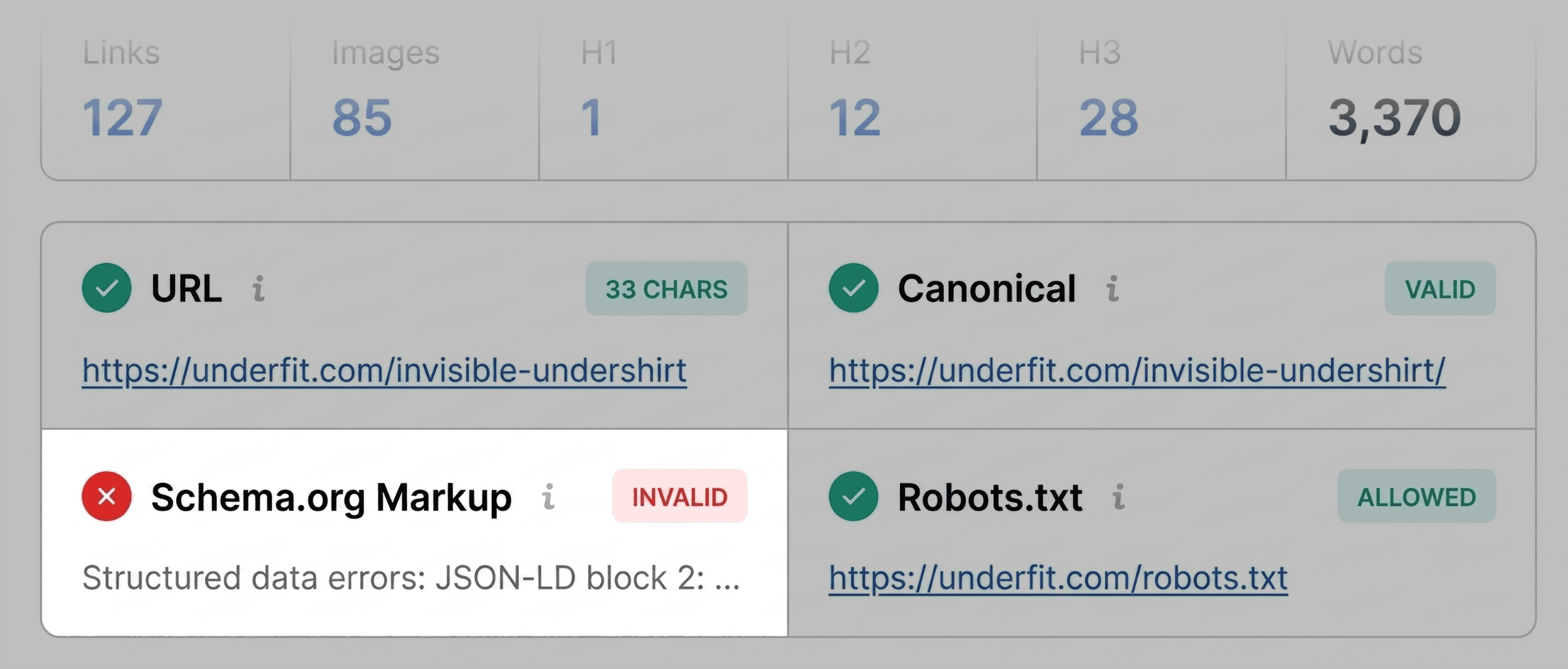
In the high-stakes world of digital marketing, performance plateaus are inevitable. Whether it is a cornerstone product page that has suddenly plummeted in search rankings, a competitor’s blog post consistently outperforming your own, or a high-traffic landing page that simply refuses to convert, the pressure to diagnose the issue is immediate. Traditionally, SEO professionals have relied on full-site crawls—time-consuming processes that can take hours to configure and run. However, for immediate triage and granular page-level insights, a more agile approach is required.
The SEOquake Chrome extension, developed by Semrush, provides a sophisticated, lightweight alternative to heavy-duty auditing tools. By offering a comprehensive diagnostic suite directly within the browser, it allows marketers to evaluate technical signals, on-page SEO health, link architecture, and core visibility metrics without ever navigating away from the page in question.

Understanding the Core Capabilities of SEOquake
SEOquake functions as a diagnostic bridge between raw HTML and actionable strategy. Once installed, the extension acts as a persistent layer over any webpage, providing an instant summary of its SEO profile.

The Two Pillars of Auditing
The power of SEOquake lies in its two-tiered reporting system:

- The Quick View Pop-Up: Designed for immediate triage, this interface provides a "snapshot" view of the page, allowing users to identify glaring errors within 60 seconds.
- The Full Report: A deep-dive environment that categorizes technical and structural data into six distinct panels. This is where the actual "diagnosis" happens, providing the context necessary to move from identifying a problem to planning a fix.
Throughout these reports, SEOquake employs a color-coded system that acts as a visual shorthand for site health: Green indicates a pass, Orange serves as a warning for elements that require professional judgment, and Red signals a critical error that likely necessitates immediate intervention.

Minute One: The Triage Phase
Triage is the most critical phase of the three-minute workflow. In this stage, the objective is not to solve problems, but to isolate them. The Quick View pop-up contains five specialized tabs: Page Info, Diagnosis, Internal Links, External Links, and Density.

Assessing Core SEO Elements
The "Page Info" tab is the recommended starting point for any audit. It serves as a health check for the foundational elements of SEO. An auditor should prioritize five specific metrics during this minute:

- Title Tag: Does it accurately describe the page and contain the primary keyword?
- Meta Description: Is it persuasive and within the optimal length?
- Heading Structure (H1–H6): Is there a clear, logical hierarchy?
- Canonical Tags: Does the page point to itself or a parent version?
- Robots Meta Tag: Is the page accidentally set to "noindex"?
If the system flags a red error in any of these areas—for instance, invalid Schema.org markup—it is an immediate red flag. On a product page, invalid JSON-LD (structured data) can render the page ineligible for Google’s Rich Results (such as star ratings or price snippets), effectively lowering the click-through rate (CTR) before a user even lands on the site.

Minutes Two and Three: The Diagnostic Deep Dive
Once triage is complete, the auditor moves to the "Full Report" to investigate the "Orange" and "Red" flags identified in the first minute.

Technical SEO and Audit Panels
The "Audit" panel provides a comprehensive look at the site’s technical backbone, including crawlability and indexation status. In a typical scenario—such as an audit of the UnderFit product page—one might find that while the page is technically "healthy" (mostly green/orange), there are subtle issues like a missing link to the XML sitemap. While not a "blocker" that prevents indexing, it is a structural deficiency that hinders the search engine’s ability to discover new content efficiently.

Keyword Density: Identifying Content Gaps
The Keyword Density panel is often misunderstood as a tool for "keyword stuffing," but its true value lies in identifying topic coverage gaps. By analyzing the "Keyword Cloud" and the frequency of one-word and multi-word phrases, an auditor can determine if the page is truly optimized for the intended user intent.

If a page meant to sell "V-neck undershirts" shows that the phrase "V-neck" is buried or absent, the audit has successfully identified a content-strategy failure. Furthermore, this panel helps identify "noise"—phrases that appear frequently but are derived from buttons or navigation widgets rather than the actual product copy.

Link Health: Navigating the Web
The "Links" panel is perhaps the most revealing tool for technical SEOs. It categorizes every internal and external link on the page, checking for HTTP response codes. A high number of broken external links (404 errors) or improperly tagged "dofollow" links can bleed PageRank away from the page, diluting its authority. During a diagnosis, the auditor can export these links to a CSV file to systematically repair the broken paths.

Implications of the Three-Minute Workflow
The efficiency of this workflow has significant implications for how agencies and in-house teams manage their digital assets. By decentralizing the audit process, SEOquake allows for "micro-audits" that can be performed during routine maintenance, rather than waiting for monthly or quarterly site crawls.

When to Escalate to a Site-Wide Audit
Not every issue found via SEOquake can be solved at the page level. For example:

- Site-wide Schema errors: If the JSON-LD errors identified on a single product page are present across the entire product catalog, the issue is likely a template-level bug in the site’s code.
- Sitemap issues: These are, by definition, domain-wide concerns.
- Canonicalization loops: If the tool reveals that thousands of pages have conflicting canonical tags, a full-site crawl is mandatory.
In these instances, SEOquake acts as the "early warning system." Once the scope of the problem is understood, the auditor should pivot to a full-scale solution, such as Semrush’s Site Audit tool, which allows for the monitoring of 100+ URLs at once.

Conclusion: The Professional Standard
The modern SEO landscape demands speed without sacrificing precision. The ability to perform a high-level diagnostic in three minutes transforms the way teams respond to volatility in search performance.

By utilizing tools like SEOquake to triage, diagnose, and categorize issues—whether they are minor metadata errors or major technical failures—marketers can spend less time searching for the source of a problem and more time implementing high-impact solutions. As search algorithms continue to prioritize user experience and technical integrity, the habit of conducting regular, swift page-level audits will remain a hallmark of the most effective SEO professionals.

Backlinko is owned by Semrush. We are committed to providing world-class SEO insights, backed by hands-on experience. Unless otherwise noted, this content was written by an employee or paid contractor of Semrush Inc.


 Nana
Nana
 Dwi Wanna
 Nila Kartika Wati
 Jia Lissa

 Sagoh
Sagoh

 Lina Hope