Azzam Bilal Chamdy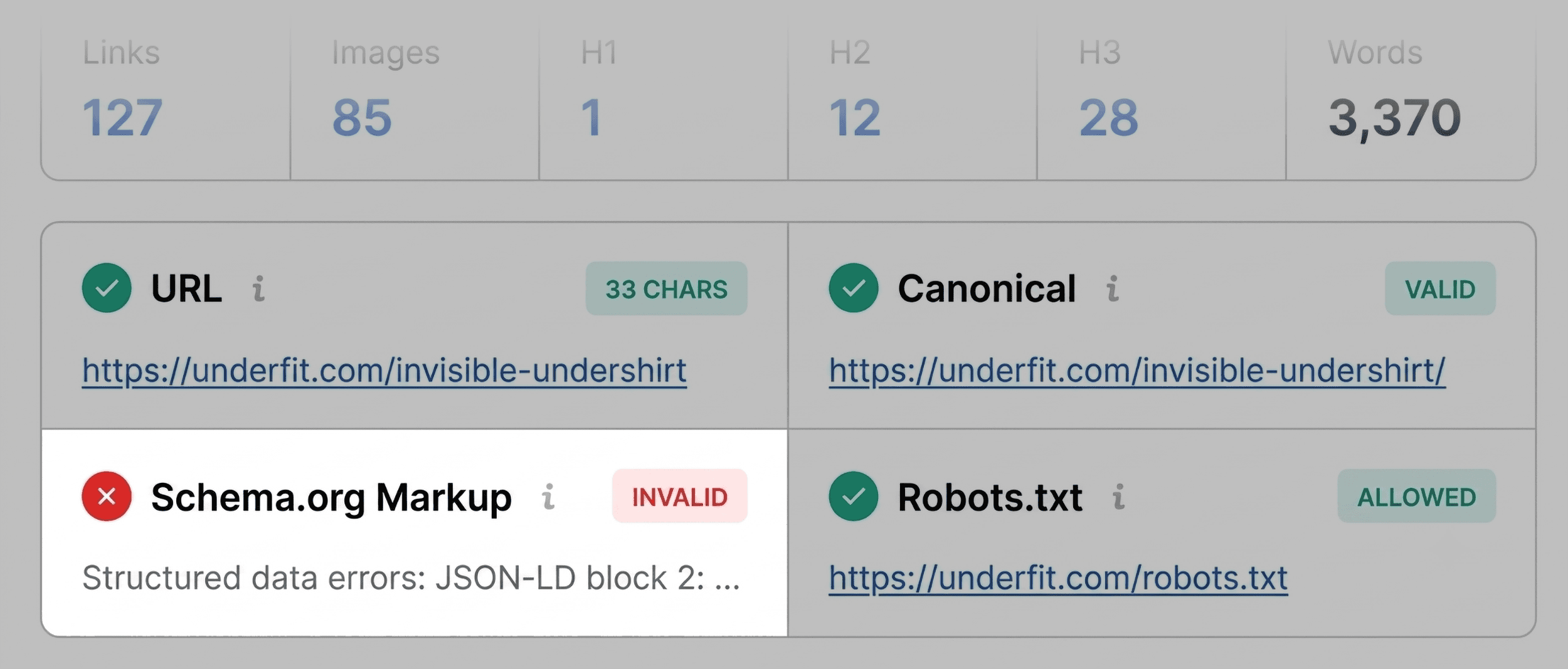
When a high-priority landing page suffers a sudden drop in search rankings, or a competitor’s post begins outperforming your best content, the pressure to identify the root cause is immediate. In the fast-paced world of digital marketing, waiting hours for a site-wide crawl to complete is a luxury most SEO professionals cannot afford. You need answers, and you need them now.
The SEOquake Chrome extension, developed by Semrush, provides a streamlined solution for this exact scenario. By allowing users to audit technical signals, on-page SEO, and link structures without ever leaving the browser, it transforms a complex diagnostic process into a manageable three-minute workflow.

The Mechanics of SEOquake: A Lightweight Auditor
At its core, SEOquake is an SEO-focused browser extension designed to provide instant visibility into a webpage’s underlying data. It acts as a bridge between the browser environment and powerful SEO metrics, allowing for real-time analysis of any URL.

The Two Modes of Auditing
SEOquake offers two primary modes of investigation:

- The Quick View Pop-up: A dashboard accessible via the browser icon, providing an immediate snapshot of the page’s SEO health.
- The Full Report: A deep-dive interface that categorizes technical and content-based issues into actionable, color-coded panels.
By utilizing a color-coded system—where green indicates compliance, orange signals warnings, and red highlights critical errors—the extension allows users to prioritize their efforts, focusing on "firefighting" critical issues before moving to minor optimizations.

Chronology of a 3-Minute Audit
To maximize efficiency, a professional audit should follow a structured, time-boxed sequence. This method ensures that critical "blockers" are identified within the first 60 seconds.

Minute One: Triage via Quick View
The first minute is dedicated to triage. The objective is simple: Is there something obviously broken that prevents the page from ranking? The Quick View pop-up contains five tabs, but for a rapid assessment, focusing on Page Info, Audit, and Content is most effective.

- Page Info: Check the basics. Is the title tag optimized? Is the meta description compelling? Are the canonical tags correctly set?
- Audit Tab: Check for technical "red flags." On many modern pages, this is where you will discover if search engines are being blocked from crawling or indexing the content.
- Content: A quick glance here reveals if the page structure is coherent. Are heading tags (H1-H6) used logically?
During an audit of a sample product page, for instance, a common finding is an invalid JSON-LD schema. If this is flagged in red, it is an immediate priority, as it renders the page ineligible for rich snippets—depriving the listing of vital price, availability, and rating data.

Minutes Two and Three: Deep-Dive Diagnosis
Once the initial triage is complete, the "Full Report" is used to confirm the cause of the flags identified in minute one. This panel offers six specific tabs: Diagnostic, Page Info, Internal/External Links, Density, Semrush, and Compare.

The goal here is to determine if the issue is isolated to the page or a systemic error across the site. For example, if the tool flags an XML sitemap issue, it is rarely a single-page problem. This triggers a transition from a page-level audit to a broader site-wide investigation.

Supporting Data: Understanding Keyword and Link Health
A robust SEO audit goes beyond technical compliance; it evaluates the content’s topical relevance and the integrity of its link graph.

Keyword Density and Topical Gaps
The "Density" panel is an invaluable tool for ensuring that your content matches user intent. By analyzing the "Keyword Cloud," an auditor can see if the most prominent terms align with the page’s target keywords. If a product page for "v-neck undershirts" features terms like "fabric" or "fit" as the most prominent keywords, the page is likely well-aligned. However, if the density reflects irrelevant terms, it may signal that the page is suffering from "keyword noise" derived from navigation elements or bloated HTML code.

Link Integrity
The "Links" panel provides a comprehensive look at the internal and external link graph. Broken external links are not just a user experience issue; they are a sign of content neglect. Using SEOquake to export this data into a CSV allows teams to systematically verify which links need to be redirected, updated, or removed.

Implications of Proactive Auditing
The ability to diagnose pages in minutes has profound implications for site maintenance. By integrating this audit process into daily workflows, teams can:

- Maintain Rich Results: By consistently monitoring schema markup, brands can ensure their products appear with star ratings and pricing, which significantly boosts click-through rates (CTR).
- Optimize Crawl Budget: Fixing broken internal links and ensuring proper sitemap indexing helps search engine crawlers spend their limited time on the most valuable pages of a site.
- Improve User Accessibility: Addressing issues like missing alt text on images—often flagged in the Content tab—improves both SEO performance and accessibility for screen-reader users.
Expert Perspective: When to Scale Up
While SEOquake is a powerful tool for page-level diagnosis, it is essential to recognize its limitations. The extension provides a snapshot of the page as it appears in the browser.

If the diagnostic process reveals site-wide issues—such as widespread H1 duplication, global template errors, or systemic crawl errors—the audit must be scaled. In these cases, moving to a full-scale crawler like the Semrush Site Audit is the recommended next step. This allows for a deeper examination of site architecture, server logs, and rendering issues that a single-page extension cannot capture.

Conclusion
The three-minute SEOquake workflow is not intended to replace comprehensive site audits; rather, it is a surgical tool for modern digital marketers. By rapidly identifying whether a performance issue is caused by a technical glitch, a content gap, or an external factor, professionals can make informed decisions faster.

For those looking to adopt this practice, the path is clear: install the extension, establish a consistent triage ritual, and reserve your deep-site crawls for the broader issues that require a macroscopic view. In an industry defined by constant change, the ability to act quickly is the ultimate competitive advantage.

 Nana Wu
 Suro Senen
 Reynand Wu
 Nila Kartika Wati
 Raul Delapena Setiawan
 Dwi Wanna
 Muslim