
 Nila Kartika Wati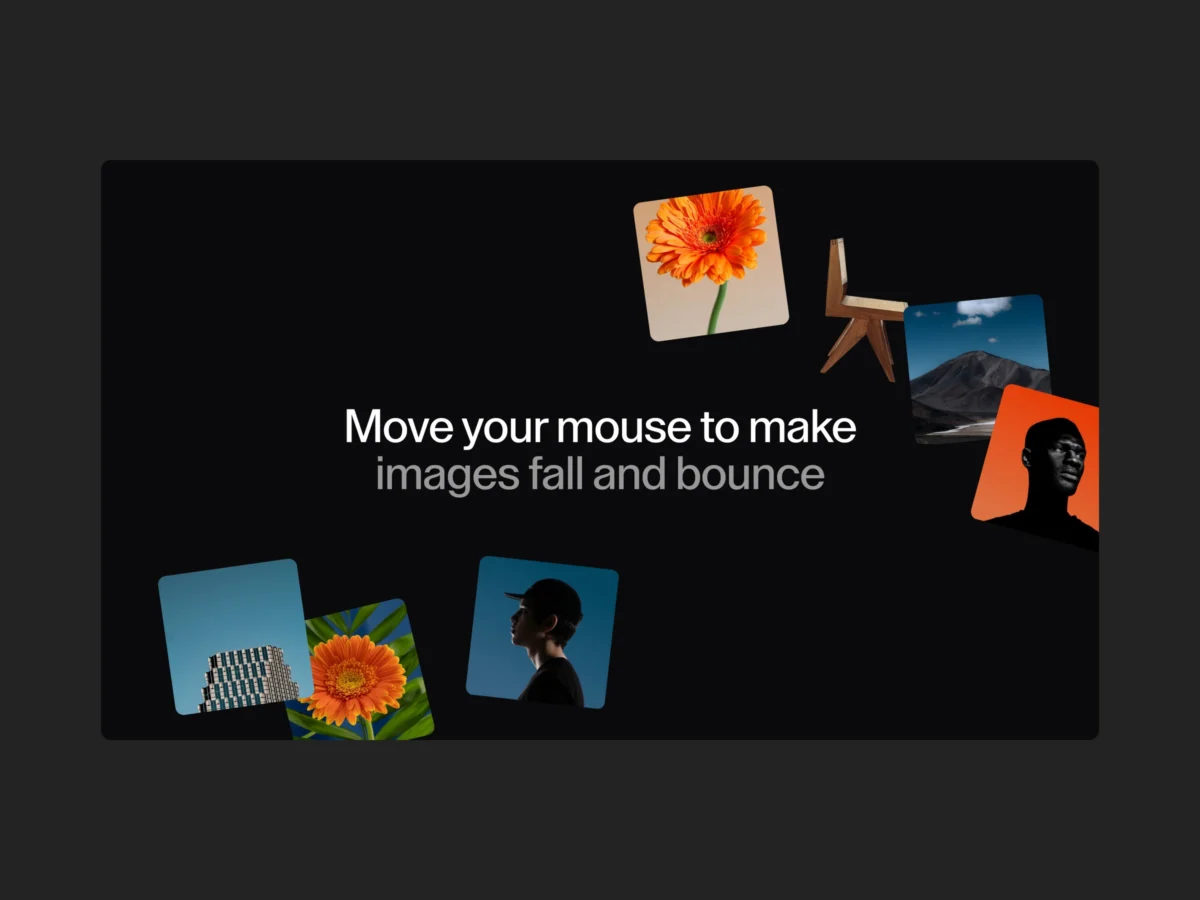
In the rapidly evolving landscape of web design, the intersection of performance and playfulness remains a primary focus for creative developers. As users grow accustomed to increasingly static, minimalist interfaces, the demand for "delightful" interactions—micro-animations that respond fluidly to user input—has surged. In a recent collaborative effort between Made With Gsap and Codrops, the web development community has been introduced to a sophisticated, physics-based mouse trail effect that pushes the boundaries of standard DOM manipulation.
The new demo showcases an interactive experience where images appear at the cursor’s position, only to succumb to simulated gravity, fall to the bottom of the viewport, bounce, and gracefully exit the screen. This article dissects the technical architecture, the underlying logic, and the implications of this project for modern front-end development.
The Core Concept: Bridging UI and Physics
At its essence, the project is a masterclass in combining GreenSock Animation Platform (GSAP) with native JavaScript event listeners. The primary objective was to move away from rigid, linear transitions and toward a more organic, "physical" feel.
The effect operates on a distance-tracking trigger. Rather than spawning images on every single pixel movement—which would be computationally expensive—the script monitors the cumulative distance traveled by the cursor. Once the distance exceeds a calculated threshold, a new element is instantiated. This method ensures that the density of the "trail" remains consistent regardless of how fast or slow the user moves their mouse.
Chronology of the Development
The development of this effect followed a structured, multi-phase lifecycle, focusing first on DOM efficiency, then on the physics engine, and finally on the visual polish.
1. Architectural Setup
Initially, the developers established a container to hold the image assets. By pre-loading images in the HTML, they ensured that the browser’s cache handles the assets before the animation even begins. This prevents the "stutter" often associated with dynamically injected assets.
2. The Tracking Logic
The script tracks the X and Y coordinates of the mouse cursor, calculating the delta between the current position and the previous one. By summing the absolute differences, the script effectively measures the "velocity" of the user’s interaction. Once this incr (increment) variable surpasses window.innerWidth / 8, the animation function is triggered.
3. The Physics Simulation
The most complex phase involved the createMedia() function. The developers utilized GSAP’s timeline to sequence the entrance, the "fall," and the final bounce. By passing deltaX and deltaY parameters, the images maintain the momentum of the mouse movement, creating a natural trajectory that mimics real-world throwing physics.
Technical Deep-Dive: The Code Breakdown
Understanding the Trigger Mechanism
The logic relies on a precise mousemove listener. By storing the previous coordinates in oldIncrX and oldIncrY, the system can calculate the distance traveled since the last event.
root.addEventListener("mousemove", e =>
    const valX = e.clientX
    const valY = e.clientY
    incr += Math.abs(valX - oldIncrX) + Math.abs(valY - oldIncrY)
    // Trigger reset and create media once threshold is met
    if(incr > resetDist)
        incr = 0
        createMedia(valX, valY - root.getBoundingClientRect().top, valX - oldIncrX, valY - oldIncrY)

    oldIncrX = valX
    oldIncrY = valY
)
The Power of Dynamic Easing
Perhaps the most impressive technical detail is the use of dynamic easing. As the image falls, the bounce intensity is calculated based on the starting height:
'back.in(' + (1.5 + (1 - y/H)) + ')'.
This ensures that an image falling from the top of the screen hits with significantly more "impact" than one starting near the bottom. This attention to detail elevates the effect from a standard animation to a nuanced, responsive user interface component.
Supporting Data: Why Performance Matters
In modern web development, adding complex animations often invites performance degradation. However, this implementation utilizes several optimization strategies:
- Memory Management: The use of
onComplete: () => root.removeChild(image); tl && tl.kill()is critical. By destroying the DOM elements once the animation finishes, the project prevents memory leaks, ensuring the browser remains responsive even after long periods of interaction. - Layered Tweens: By running horizontal and vertical animations in parallel using GSAP’s position parameter (
<), the CPU load is minimized, allowing for smooth 60fps performance across most modern devices.
Official Responses and Collaborative Intent
The collaboration between Made With Gsap and Codrops serves a specific purpose: to provide the community with high-quality, "copy-pasteable" components that don’t sacrifice design integrity.
"We wanted to bridge the gap between static design and interactive storytelling," noted the development team. "By providing the ZIP files and Webflow components, we are enabling designers to implement complex GSAP physics without requiring a deep background in advanced trigonometry or engine-level programming."
The feedback from the early release has been overwhelmingly positive, with developers noting that the "gravity" logic is easily adaptable to other elements, such as text fragments, icons, or custom SVG shapes.
Implications for the Future of Web Interaction
1. The Rise of "Micro-Physics"
This project suggests a shift toward the "Micro-Physics" era of web design. Developers are no longer satisfied with simple hover states; they are beginning to treat the browser viewport as a canvas for physics-based simulation. This trend is expected to grow as more users access the web via high-refresh-rate displays.
2. Accessibility vs. Aesthetics
While these effects are visually stunning, the developers were careful to include a guard clause for the bottom of the viewport, ensuring that animations do not interfere with footer content or interactive navigation. This highlights a growing awareness in the creative community regarding the balance between "show-stopping" animations and functional accessibility.
3. The Democratization of GSAP
By packaging these complex effects into the Made With Gsap library, the barrier to entry for creative coding has significantly lowered. This is a crucial step in ensuring that high-end motion design is not reserved solely for boutique agencies but is accessible to the broader freelance and developer community.
How to Implement and Customize
For those looking to integrate this into their own projects, the flexibility of the code allows for several levels of customization:
- Customizing the "Fall": By altering the
durationand theeaseparameters within the GSAP timeline, users can change the gravity from "heavy and metallic" to "bouncy and light." - Responsive Scaling: The use of
window.innerWidth / 8for the trigger threshold is a smart responsive design choice. It ensures that the frequency of the animation scales proportionally with the device screen size, preventing the effect from feeling cluttered on mobile devices. - Asset Swapping: Because the code uses a standard
imagesarray, developers can easily swap in SVGs, icons, or even complex HTML components, provided they maintain the basic structure.
Conclusion: A New Standard for Engagement
The collaboration between Made With Gsap and Codrops provides more than just a cool demo; it provides a blueprint for future-proofed interactive web design. By prioritizing clean code, efficient memory management, and thoughtful physical logic, this project stands as a testament to what is possible when creative vision meets technical precision.
As the industry continues to evolve, developers should look toward these types of "open-component" models to accelerate their workflows. Whether you are building a personal portfolio or a high-traffic marketing site, the ability to weave subtle, physics-driven interactions into your project is a skill that will define the next generation of web experience.
To get started, developers are encouraged to visit the official Made With Gsap portal. With over 100 effects available and new content dropping weekly, the platform is rapidly becoming the go-to repository for those looking to inject life into the modern web. For those interested in the full potential of these animations, the current promotional offer—using the code Codrops10—provides an excellent entry point into their premium collection of creative effects.

 Sagoh
Sagoh
 Asep Darmawan
 Raul Delapena Setiawan
 Reynand Wu


 Azzam Bilal Chamdy
 Ali Ikhwan