
 Evan Lee Salim
In the rapidly evolving landscape of digital productivity, the sheer volume of data generated by modern professionals has become a double-edged sword. While Google Drive serves as a robust repository for our documents, spreadsheets, presentations, and media, the task of extracting actionable insights from these vast archives can feel like finding a needle in a digital haystack.
Google has recently addressed this friction with a powerful, yet underutilized, feature: Drive Projects. This tool allows users to bundle specific files, emails, calendar events, and notes into a unified workspace, providing a dedicated environment for Gemini, Google’s AI assistant, to analyze and interpret information with unprecedented precision.
The Core Challenge: Why "General" AI Isn’t Always Enough
For many Workspace users, prompting Gemini to "summarize my budget" or "find information on the Q4 strategy" is a standard practice. However, as your Drive library grows, the AI is forced to parse through thousands of disparate files, old versions, and unrelated documents. This "wide-net" approach often leads to latency and, more importantly, a dilution of context.

By implementing the Projects feature, Google is shifting the paradigm from "search everything" to "analyze specific sources." Much like Google’s standalone NotebookLM, Drive Projects empowers users to define the boundaries of their AI’s knowledge base. By narrowing the scope, Gemini can provide faster, more accurate, and highly contextual responses that are directly relevant to the task at hand.
Chronology and Evolution of Workspace AI
The integration of generative AI into Google Workspace has been a multi-year journey. Following the initial rollout of Gemini for Workspace, users were granted the ability to interact with files directly via a side panel. While revolutionary, it was a reactive tool—users had to open a document to ask questions about it.
The introduction of Drive Projects marks a transition toward a proactive, project-centric workflow.
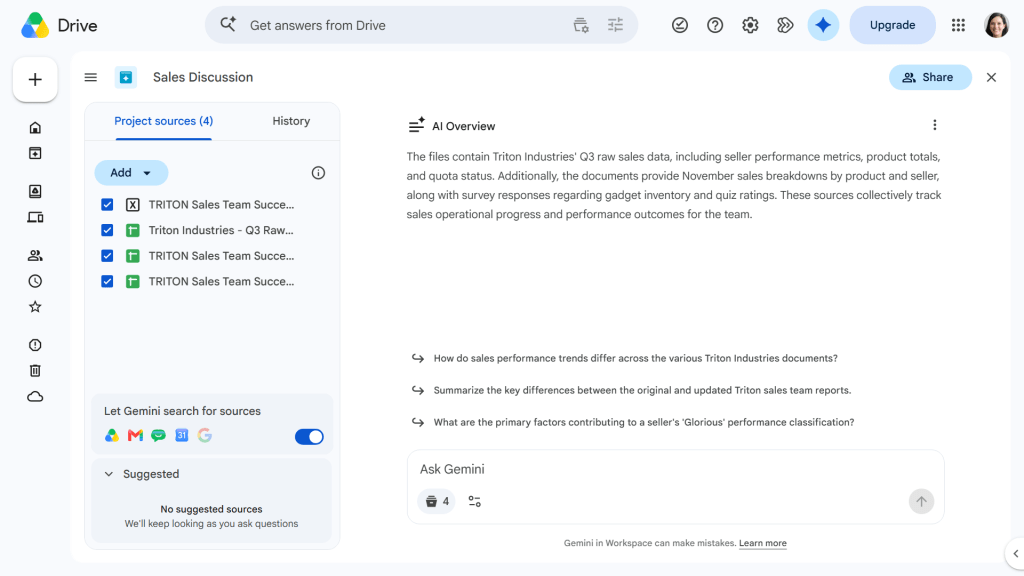
- Phase 1: Basic AI integration (summarization and drafting).
- Phase 2: Cross-app context (Gemini accessing Gmail, Chat, and Calendar).
- Phase 3 (Current): The creation of "Project Containers," allowing users to silo information and assign specific intelligence to defined workflows.
This evolution signifies that Google is no longer just providing a chatbot; they are providing an intelligent project management layer that sits atop your existing data ecosystem.
Supporting Data and Technical Functionality
The Mechanics of Efficiency
When you create a project, you aren’t moving or duplicating files. Instead, you are creating a "metadata wrapper" that points Gemini to a curated list of assets. Because the AI is restricted to these specific pointers, the token processing time is significantly reduced, and the risk of "hallucinating" information from unrelated, similarly named files is drastically lowered.
The "Let Gemini Search" Toggle
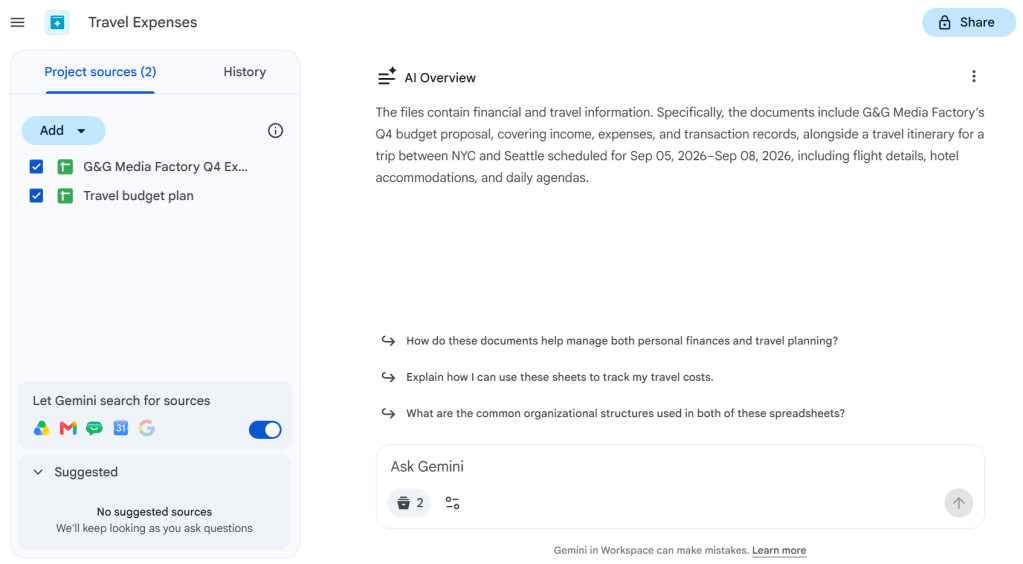
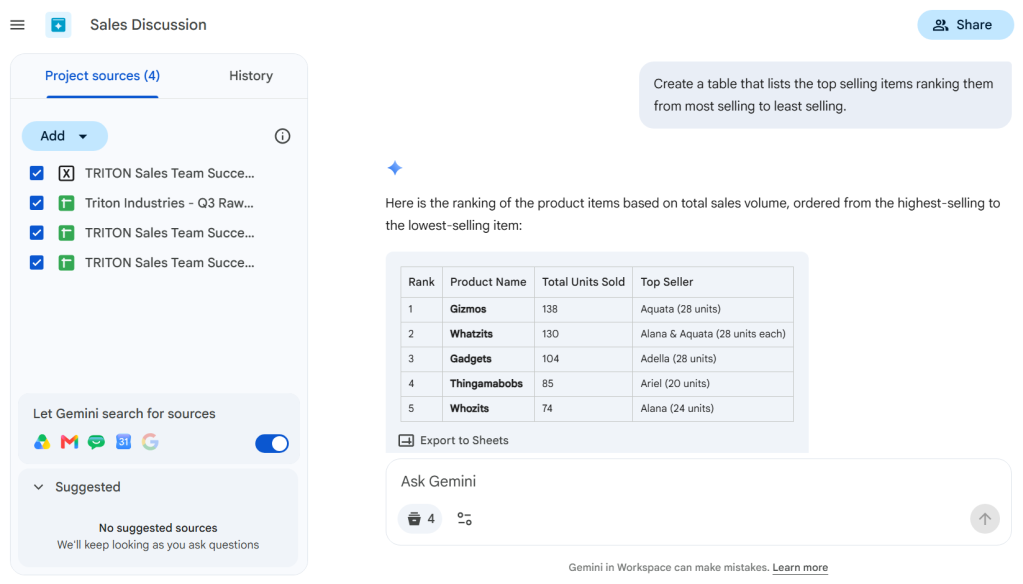
A standout feature of the Projects interface is the "Let Gemini search for sources" toggle. When activated, this allows the AI to dynamically scan your connected Workspace apps—Gmail, Calendar, and Chat—for related materials not manually added to the project. This feature bridges the gap between static documents and the fluid, real-time communication that defines modern business.
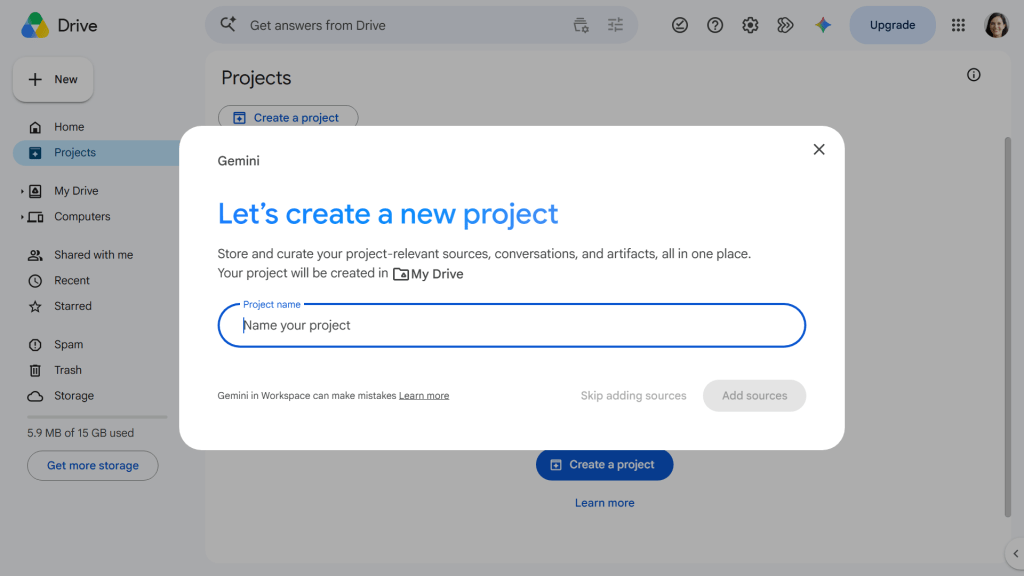
How to Implement Drive Projects: A Step-by-Step Guide
To leverage this feature, you must have a qualifying Google Workspace subscription (such as Business Standard, Business Plus, or Enterprise tiers).
Creating Your First Project
- Initiation: Navigate to the Google Drive web interface. You can initiate a project from the "Projects" tab in the left-hand sidebar.
- Naming: Choose a descriptive title. Clarity here is vital for future organization.
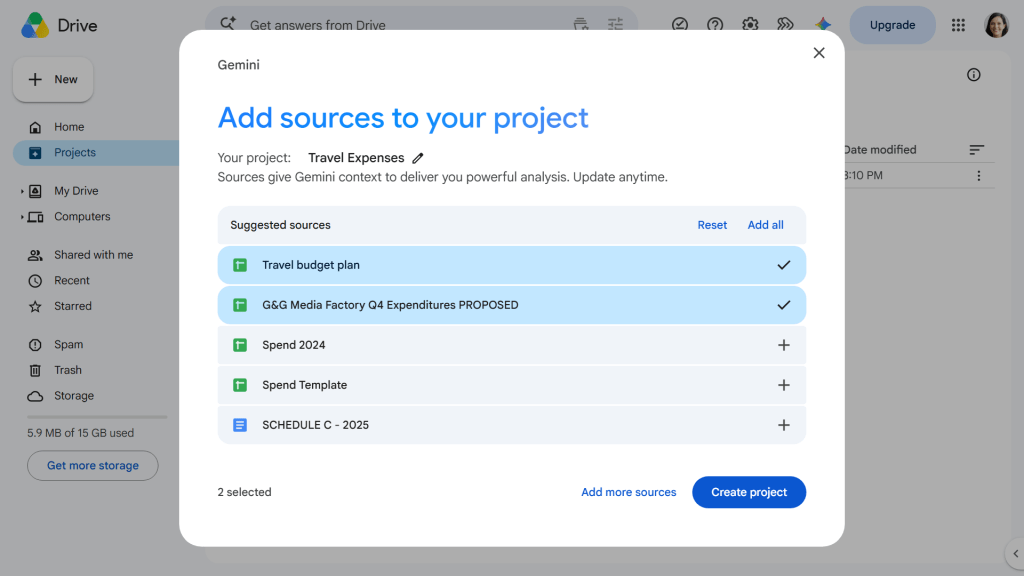
- Curation: Click "Add Sources." Gemini will suggest relevant files based on your recent activity, but you should manually supplement these with folders or specific documents to ensure the AI has the full context required.
- Activation: Once the sources are set, toggle the search settings to allow Gemini to pull in relevant communication history from Gmail and Chat.
The "Save as Project" Workflow
If you are already in a deep-dive conversation with Gemini regarding a complex problem, you don’t need to start from scratch. Simply click the "Save as a project" button in the top right corner of the chat window. This converts your current session into a saved asset, preserving the chat history and the source materials for future reference.
Collaborative Implications: Working Together with AI
Perhaps the most significant value proposition of Drive Projects is its collaborative potential. In a team setting, sharing a project is akin to giving your team a shared "brain."
Permission Structures
When you share a project, the permissions mirror standard Google Drive file-sharing protocols:
- Viewer: Can read the project sources and see the chat history but cannot add new sources or initiate new, persistent AI threads.
- Editor: Can add or remove sources, rename the project, and conduct their own independent AI inquiries within the project scope.
Privacy Considerations
While collaborative AI is powerful, it necessitates caution. When you add a sensitive document to a project and share that project, you are effectively granting access to that content to the collaborators. It is imperative that teams maintain good "data hygiene," ensuring that sensitive documents are only added to projects with the appropriate stakeholders.
Official Perspective and Future Outlook
Google’s positioning of Drive Projects is clear: they want to turn the passive cloud storage model into an active, intelligent workspace. By allowing users to "teach" the AI about specific projects, Google is moving away from generic large language model interactions and toward a bespoke, enterprise-ready AI experience.
In recent briefings, Google representatives emphasized that the goal of these tools is to reduce the "context switching" tax. Professionals spend a disproportionate amount of time moving between emails, documents, and messaging platforms. By centralizing these into a single, AI-driven interface, Google hopes to reclaim that lost time.
Strategic Implications for Businesses
For organizations, the adoption of Drive Projects represents a shift in how knowledge is managed.
- Standardization of Knowledge: Instead of having team members hunt through endless subfolders, managers can create a "Project Hub" that serves as the single source of truth for a specific initiative.
- Onboarding Efficiency: When a new employee joins a project, they can be given access to the Drive Project, allowing them to use Gemini to get up to speed on the project’s history, goals, and documentation in a fraction of the time it would take to read through years of email threads.
- Data-Driven Decision Making: Because Gemini can format extracted data into tables and export them directly to Google Sheets, the barrier to performing real-time, cross-document analysis is virtually eliminated.
A Note on Reliability
While the efficiency gains are undeniable, users must remain diligent. As with all generative AI, the outputs should be treated as draft material. Always verify critical data—such as budget figures or legal clauses—against the source documents. Gemini is an expert assistant, but the human user remains the final authority on accuracy.
Conclusion
Google Drive Projects is more than just a new folder feature; it is an intelligent framework for the modern workplace. By enabling users to define the scope of their AI’s focus, Google has created a bridge between the chaotic volume of digital storage and the need for sharp, actionable insights. Whether you are managing a quarterly budget, overseeing a complex project rollout, or simply trying to organize your team’s communications, the ability to "bundle and query" is an essential skill for the future of work.
As we continue to integrate artificial intelligence into our daily operations, the tools that provide us with the most control and the clearest context will ultimately define our success. Drive Projects is, without question, a vital step in that direction.

 Nana Muazin
 Laily UPN
 Nila Kartika Wati
 Jia Lissa
 Basiran
 Sagoh
Sagoh

 Lina Hope