
 Reynand Wu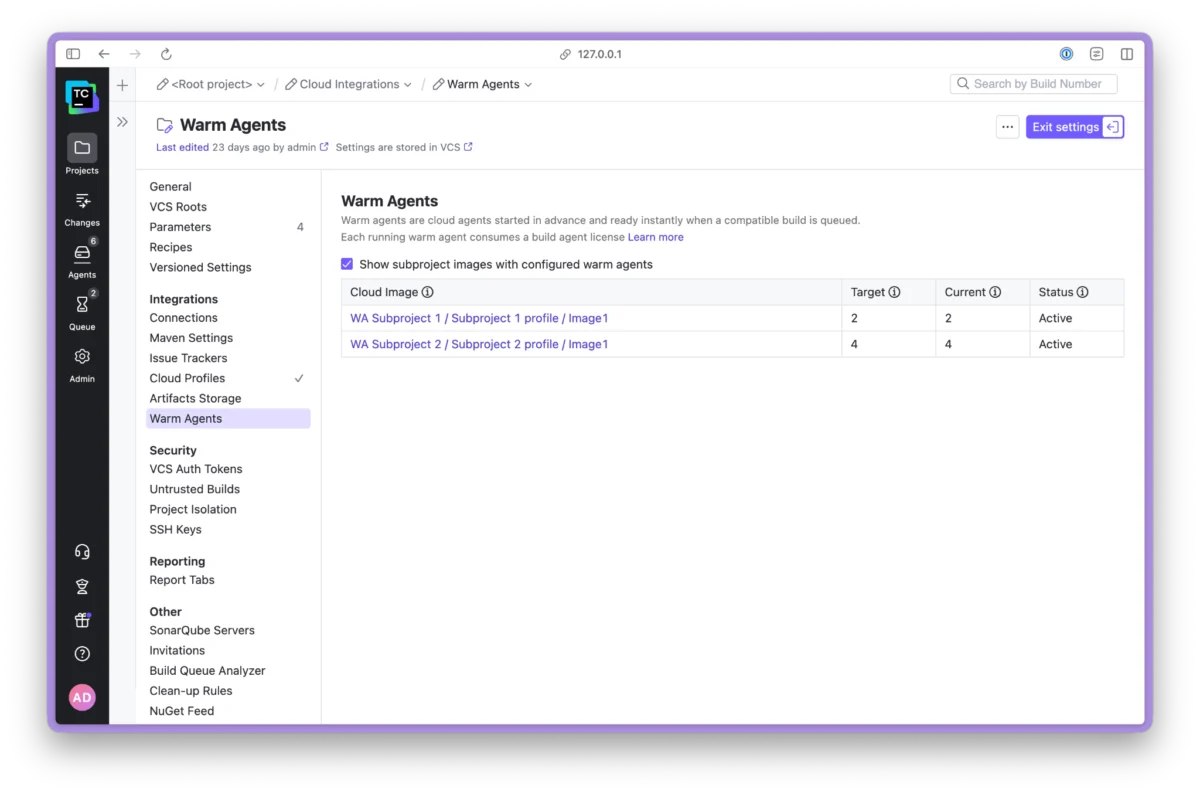
In the high-stakes environment of modern software development, time is the most precious currency. For DevOps engineers and developers alike, nothing disrupts the flow of productivity quite like the "waiting for a starting agent" status message. This seemingly innocuous delay—where a rapid, one-minute PR build is held hostage by a ten-minute cloud instance initialization—is a notorious bottleneck in CI/CD pipelines.
JetBrains has officially addressed this industry-wide pain point with the release of the Warm Agents plugin for TeamCity. By introducing a mechanism to maintain a pool of pre-started, idle cloud instances, JetBrains is shifting the paradigm from reactive provisioning to proactive availability.
The Genesis of the Problem: Why Cold Starts Strangle Productivity
To understand the necessity of Warm Agents, one must first understand the inefficiency of the "cold start" model. In traditional cloud-based CI setups, build agents are provisioned on-demand. When a build is triggered, the CI server sends a request to a cloud provider (such as AWS, GCP, or Azure), which must then spin up a virtual machine, initialize the OS, boot the agent software, and register it with the TeamCity server.
While modern cloud providers are fast, this "cold start" overhead is rarely negligible. For organizations running hundreds of commits per day, these cumulative minutes add up to hours of wasted developer time and significant context switching. The frustration is compounded when a minor unit test, which takes seconds to execute, is forced to wait for a full container or VM lifecycle.
The Warm Agents plugin eliminates this latency by ensuring that a predefined number of "warm" agents are already running, authenticated, and waiting for tasks. When a build enters the queue, it is assigned immediately to a warm agent, allowing the build to commence in milliseconds rather than minutes.
Chronology: From Feature Request to Production Release
The development of the Warm Agents plugin was not a sudden decision, but a response to years of community feedback.
- The Early Demand (2015–2020): The concept of a "minimum number of idle agents" has been one of the most requested features on the TeamCity YouTrack issue tracker (notably ticket TW-41207). Developers were increasingly vocal about the need for a persistent pool of agents to handle bursty CI traffic.
- Architectural R&D (2021–2022): JetBrains engineers explored various ways to implement persistent agents without creating a "billing nightmare." The primary challenge was ensuring that the plugin would remain provider-agnostic while adhering to TeamCity’s complex licensing and resource management architecture.
- The Beta Phase (Early 2023): JetBrains introduced the plugin to early adopters, focusing on REST API integration to allow for programmatic scaling.
- The Official Launch: Following successful testing, the plugin was made available on the JetBrains Marketplace, accompanied by comprehensive documentation and CLI tools to support enterprise-grade automation.
Technical Architecture: How It Works
The plugin operates by maintaining a "target count" for specific cloud images. When the TeamCity server detects that the number of idle agents for a given configuration falls below the user-defined threshold, it triggers a provisioning request to the cloud provider immediately.
Installation and Configuration
The plugin is accessible via the Admin | Plugins menu within the TeamCity interface. Once installed, the primary interface for managing Warm Agents is the TeamCity REST API. For power users, JetBrains recommends using teamcity-cli, which allows for seamless integration into terminal workflows and CI scripts.
To set a target of ten idle agents for a specific cloud profile, the following command is used:
teamcity api '/app/<projectExternalID>/<cloudProfileID>/<cloudImageName>/warmAgents?target=10' -X PUT
The plugin is designed to be "smart" about scaling. If a user sets a target of 10, but the cloud provider has a hard limit on the total number of running instances, the plugin respects the provider’s constraints while attempting to keep as many warm agents as possible.
Supporting Data: The Economic Trade-off
The adoption of Warm Agents involves a fundamental trade-off: Cost vs. Latency.
By keeping idle agents running, an organization is effectively paying for uptime that isn’t actively compiling code. Because cloud providers charge for the time instances are active, maintaining a pool of warm agents will inevitably increase the monthly cloud bill.
However, the "cost" of idle instances must be weighed against the "cost" of developer downtime. If a team of 50 developers loses 15 minutes a day due to queueing, that equates to 12.5 hours of lost engineering time daily. At average developer salary rates, the cost of keeping ten idle agents running is often significantly lower than the cost of the productivity lost to the queue.
Metrics and Observability
To help organizations make data-driven decisions regarding this trade-off, the plugin provides granular metrics. By running:
teamcity api '/app/projectMetrics?projectId=<projectExternalID>'
Users can export utilization and saturation data in Prometheus format. This allows DevOps teams to visualize their build demand over time. Using these metrics, an organization can effectively tune their "Warm Agent" strategy—scaling up during peak hours and scaling down to zero during nights and weekends.
Strategic Implications: Automation and Scheduling
One of the most powerful features of the Warm Agents plugin is its compatibility with TeamCity’s existing scheduling triggers. Since the target count can be modified via REST API, developers can automate the "warmth" of their agents based on their team’s working hours.

The "Day-Night" Strategy
Using the Kotlin DSL, teams can configure their CI server to scale up the number of warm agents at 8:00 AM and scale them down to zero at 6:00 PM. This ensures that developers start their day with near-instant build times, while the company avoids unnecessary cloud spend during the night.
Implementation Example:
schedule
    schedulingPolicy = daily
        hour = 8

    buildParams
        param("warmAgents.target", "5") // Scale to 5 during work hours
This level of automation transforms the CI/CD pipeline from a static resource pool into a dynamic, "breathing" system that responds to the actual human behavior of the engineering team.
Official Responses and Future Outlook
The JetBrains team has been clear that this is only the first step. According to the official documentation and the associated YouTrack issue for future improvements (TW-102916), the roadmap includes:
- Auto-scaling Intelligence: Future versions may include AI-driven scaling that learns from historical build patterns, automatically increasing the warm agent count ahead of known peak demand periods.
- Enhanced UI Integration: While the REST API is powerful, JetBrains is working on providing a more robust visual dashboard within the TeamCity UI to manage warm agents without needing to drop into the terminal.
- Cost Forecasting: Integrating cost estimation directly into the Warm Agents metrics page, allowing managers to see exactly how much their "latency reduction" is costing them in real-time.
Conclusion
The release of the Warm Agents plugin is a testament to JetBrains’ commitment to developer experience. By acknowledging that build latency is a significant, tangible problem, they have provided a flexible, scalable, and highly configurable solution.
For teams already struggling with build queues, the Warm Agents plugin offers a clear path to reclaiming lost hours. However, it requires a disciplined approach to configuration and monitoring. By leveraging the built-in metrics and scheduling capabilities, organizations can strike a balance between high-performance CI/CD and fiscal responsibility, ensuring that their developers spend more time writing code and less time staring at a "Waiting for Agent" progress bar.
As DevOps practices continue to evolve toward faster, more iterative cycles, tools that reduce friction—like the Warm Agents plugin—will become the standard for high-performing engineering organizations.

 Nila Kartika Wati
 Neng Nana
 Basiran

 Iffa Jayyana
 Raul Delapena Setiawan
 Rifan Muazin
 Asro
Asro