
 Laily UPN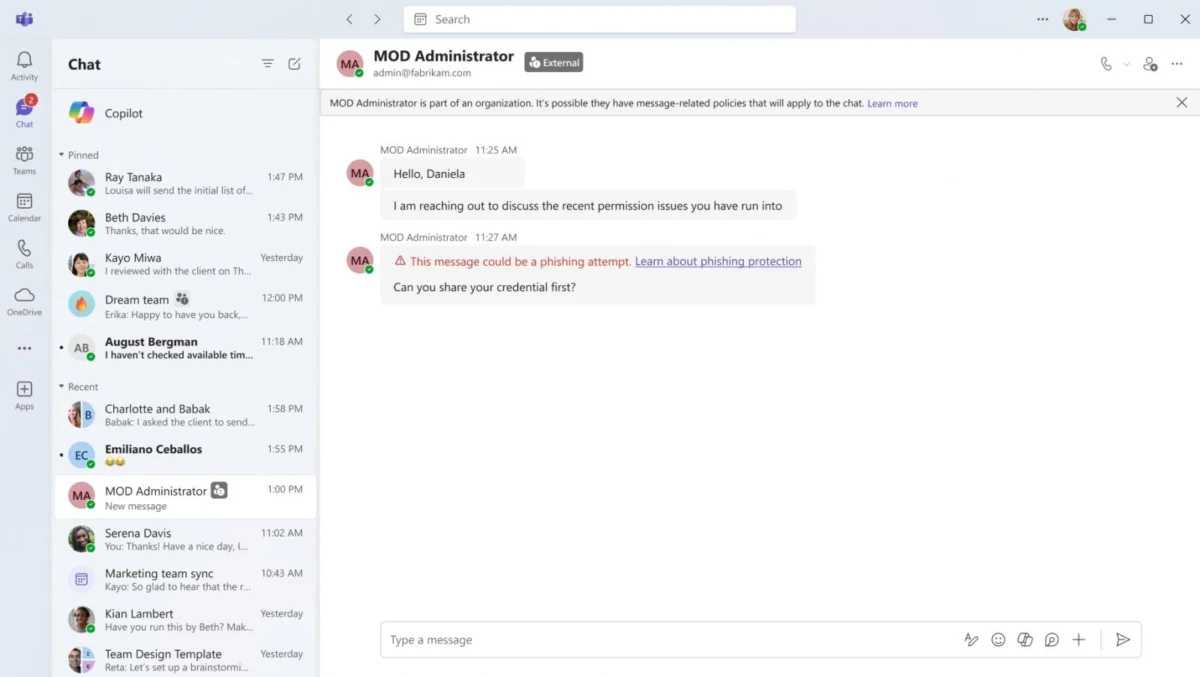
In a significant move to fortify enterprise communication platforms against increasingly sophisticated cyber threats, Microsoft has announced the upcoming deployment of a new AI-powered security feature within Microsoft Teams. Designed to detect phishing, social engineering scams, and identity theft, this tool represents a shift in how organizations defend their collaborative environments—moving from reactive link-scanning to proactive behavioral analysis.
As remote and hybrid work environments continue to rely heavily on instant messaging and collaborative tools, these platforms have become primary hunting grounds for threat actors. Microsoft’s latest intervention is a direct response to the rising tide of sophisticated social engineering attacks that have plagued enterprise environments over the past two years.
The Core Innovation: Context-Aware Threat Detection
Traditional security measures in enterprise messaging apps have historically focused on "blacklisting"—the process of scanning URLs for known malicious domains or checking files for known malware signatures. However, as attackers evolve, these methods are becoming insufficient. Cybercriminals are now utilizing "living off the land" techniques, using legitimate infrastructure to bypass standard filters.
Microsoft’s new AI-powered feature shifts the focus to context-aware behavioral analysis. Rather than merely looking for a bad link, the tool analyzes the intent, tone, and context of a conversation. It is specifically calibrated to monitor interactions with "external contacts"—users outside of an organization’s verified tenant—as these connections represent the highest surface area for security breaches.
How the Technology Operates
By leveraging Large Language Models (LLMs) and advanced pattern recognition, the system evaluates incoming messages for signs of manipulation. This includes identifying attempts at "authority impersonation," such as attackers posing as IT help desk staff or senior executives. The AI assesses whether a request for sensitive information, credentials, or remote access aligns with standard communication patterns, flagging anomalies that would typically bypass legacy security protocols.
Chronology: A Response to Escalating Threats
The development of this feature follows a series of high-profile security incidents that have exposed vulnerabilities within the Microsoft ecosystem.
- 2023–2024 (The Rise of Impersonation): Throughout this period, security researchers identified a growing trend of "Help Desk Impersonation" attacks. In these scenarios, threat actors would join external Teams chats and pose as corporate IT personnel, tricking employees into providing remote access to their workstations or revealing multi-factor authentication (MFA) codes.
- Mid-2026 (Internal Validation): Microsoft began internal testing of the behavioral detection engine, refining its ability to distinguish between legitimate external collaboration and malicious social engineering.
- October 2026 (The Announcement): Microsoft officially confirmed the rollout via a Microsoft 365 Message Center notification, outlining the deployment schedule and operational parameters.
- November 2026 (Initial Rollout): The feature is scheduled to begin its global rollout, initially running in a "shadow mode" for quality validation.
- December 2026 (General Availability): The feature is expected to reach general availability, providing full protection across all enterprise-grade Teams accounts.
Supporting Data: Why Behavioral Analysis is Necessary
The necessity for this tool is underscored by the shifting landscape of cybercrime. According to recent cybersecurity industry reports, social engineering attacks have seen a 40% year-over-year increase in enterprise messaging environments.
The Anatomy of the Threat
- Targeting Efficiency: Attackers often target new employees or those in high-stress roles who may be more prone to following "urgent" instructions from someone claiming to be an administrator.
- The "Trust" Gap: Because users are conditioned to trust the Teams interface, they are significantly more likely to click a malicious link or approve an MFA prompt within the app than they would be in a browser-based email client.
- The Cost of Compromise: Successful social engineering attacks frequently lead to full account takeover (ATO), allowing attackers to move laterally through an organization’s network, exfiltrate sensitive data, or deploy ransomware.
By automating the detection of these threats, Microsoft aims to reduce the "dwell time" of attackers—the duration they spend inside a network before being detected.
Official Responses and Privacy Safeguards
Privacy remains a paramount concern for organizations adopting AI-driven security tools. In its official communication, Microsoft has been transparent about the limitations and the ethical framework governing the new feature.
Privacy and Data Governance
In the documentation provided to IT administrators, Microsoft explicitly stated that the tool is strictly for security purposes. The company emphasized three critical points:
- No AI Training: None of the messages analyzed by the feature will be used to train Microsoft’s broader AI models. This is a crucial distinction for enterprises concerned about intellectual property leakage.
- No Surveillance: The tool is not intended for employee monitoring, productivity tracking, or advertising. It is a security-first utility designed to mitigate external threats.
- Data Retention: Microsoft has confirmed that the system does not store message content for long-term analysis, ensuring that the privacy of the end-user remains intact while maintaining the security of the communication channel.
The "Shadow Mode" Validation
During the initial rollout phase in November, the AI will operate in the background without alerting the user. This "quality validation" period is intended to minimize false positives—a common frustration with AI security tools. By calibrating the detection thresholds during this phase, Microsoft hopes to ensure that when the warnings do appear in December, they are accurate and actionable.
Implications for Organizations and IT Teams
The implementation of this feature is "automatic," meaning IT departments will not need to configure settings, create policies, or adjust permissions. While this significantly reduces the administrative burden, it also requires organizations to prepare their internal communications.
The Role of the End-User
When the feature becomes fully active, users will see an alert when a potential phishing attempt is detected. IT departments should consider:
- Security Awareness Training: Employees should be informed that these warnings will appear and be instructed on how to react (e.g., reporting the message rather than simply ignoring it).
- Incident Response Protocols: Organizations must ensure that their security operations centers (SOC) are ready to handle the increased reporting that will likely follow as the AI begins flagging suspicious interactions.
The Future of Workplace Security
This move signals a broader shift in the "Security by Design" philosophy. As AI becomes a tool for attackers, it must necessarily become the primary tool for defenders. Microsoft’s strategy here suggests that future security updates for Teams will continue to move toward "autonomous security," where the platform itself takes a more active role in policing the traffic that passes through it.
Conclusion: A Necessary Evolution
The rollout of AI-powered phishing detection in Microsoft Teams is a critical step in acknowledging the limitations of current defense mechanisms. As the boundary between internal and external communication continues to blur, relying on traditional perimeter security is no longer sufficient.
By focusing on behavioral cues and intent-based analysis, Microsoft is providing a necessary safety net for the modern, distributed workforce. While the effectiveness of the tool will be tested in the coming months, the move reflects a broader commitment to securing the collaborative tools that form the backbone of the global economy. Organizations should welcome this update, while remaining vigilant that no automated tool can replace the importance of a well-informed and security-conscious workforce.
As of December 2026, the digital workplace will be a slightly more secure environment, though the cat-and-mouse game between cybersecurity researchers and threat actors will undoubtedly continue to evolve. For now, Microsoft’s proactive approach provides a significant hurdle for those looking to exploit the trusted environment of Microsoft Teams.

 Sagoh
Sagoh
 Layla Zulfa
 Suro Senen
 Azzam Bilal Chamdy
 Asep Darmawan
 Nana Wu
 Nana
Nana
 Muslim