
 Raul Delapena Setiawan
Data analysis has long been shrouded in a veil of complexity, often perceived as a domain reserved exclusively for mathematicians, statisticians, or software engineers wielding massive server clusters. However, the democratization of data science tools—specifically the Python ecosystem—has fundamentally shifted this paradigm. Today, an entry-level practitioner can extract profound insights from raw information with just a few lines of code.
This guide serves as a comprehensive roadmap for constructing a functional, efficient data analysis tool using Python and the industry-standard library, pandas. Whether you are an aspiring data scientist or a professional looking to optimize your workflow, understanding the mechanics of data manipulation is an essential modern skill.
The Fundamentals of Data Analysis
At its core, data analysis is the process of inspecting, cleansing, transforming, and modeling data to discover useful information and support decision-making. While the term often conjures images of machine learning algorithms, the vast majority of actionable business intelligence begins with descriptive statistics: understanding what happened, why it happened, and how different variables interact.
By leveraging Python’s pandas library, we move away from the limitations of static spreadsheets and into the world of reproducible, scalable analysis. This article will walk you through building an analyzer designed to process student performance data, providing a framework you can adapt to any CSV dataset.
Prerequisites and Environment Setup
Before diving into the code, ensure your development environment is properly configured. You do not need to be a seasoned programmer; however, a foundational grasp of Python syntax is highly recommended.
Essential Tooling
To follow this workflow, you will need:
- Python 3.x: Ensure you have a current version of Python installed.
- pandas: The primary engine for data manipulation.
- Matplotlib: A foundational library for data visualization.
You can establish your environment by executing the following command in your terminal or command prompt:
pip install pandas matplotlibOnce installed, verify your setup with a simple script to ensure the libraries are correctly linked to your Python interpreter. If the command import pandas as pd executes without error, you are prepared to begin.
Chronology of the Analysis Workflow
A professional data analysis project follows a predictable, logical progression. Skipping steps—such as initial data inspection—is the most common cause of flawed conclusions.

Phase 1: Data Acquisition and Loading
We begin by creating a mock dataset, students.csv. In a professional setting, this data might come from an SQL database, a cloud-based API, or a legacy spreadsheet. For this exercise, we define our dataset to include names, grades, study hours, attendance percentages, and test scores.
Loading this into Python is seamless:
import pandas as pd
data = pd.read_csv("students.csv")
The read_csv function converts your flat file into a DataFrame—a robust, two-dimensional table structure that acts as the foundation for all subsequent operations.
Phase 2: Exploratory Data Analysis (EDA)
Before performing calculations, you must understand the "shape" of your data.
head(): Provides a snapshot of the first few records.shape: Returns the total count of rows and columns.info(): Reveals data types, which is critical for identifying non-numeric entries that might break your calculations.
Phase 3: Statistical Computation
With the data loaded and inspected, we move to quantification. Instead of manual arithmetic, we utilize built-in methods. For instance, calculating the mean of student scores is as simple as data["score"].mean(). The describe() method is perhaps the most powerful tool in this phase, as it provides a comprehensive summary—including quartiles, standard deviation, and mean—in a single command.
Supporting Data and Advanced Manipulation
True power in data analysis comes from the ability to filter and group information. These operations allow you to move from general observations to granular insights.
Filtering for Relevance
In real-world scenarios, you rarely need the entire dataset. You often need specific subsets. Using Boolean indexing, we can isolate students who meet specific criteria, such as "those with a score above 90."
high_achievers = data[data["score"] >= 90]This syntax allows for complex filtering, such as combining multiple conditions (e.g., high study hours and high attendance) using the & operator.
Aggregation and Grouping
To understand performance by grade level, we utilize the groupby() method. This allows us to collapse the dataset into meaningful categories and calculate aggregate statistics for each.
grade_summary = data.groupby("grade")["score"].agg(["mean", "min", "max"])This output provides a clear, comparative view of how different groups perform, which is vital for identifying outliers or systemic trends.
Implications: Correlation vs. Causation
One of the most important lessons in data science is the distinction between correlation and causation. When analyzing the relationship between study hours and test scores, you might use the corr() method to find a positive numerical correlation.
However, a professional analyst must exercise caution. A high correlation coefficient does not inherently mean that studying caused the higher score; other variables—such as prior knowledge, interest in the subject, or external academic support—might also be influencing the outcome. Relying solely on correlation without context is a common pitfall that leads to faulty business decisions.
Visualizing Insights
Human beings are inherently visual. A table of numbers is often ignored, whereas a well-crafted chart commands attention. Using Matplotlib, we can transform our numerical analysis into a narrative.
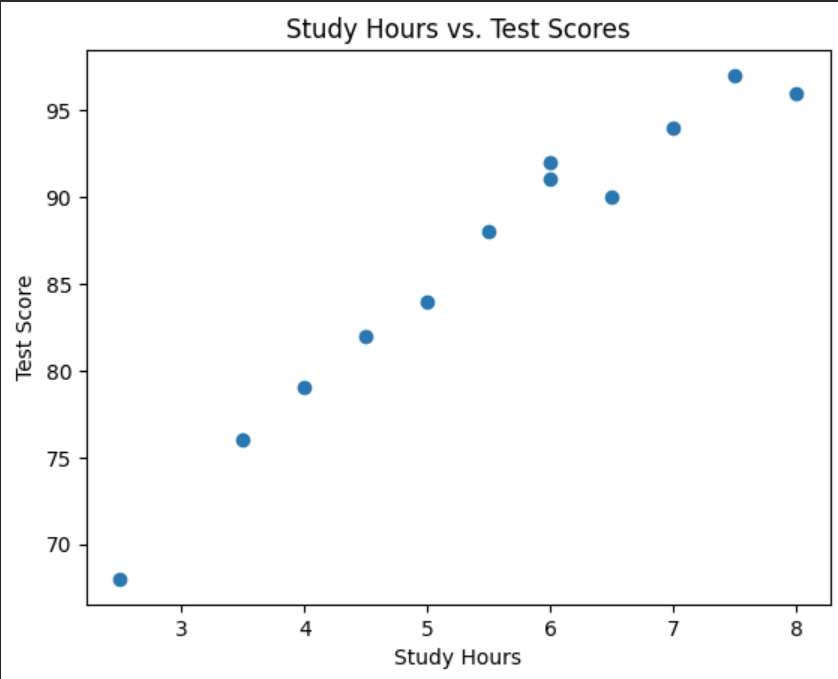
A scatter plot plotting study hours against test scores can immediately reveal if there is a positive trend line. Similarly, a bar chart comparing the mean score per grade provides an instant visual summary of academic performance across different cohorts. These visualizations are not merely for decoration; they are essential for communicating complex findings to stakeholders who may not have the time to parse raw data.
Best Practices for Robust Analysis
To ensure your code remains maintainable and accurate, adhere to these professional standards:
- Modularize with Functions: Do not write a single, monolithic script. Break your logic into reusable functions (e.g.,
calculate_stats()orfilter_students()). This makes your code easier to debug and test. - Handle Missing Data: Real-world datasets are messy. Always check for null values using
isnull().sum(). Decide whether to drop incomplete rows or impute missing values with the mean or median. - Validate Column Names: Before running your script, ensure your column headers match your data structure. Mismatched names are a frequent source of "KeyError" crashes.
- Export Results: Always provide a way to save your findings. Use
to_csv()to export processed data for stakeholders or further downstream analysis.
Conclusion: The Path Forward
Building a simple data analyzer is the first step toward a data-driven mindset. While this guide focused on student performance, the principles are universal. Whether you are analyzing financial trends, logistics data, or user engagement, the workflow remains identical: import, inspect, cleanse, analyze, and visualize.
As you progress, consider expanding your analyzer to handle larger datasets, incorporate more complex statistical models, or even automate the generation of PDF reports. The barrier to entry in data science is lower than ever, but the value of the insights you can produce is higher than it has ever been. By mastering the tools of pandas and Python, you are not just writing code—you are building the capability to turn raw, chaotic information into clear, actionable intelligence. Happy coding.

 Nana
Nana
 Iffa Jayyana
 Asep Darmawan
 Ali Ikhwan
 Nana Muazin
 Muslim
 Layla Zulfa