
 Basiran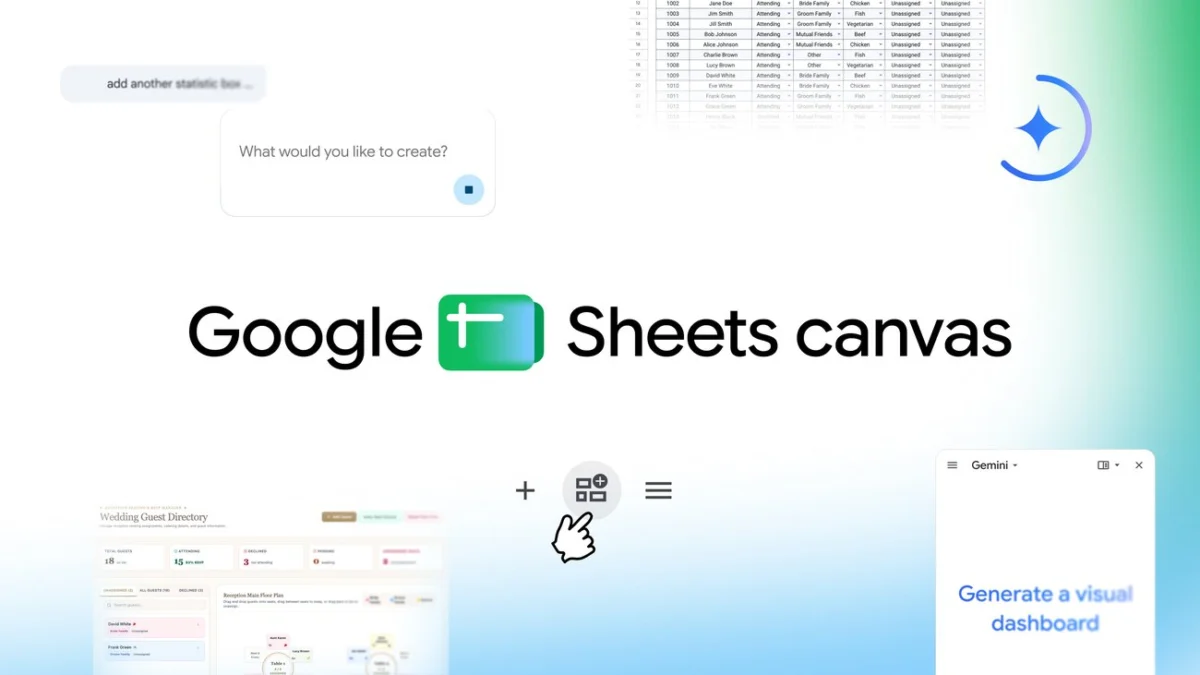
In the modern digital workspace, the spreadsheet has long been the unsung hero of productivity. From the humble ledger to the complex multi-tab financial model, spreadsheets are the backbone of decision-making. Yet, for all their utility, they are often perceived as sterile, intimidating, and cumbersome. Staring at a grid of hundreds of rows and columns can lead to “data fatigue,” where the narrative hidden within the numbers is lost to the sheer volume of cells.
Google is aiming to shatter this perception with the launch of "Sheets canvas," a transformative new feature that leverages the power of Gemini, Google’s advanced generative AI model. By enabling users to turn static spreadsheets into interactive, visual "mini-apps" through simple natural language prompts, Google is effectively bridging the gap between raw data and actionable insight.
The Evolution of the Spreadsheet: From Grids to Canvas
The history of the spreadsheet is one of iterative improvement, but the core interface—a grid—has remained largely stagnant for decades. While tools like pivot tables and charts have allowed for better visualization, they often require a steep learning curve and constant manual updates.
Sheets canvas changes the paradigm by acting as a dynamic, read-write layer that sits directly on top of existing spreadsheet data. This means that users no longer have to manipulate formulas or struggle with rigid formatting to view their data in a meaningful way. Instead, the "canvas" acts as a flexible interface that can be sculpted to fit the user’s specific needs, whether that is a Kanban board for project management, a structured dashboard for tracking personal finance, or a visual seating chart for an event.
Key Functionality: The Power of the Prompt
The cornerstone of Sheets canvas is its integration with Gemini. The process is remarkably straightforward: a user opens a spreadsheet, triggers the "Ask Gemini" side panel, and inputs a natural language prompt—such as "Create a dashboard for my project tasks" or "Turn this RSVP list into a seating chart."
The AI interprets the underlying data structure and generates a visual canvas that organizes that information into a more intuitive, user-friendly format. Because this layer is "read-write," any change made on the canvas—such as moving a task card from "In Progress" to "Done"—is automatically reflected in the original source data within the spreadsheet. This two-way synchronization ensures that the user never has to worry about data discrepancy or broken links.
A Chronology of Integration: The Path to AI-Powered Sheets
The rollout of Sheets canvas is the latest milestone in a broader, multi-year strategy by Google to infuse its Workspace suite with generative AI.
- Early 2023: Google announces the integration of generative AI into Workspace, starting with Gmail and Docs, allowing users to draft content and summarize documents.
- Late 2023: The expansion of "Duet AI" (later rebranded under the Gemini moniker) brings predictive analysis to Google Sheets, helping users with formula generation and data categorization.
- Mid-2024: Google begins testing "natural language to app" interfaces, allowing users to create custom templates based on specific datasets.
- August 2026: The official launch of Sheets canvas, representing the first time that a spreadsheet’s entire presentation layer can be dynamically reconfigured by AI.
This progression marks a shift from AI as a "helper" that suggests formulas, to AI as a "designer" that architects the user interface itself.
Supporting Data: Why Visualization Matters
The demand for better data visualization is not merely aesthetic; it is a matter of cognitive efficiency. Studies in data science have long shown that the human brain processes visual information significantly faster than text-based or tabular data.
According to internal Google research, users who leverage visual dashboards rather than traditional lists are 40% more likely to identify trends, outliers, or bottlenecks in their projects. By allowing users to create custom, task-specific views, Sheets canvas addresses three primary pain points identified by Workspace power users:
- Contextual Loss: The difficulty of maintaining focus on high-priority items while viewing an entire dataset.
- Navigation Friction: The time lost scrolling through large spreadsheets to find relevant information.
- Collaborative Ambiguity: The difficulty of communicating data insights to stakeholders who may not be comfortable reading complex spreadsheets.
By transforming a sheet into a "mini-app," these barriers are significantly lowered, allowing team members with varying levels of data literacy to interact with the same information without fear of corrupting the source file.
Official Perspectives: The Vision for the Future
Eric Birnbaum, Director of Product Management for Google Sheets, describes the launch as a democratization of data management. "Spreadsheets are powerful, but they shouldn’t feel like a chore," Birnbaum stated during the product unveiling. "With Sheets canvas, we are moving toward a future where the tool adapts to the user, not the other way around. Whether you are a student tracking assignments or a business leader managing complex project milestones, your data should look and behave the way you need it to."
Google’s strategy is clearly aimed at enterprise adoption. By including Sheets canvas in Business and Enterprise Standard and Plus plans, Google is signaling that this is not just a consumer novelty, but a professional-grade tool designed to streamline workflows in high-stakes environments.
Implications for the Workspace Ecosystem
The implications of Sheets canvas are far-reaching for the broader software-as-a-service (SaaS) industry.
1. The Rise of "No-Code" Business Logic
Sheets canvas effectively serves as a "no-code" development platform. By allowing users to build custom interfaces on top of data, Google is reducing the dependency on specialized app-building software. Small businesses that previously required third-party project management tools may find that they can now build those same workflows directly inside Google Sheets.
2. A Competitive Shift in Generative AI
This launch places Google in a unique position against competitors like Microsoft 365. While Microsoft has integrated Copilot into Excel, Google’s approach with "canvas" focuses on the reconfiguration of the UI rather than just the generation of content. This distinction could prove crucial in how users choose their primary productivity suite.
3. The Future of Data Literacy
As AI continues to lower the barrier to entry, the definition of "data literacy" will change. In the past, being data-literate meant knowing VLOOKUP or pivot table syntax. In the era of Sheets canvas, being data-literate will mean knowing how to ask the right questions—how to frame a prompt that results in a useful, logical, and actionable visual interface.
Looking Ahead: What’s Next?
As Sheets canvas rolls out globally, the focus will undoubtedly shift toward expanding the library of "templates" or "layouts" the AI can generate. Currently, the tool excels at standard views like Kanban boards, progress trackers, and seating charts. Future iterations could include complex financial forecasting interfaces, dynamic Gantt charts, or even interactive CRM dashboards.
For now, the message from Google is clear: the era of the static spreadsheet is coming to an end. By turning rows and columns into a flexible canvas, Google is inviting users to stop merely recording their data and start visualizing their success. As the tool becomes more deeply integrated into the daily workflows of millions of users, we can expect to see a surge in creative, data-driven applications built by people who previously never considered themselves "programmers."
The spreadsheet is no longer just a grid—it is now a blank slate for your data’s story.


 Nana
Nana
 Siti Muinah
 Raul Delapena Setiawan
 Reynand Wu
 Sagoh
Sagoh

 Azzam Bilal Chamdy
 Ali Ikhwan