Lina Irawan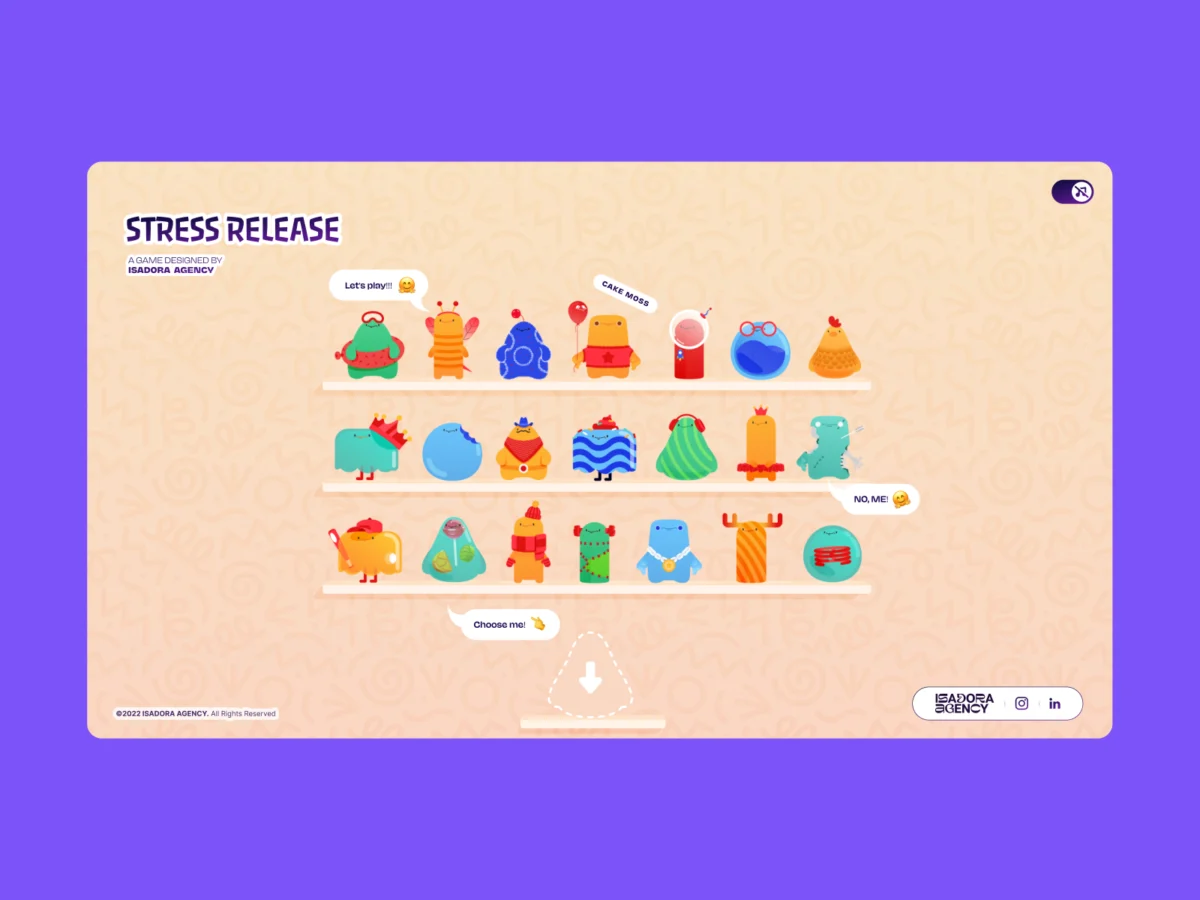
In the modern landscape of high-end web development, the pursuit of "tactile" interactivity often leads engineers down a well-trodden path: the integration of complex physics engines. Whether it is the robust dynamics of Matter.js, the 3D capabilities of Cannon.js, or bespoke WebGL shaders, the industry standard has long been to simulate reality through algorithmic approximation. However, for the team at Isadora Agency, the challenge of building Stress Release—a digital stress-relief toy—revealed a fundamental tension between simulated physics and artistic intent.
When tasked with creating an interface that allowed users to smash, stretch, and distort UI characters, the team realized that "plausible" motion was not enough. They required "intentional" motion—a level of precision that only a frame-by-frame, artist-led approach could provide. By pivoting away from physics engines entirely, the team successfully architected a highly interactive experience using only Lottie animations, DOM events, and foundational geometry.
The Design Requirement: Prioritizing Artistic Intent
The core philosophy behind Stress Release was the preservation of the animator’s vision. When a designer spends hours crafting a "mega squeeze" reaction—a sequence spanning exactly 181 frames of specific visual distortion—they are creating a narrative arc of tension and release.
In a traditional physics-based simulation, that 181-frame masterpiece would be subjected to environmental variables, velocity calculations, and collision jitter, effectively "washing out" the artist’s nuanced keyframing. The Isadora Agency team identified that their requirement was not for realistic physics, but for absolute deterministic control.
By choosing programmatic state control over Lottie’s native API, the developers ensured that the interaction layer functioned as a transparent bridge, triggering the animation exactly as intended, every single time. This approach respects the "squash and stretch" principles of traditional animation, ensuring the digital experience feels handcrafted rather than procedurally generated.
Chronology of Development: From Physics to Math
The development process was defined by a transition from standard game-dev tooling to a "pure web" philosophy.

Phase 1: Exploration of Simulation
Initially, the team experimented with common physics engines. While these tools were excellent at creating gravity-based bouncing, they struggled to replicate the "personality" required for the character cards. The team found that the cognitive load of tuning friction and restitution constants to match an animator’s specific easing curves was inefficient and often resulted in "uncanny valley" motion that felt disconnected from the visual identity of the characters.
Phase 2: The Shift to Geometric Logic
Once the team abandoned physics engines, they focused on mapping user input directly to the DOM. The challenge was to make a flat, vector-based SVG character feel like a physical object. This was achieved by treating the character’s container as a coordinate plane. By calculating the distance from the user’s click point to the center of the character, the developers created a "concentric zone" system.
Using the Pythagorean theorem—implemented as Math.hypot(a, b)—the system generated a distance value from every click. This single value became the "master key" for the experience:

- Scoring: The closer the click to the center, the higher the points, creating a gamified "bullseye" mechanic.
- Feedback Intensity: The distance value determined which animation segment (light, medium, or heavy squeeze) was triggered.
- Visual Placement: The coordinates of the click were used to dynamically inject an "explosion" animation exactly at the point of impact, reinforcing the feeling of physical contact.
Supporting Data and Technical Implementation
The efficacy of this architecture lies in its reliance on native browser capabilities rather than heavy external libraries. By managing animation segments programmatically, the team achieved a "click-feedback loop" that was both immediate and consistent.
Mapping the Interaction
The code utilizes jQuery and standard JavaScript to bridge the gap between user intent and visual reaction. The logic centers on translating page coordinates to local character coordinates:
// Calculate vector from center of element to point of click
var x_center = parseFloat($("#playChar").width() / 2);
var y_center = parseFloat($("#playChar").height() / 2);
var offset = $("#playChar").offset();
var X = parseFloat(e.pageX - offset.left);
var Y = parseFloat(e.pageY - offset.top);
var a = parseFloat(X - x_center);
var b = parseFloat(Y - y_center);

// Determine proximity for feedback
var distance = Math.hypot(a, b);
This mathematical approach allows for highly performant hit detection. Because the system does not need to calculate the physics of every pixel, it remains lightweight, allowing the browser to dedicate its resources to rendering the Lottie SVGs smoothly.

Controlling the Narrative Sequence
The interaction handling is structured as a state machine. Each character contains predefined segments—idle, squeeze1, squeeze2, and squeeze3. When a user interacts, the system halts the current animation, forces a jump to the specified frame range, and then returns control to the idle loop upon completion. This deterministic sequencing ensures that no matter how rapidly a user clicks, the animation remains crisp and coherent.
Performance Optimization in a Lottie-Heavy Environment
A significant hurdle in this project was the performance overhead of 21 complex character animations. To maintain a fluid experience, especially on mobile devices with limited CPU/GPU capacity, the team implemented a tiered optimization strategy.
- Quality Throttling: For the "shelf" view, where multiple characters are visible, the team set
lottie.setQuality(0.5). This reduces the interpolation calculations required per frame. - Adaptive Speed: By reducing the playback speed of background animations to 60%, the team reduced the number of frame calculations per second without sacrificing the visual "charm" of the characters.
- Context-Aware Rendering: Only the "active" character—the one being squeezed—is rendered at full 100% quality. This ensures that the user’s interaction feels premium and responsive while the surrounding UI remains efficient.
Implications for Web UX
The success of the Stress Release project serves as a compelling case study for the modern web developer: do not let the tool dictate the design. While physics engines are powerful, they are not the universal solution for interactive web design.

Key Takeaways for Future Projects:
- Respect the Animator’s Timeline: If the design requires specific, non-linear, or highly stylized motion, favor manual state control over automated simulation.
- Leverage CSS Variables for Responsiveness: By using CSS variables to handle layout scaling, developers can avoid the headaches of recalculating bounding boxes and collision vectors across various viewports.
- Math as a Design Tool: Geometry (like the Pythagorean theorem) is a lightweight, high-performance way to create the "illusion" of tactile physics.
- Deterministic Control is King: In highly interactive experiences, predictability is the foundation of user satisfaction. Users enjoy the "tactile" feel when they know their input will result in a consistent, meaningful reaction.
Conclusion
The Stress Release project proves that sophisticated, tactile web experiences can be achieved through the clever synthesis of standard DOM manipulation, basic geometry, and robust state management. By prioritizing the "intentionality" of the design, the Isadora Agency team created a digital environment that feels responsive, rewarding, and, most importantly, human. This architecture empowers developers to create interfaces that are not just functional, but genuinely fun to interact with, proving that the most advanced web experiences are often those that best understand the relationship between the code and the art.

 Lina Hope
 Ammar Sabilarrohman
 Rifan Muazin
 Layla Zulfa