
 Lina Irawan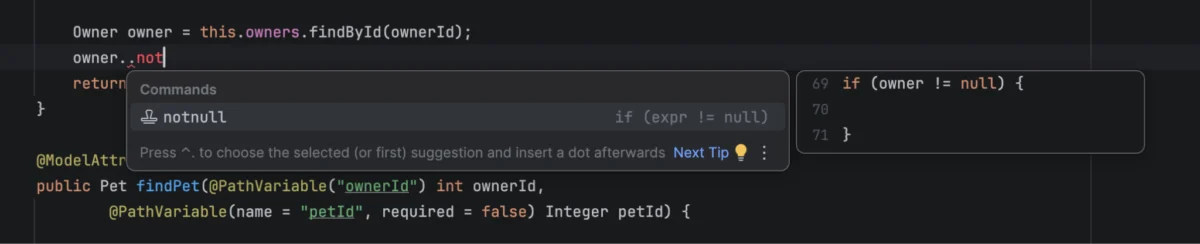
Modern software development is a balancing act. As integrated development environments (IDEs) become increasingly sophisticated, developers face a paradoxical challenge: while the tools are more capable than ever, the cognitive load required to master them—and the physical effort required to locate specific features—has reached a saturation point. With the release of the IntelliJ IDEA 2026.3 Early Access Program (EAP), JetBrains is addressing this "discoverability tax" head-on by evolving its Command Completion feature into the central nervous system of the coding experience.
The Core Concept: From "What Can I Type" to "What Can I Do"
For decades, the standard paradigm for IDE interaction has been the autocompletion of symbols—variables, methods, and classes. When a developer types, the IDE asks, "What code can I suggest here?"
IntelliJ IDEA’s Command Completion shifts the focus entirely. By simply typing .. anywhere in the editor, the IDE pivots to a more profound question: "What actions are relevant to this specific context?"
This is not merely a search bar; it is a context-aware bridge between the developer’s intent and the IDE’s vast library of capabilities. Whether a developer is looking to refactor a legacy module, navigate through complex dependencies, generate documentation, or fix a runtime error, Command Completion acts as a unified gateway. It eliminates the need to break one’s "flow state" to navigate through nested menus, hunt for keyboard shortcuts, or switch to dedicated tool windows.
Chronology: A Trajectory Toward Frictionless Development
The path to the current 2026.3 EAP release has been one of iterative refinement. JetBrains has spent the last several years observing how professional developers interact with their codebases, identifying the moments where productivity stalls.
- The Conceptual Phase: Initially, the challenge was to create a unified entry point that didn’t feel like "yet another menu." The introduction of the
..trigger was designed to be unobtrusive—a natural extension of the typing process that could be ignored if not needed, but instantly accessible if required. - The Integration Phase (2026.2): Previous updates focused on foundational stability and the introduction of initial AI-agent support. Developers began to see that the IDE could understand not just the syntax, but the intent behind a cursor position.
- The Current Milestone (2026.3 EAP): The latest update marks a departure from utility to necessity. By integrating advanced debugging tools like Logpoints, deepening AI-agent synergy, and standardizing the interface for templates and postfix completions, Command Completion has moved from a "nice-to-have" shortcut to a primary interface for everyday coding.
Supporting Data: Why Context-Awareness Matters
The industry-wide shift toward "developer experience" (DevEx) is rooted in data. Studies have consistently shown that the cost of context switching is one of the highest drains on software engineering productivity. Every time a developer leaves the editor to consult a manual, search a documentation site, or find a specific configuration panel, they lose mental focus.
JetBrains’ internal metrics suggest that developers who adopt the Command Completion workflow spend significantly less time navigating UI elements. By providing a "rich context" window—where the IDE already knows the active file, the language, the line number, and the surrounding scope—the system eliminates the "conversational overhead" often required when using AI assistants. Instead of explaining the code to an AI, the IDE provides the AI with the necessary metadata automatically.
Official Perspective: The Philosophy of the Flow
Igor Kulakov, a key voice in the development of the IntelliJ ecosystem, emphasizes that the goal is not to remove power, but to make it accessible.
"The real challenge isn’t whether your IDE can do something; it’s remembering how to trigger it," says the development team in their latest announcement. This sentiment reflects the JetBrains design philosophy: the IDE should be a transparent tool that disappears into the background of the creative process.
By unifying postfix completion, live templates, and command actions under a single, consistent interface, JetBrains is creating a "predictable surface area." A developer no longer needs to guess whether a function is triggered by a template or an action menu; if it is an action relevant to the current line, it will appear under the .. trigger.
New Frontiers in the 2026.3 EAP
The latest release brings several high-impact improvements that underscore the maturity of this feature:
1. Logpoints: Debugging Without the Mess
The struggle to remove println() statements is a rite of passage for every developer. The new Command Completion workflow allows developers to drop a Logpoint instantly. By typing .. over an expression, the IDE offers to log that value. This encourages "clean debugging"—the ability to inspect state without altering the source code, reducing the likelihood of committing "debug-cruft" to version control.
2. Deep AI Integration
The synergy with the Air plugin represents the next generation of coding assistance. Because the IDE understands the project structure so intimately, the AI requests initiated via Command Completion are remarkably precise. Whether it is generating a Javadoc string or refactoring a method signature, the context provided to the AI is pre-filtered for relevance, leading to fewer hallucinations and more accurate, code-compliant suggestions.
3. Cross-Context Utility
The feature is no longer restricted to source code. It has been extended to support binary files, decompiled code, properties files, and even Spring configuration workflows. This expansion ensures that as a developer moves from high-level logic to low-level infrastructure configuration, their primary interface for interaction remains consistent.

Implications for the Future of IDEs
The implications of this update go beyond the convenience of a keyboard shortcut. We are witnessing a fundamental shift in the relationship between the developer and the tool.
Reduced Barrier to Entry for Advanced Features: Many of the most powerful features in IntelliJ IDEA—such as structural search, advanced refactoring tools, and bytecode analysis—were previously reserved for "power users" who took the time to memorize complex shortcuts. Command Completion democratizes these features, placing them in the path of every user, regardless of their familiarity with the IDE’s deeper menus.
The Standardization of AI Interaction: As AI becomes a permanent fixture in the development stack, the "chat-box" interface is proving to be too detached from the code. By bringing AI actions into the inline completion menu, JetBrains is betting that the future of coding is integrated AI, not adjacent AI.
Standardizing the "Universal Entry Point": This trend suggests that we are moving toward a future where the "Command Palette" or "Universal Prompt" becomes the standard interaction model for all professional software. It mimics the efficiency of command-line interfaces while retaining the visual richness of a modern GUI.
Conclusion: How to Start
For those currently working within the Java, Kotlin, or Scala ecosystems, the 2026.3 EAP is available now. The barrier to entry is intentionally low: simply open an existing project and type ...
The evolution of Command Completion is a testament to the fact that even the most mature products have room to innovate. By focusing on the developer’s intent rather than just their syntax, JetBrains is not just updating an IDE; they are refining the very act of programming. As the tool continues to learn from the context of our work, the distance between "I need to do this" and "It is done" continues to shrink, promising a future where developers can spend more time solving problems and less time fighting their tools.

 Lina Hope
 Nila Kartika Wati
 Dwi Wanna
 Muslim
 Nana Wu

 Rifan Muazin
 Asro
Asro