Asro
Asro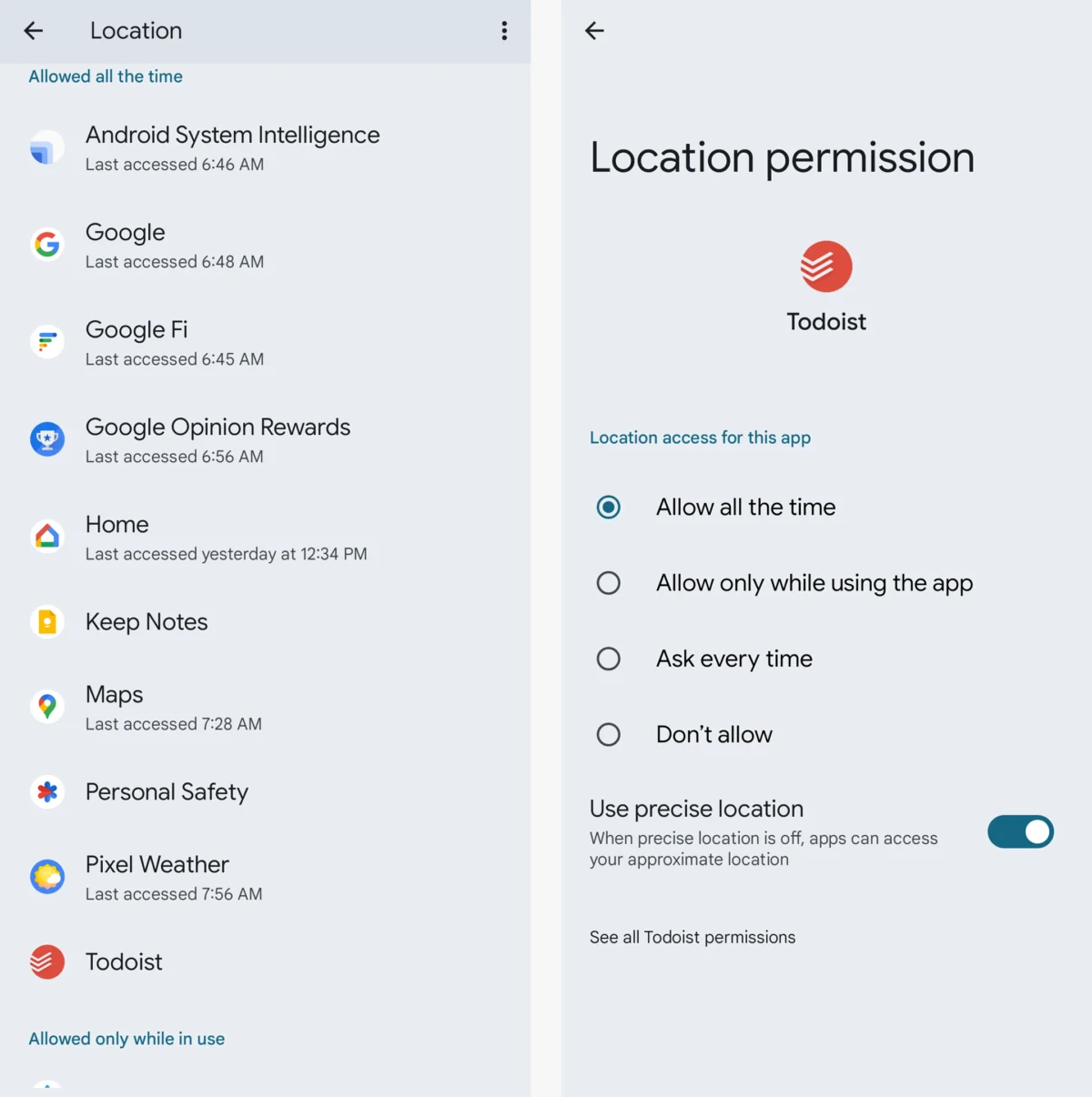
In the modern digital ecosystem, the Google account has evolved from a simple email portal into the central nervous system of our personal and professional lives. It houses our correspondence, financial documentation, private photographs, location history, and the digital keys to dozens of other third-party services. Because this single sign-in acts as the master key to your digital identity, securing it is no longer a matter of mere digital hygiene—it is an absolute necessity.
If your password is a relic from a half-decade ago, or if you have never audited the permissions granted to third-party applications, your account is effectively a target. This report details a systematic, step-by-step framework to reinforce your Google account, ensuring that your most sensitive data remains under your exclusive control.
Part I: The Foundations of Account Security
The Necessity of a Robust Password Strategy
The first line of defense remains the password. A common pitfall is the reuse of credentials across multiple platforms. If a breach occurs on a minor retail site, hackers will immediately attempt to use those same credentials to access your Google account.
To rectify this, conduct an immediate audit:

- Is your password used elsewhere? If yes, change it immediately.
- Is it short or predictable? Complexity is key.
- Do you remember it without a manager? If you can easily memorize it, it is likely not strong enough.
Utilizing a dedicated password manager—such as Google’s native Password Manager or reputable third-party alternatives—is the industry standard for maintaining unique, high-entropy passwords that would otherwise be impossible to recall.
The Second Layer: Beyond the Password
Password-only security is insufficient in an era of sophisticated phishing. Enabling Two-Factor Authentication (2FA)—or 2-Step Verification, as Google terms it—is the single most effective action you can take to prevent unauthorized access. By requiring a second form of verification, you create a barrier that a password-theft alone cannot overcome.
While SMS-based codes were once the gold standard, they are now considered vulnerable to SIM-swapping attacks. Prefer physical security keys (USB/Bluetooth dongles) or app-based push notifications. These methods ensure that even if an adversary gains your password, they cannot breach your account without physical access to your trusted hardware.
Part II: Verification and Recovery Infrastructure
Establishing Reliable Identity Proofing
Google’s security algorithms constantly monitor for suspicious sign-ins. If the system flags an anomaly, it will request verification. If your recovery email address or phone number is outdated, you may find yourself permanently locked out of your own data. Regularly visit your Google account security dashboard to verify that your recovery information is current.

The Modern Failsafe: Selfie-Centric Verification
As of August 2026, Google has introduced a sophisticated identity recovery feature: the selfie video. This allows individual users to record a short, multi-directional clip of themselves. Should you lose access to your primary 2FA methods, the system can compare a new video against your original, providing a biometric path to account recovery.
The Human Element: Recovery Contacts
In a recent expansion of its security ecosystem, Google launched "Recovery Contacts." This feature allows you to designate a trusted friend or family member to act as an authentication partner. If you are locked out, your contact can verify your identity through a secure, coordinated code-matching process. This provides a vital "human" failsafe for scenarios where all automated recovery paths fail.
Part III: Clamping Down on Digital Connections
Auditing Third-Party Access
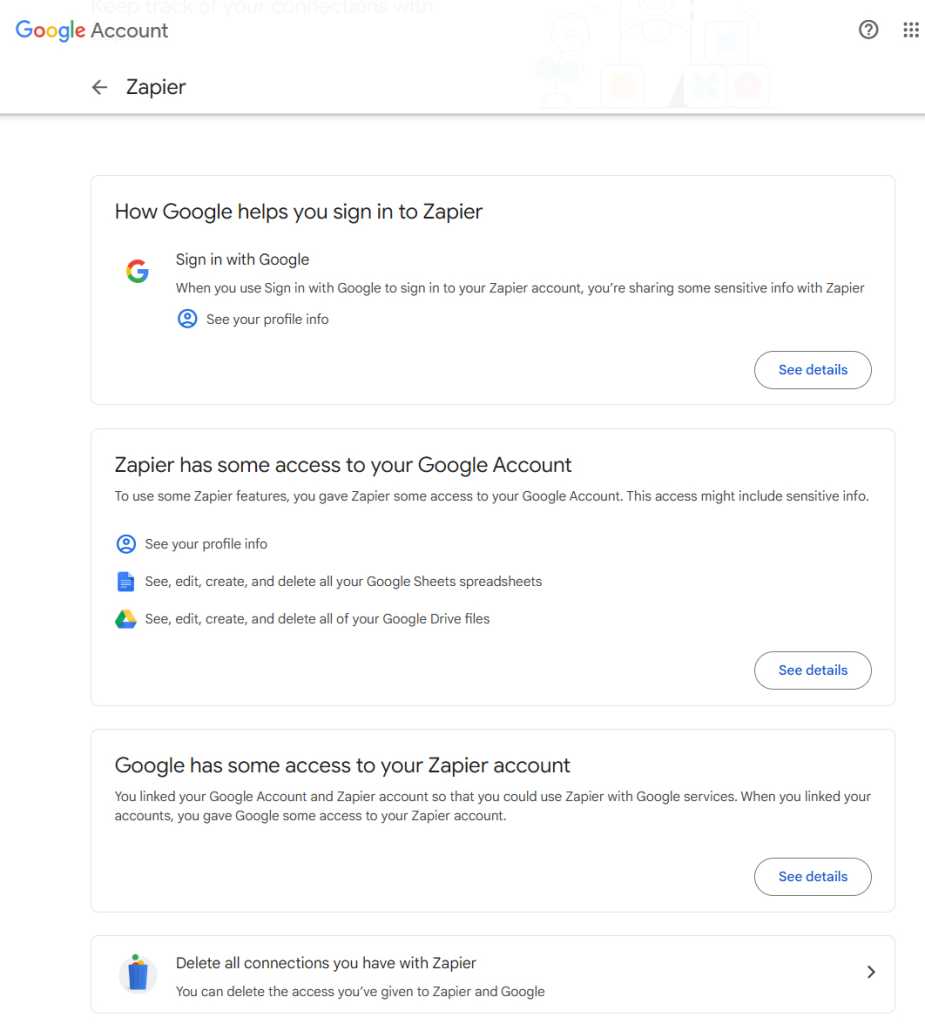
Every time you sign in to an app using "Sign in with Google," you are granting that application a specific level of access to your data. Over time, these permissions accumulate, creating a "permission sprawl."
Users should periodically visit the "Third-Party App Access" dashboard. Any application that you no longer use, or one that has requested permissions beyond its scope (such as a simple calculator app requesting access to your Gmail), should be revoked immediately. This reduces your "attack surface," ensuring that if a third-party app is compromised, your Google account is not automatically exposed.
Device Hygiene
Many users remain signed into legacy devices, such as old smartphones or public library computers. Google’s device activity dashboard allows you to see every piece of hardware currently authenticated to your account. Sign out of any device that you do not actively use to ensure that a lost or stolen device does not become a gateway for an intruder.
Browser Extensions and Permissions
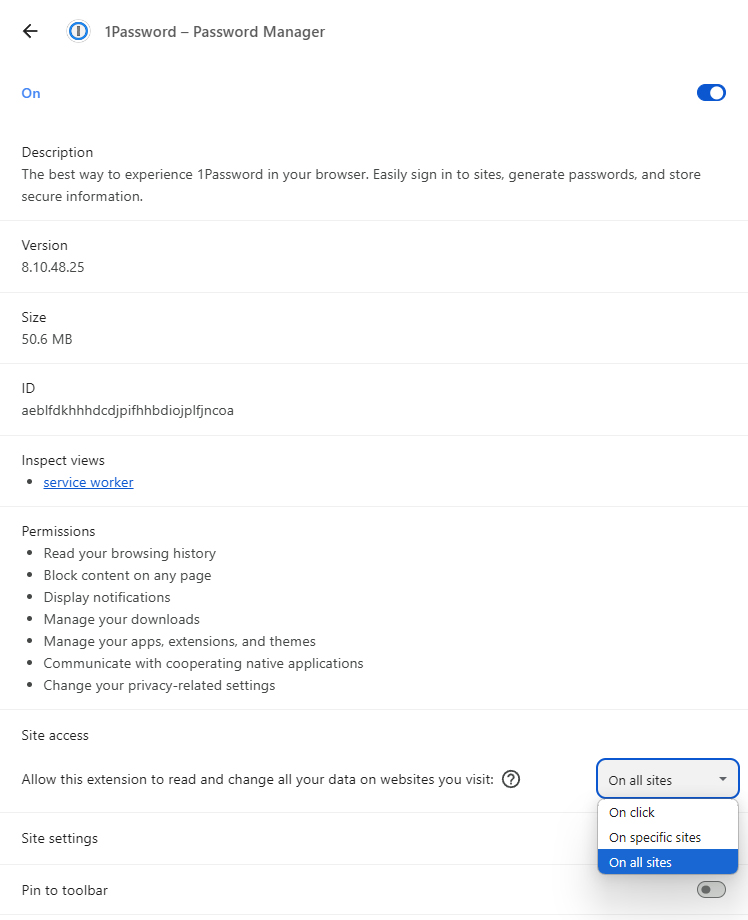
On desktop systems, browser extensions represent a significant, often overlooked, security risk. An extension meant to enhance your calendar can, if granted broad permissions, read and alter data on every website you visit.
For Chrome and Chromium-based browsers, users should navigate to the chrome:extensions menu. For every installed extension, check the "Site Access" settings. Restrict these from "On all sites" to "On specific sites" whenever possible. This "least privilege" approach ensures that extensions only see the data they absolutely need to function.
Part IV: Planning for the Worst—The Virtual Will
The Inactive Account Manager
Digital estate planning is a sensitive but essential topic. Google provides the "Inactive Account Manager" to handle your data should you become incapacitated or pass away. This tool allows you to specify a period of inactivity—after which, Google will attempt to contact you—and then trigger a notification or data transfer to trusted contacts.
You can specify which areas of your account (Photos, Drive, Gmail, etc.) are shared with your designated heirs. It is crucial to review these settings annually, as new Google services added to your account over time are not always automatically included in your sharing legacy.
Part V: The High-Security Frontier
The Advanced Protection Program
For high-profile individuals—including journalists, activists, and business executives—Google offers the Advanced Protection Program (APP). This is the company’s most rigorous security tier.
APP enforces strict policies:
- Mandatory Hardware Keys: You must use physical security keys for every login.
- Limited App Access: Most third-party apps are prohibited from accessing your sensitive Google data.
- Extended Recovery Protocols: If you are locked out, recovery is an intentionally slow, multi-day process to prevent social engineering attacks.
While this program creates a more cumbersome user experience, it provides a level of security that is effectively impenetrable to the vast majority of standard cyber-threats.
Implications and Conclusion
The security of your Google account is not a "set it and forget it" task. As cyber-threats evolve, so too must our defenses. By implementing these 12 steps—from hardening your password and enabling physical 2FA to auditing third-party connections and establishing a digital legacy—you transform your account from a vulnerable target into a hardened fortress.
Summary Checklist for Security:
- Password: Is it unique, complex, and managed by software?
- 2FA: Have you moved beyond SMS to physical keys or app-based tokens?
- Recovery: Is your recovery info, selfie video, and emergency contact up to date?
- Audit: Have you purged unused apps, old devices, and excessive browser extensions?
- Legacy: Is your Inactive Account Manager configured to protect your digital assets?
Digital security is an ongoing commitment. By performing this audit at least once per year, you ensure that your digital life remains protected against the shifting tides of the modern internet. While technology will continue to advance, the principles of vigilance, limiting access, and verifying identity remain the bedrock of a secure digital existence.

 Nila Kartika Wati
 Nana Wu
 Basiran
 Neng Nana
 Iffa Jayyana
 Raul Delapena Setiawan
 Rifan Muazin