
 Nana
Nana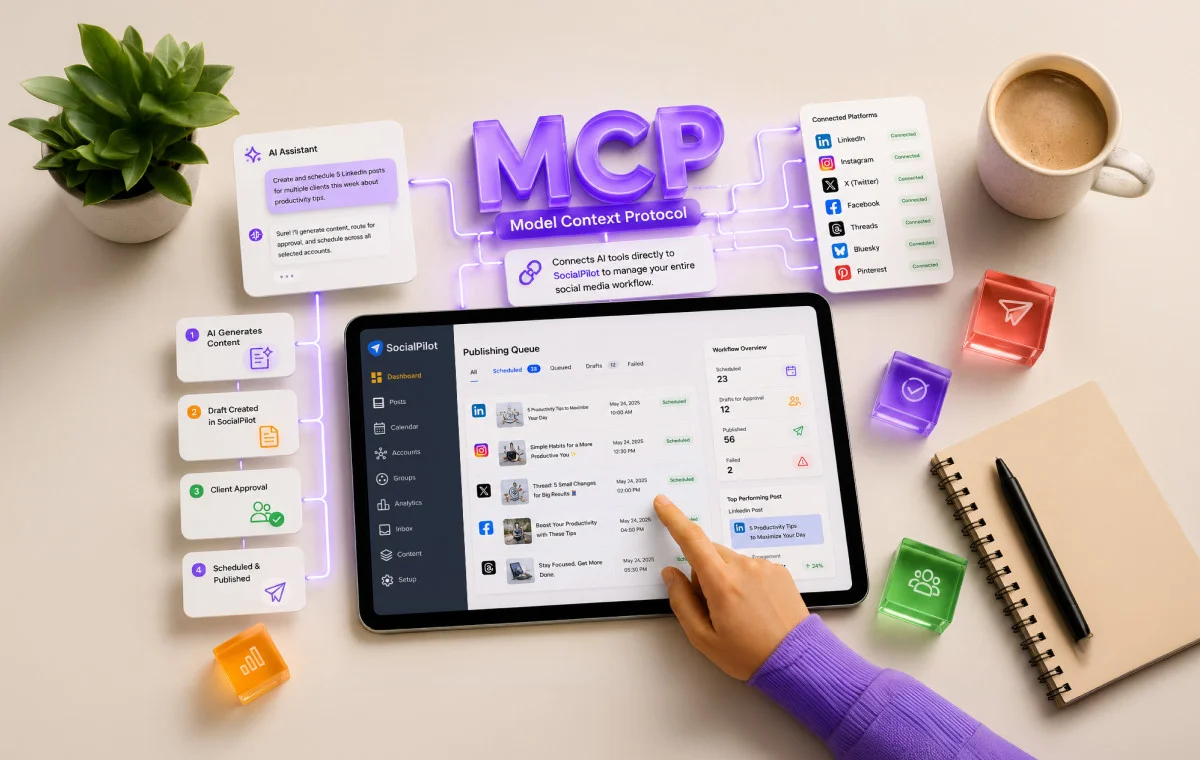
If you’ve noticed the acronym “MCP” popping up with increasing frequency across LinkedIn, tech forums, and AI newsletters, you aren’t alone. For many professionals—particularly those in the high-pressure world of social media management—it has become the most talked-about technical shift since the launch of generative AI itself. But what exactly is the Model Context Protocol, and more importantly, why does it matter to your daily workflow?
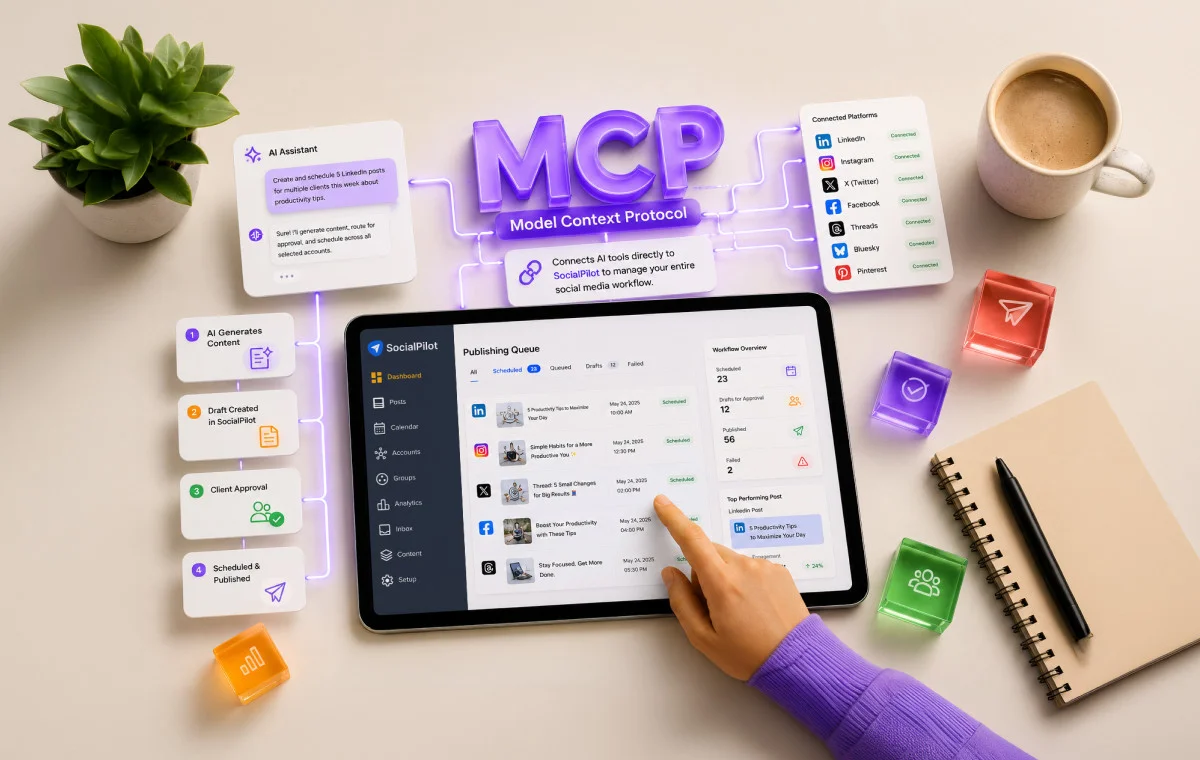
In short, MCP is the missing link that finally allows your favorite AI tools—like Claude, ChatGPT, or Cursor—to step out of the "chatbot" box and into your actual operational stack. By enabling these AIs to communicate directly with platforms like SocialPilot, the days of tedious copy-pasting and manual dashboard switching are coming to an end.
What Is MCP and Why the Industry Hype?
The Model Context Protocol (MCP) is an open-standard initiative introduced by Anthropic in November 2024. Its purpose is to solve a fundamental problem in the AI ecosystem: fragmentation.
The USB-C Analogy
To understand the significance of MCP, consider the state of computer hardware before the universal adoption of USB-C. Every device required a proprietary cable—a different port for your phone, your laptop, and your camera. It was a logistical nightmare that forced users to maintain a drawer full of incompatible cords.
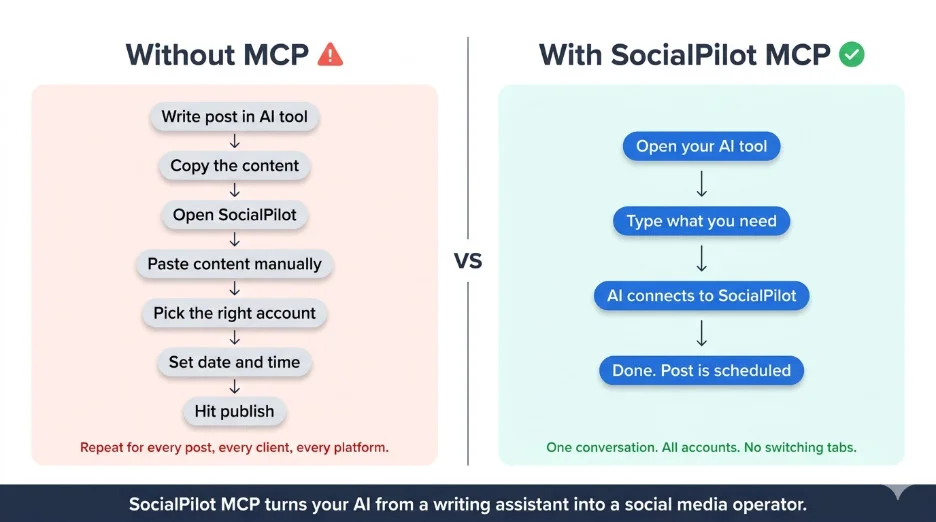
Before MCP, the AI landscape looked exactly like that. Each AI tool required a custom-built integration for every single application it wanted to talk to. These integrations were costly, time-consuming to build, and prone to breaking. Consequently, most AI tools remained "siloed"—intelligent, but disconnected from the real-world software where work actually happens.
MCP acts as the “USB-C of AI.” By providing a single, standardized language, it allows AI models to connect to any compatible platform—from project management tools to social media schedulers—without the need for custom engineering. Whether you are using Claude, ChatGPT, Windsurf, or Zapier, the protocol remains the same.
Chronology of a Paradigm Shift
- November 2024: Anthropic officially unveils the Model Context Protocol, setting the foundation for open-standard AI integration.
- Late 2024 – Early 2025: Rapid adoption by industry titans, including OpenAI and Google DeepMind, cements MCP as the standard for agentic AI.
- Mid-2025: SocialPilot launches its first-party MCP connector, moving beyond simple API integrations to provide deep, bi-directional control over social media operations.
- Present Day: Agencies and power users are transitioning from "AI as a writing assistant" to "AI as an operational agent," capable of executing complex publishing strategies autonomously.
Supporting Data: The Case for Efficiency
For agencies managing 40 or more client accounts, the inefficiency of manual workflows is staggering. Industry research indicates that social media managers spend approximately 30-40% of their time on "non-creative" tasks: copy-pasting content, logging into different client dashboards, checking for approval flags, and manually reporting metrics.
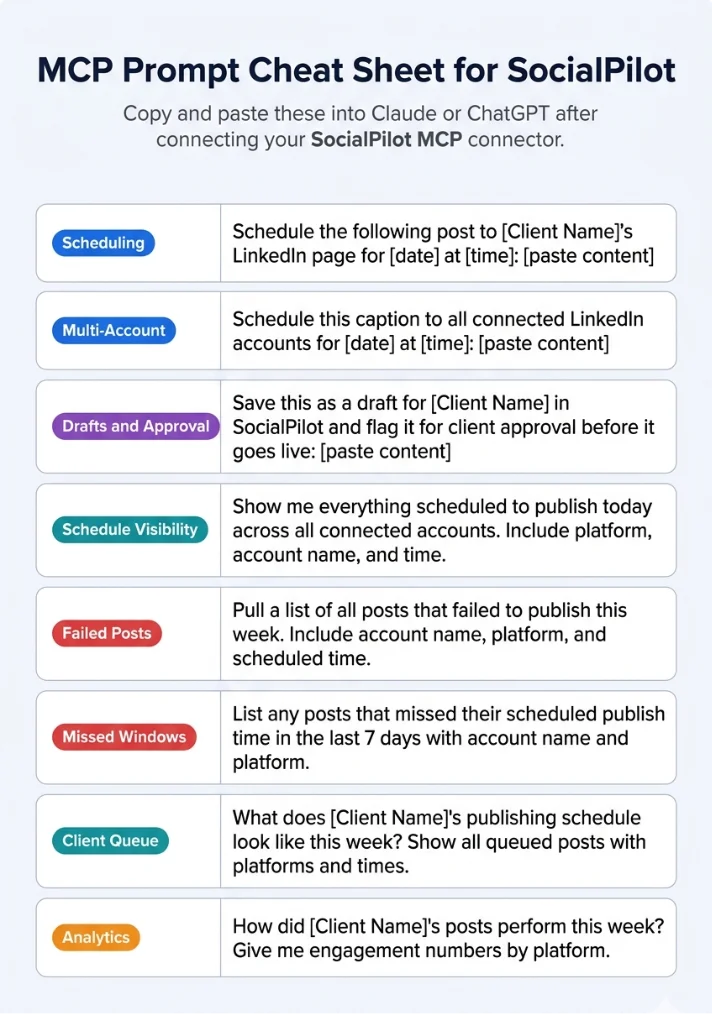
By utilizing the SocialPilot MCP connector, agencies can consolidate this workflow into a single conversation interface. Instead of jumping between a spreadsheet, a ChatGPT tab, and the SocialPilot dashboard, a user can simply prompt the AI: "Create a week’s worth of posts for Client X, assign them for team review, and let me know when they are live."
The AI, via the MCP connector, accesses the client roster, drafts the content, schedules it across multiple platforms—including Facebook, X (Twitter), LinkedIn, Instagram, Threads, and Bluesky—and flags it for approval. The result is not just a time-saving measure; it is a fundamental shift in how agency output is scaled.
Official Perspective: The Move to "Agentic" Operations
The consensus among industry leaders is clear: MCP turns an AI "assistant" into an AI "operator."
A standard integration might allow an AI to pull data from a database. An MCP-enabled implementation, however, allows the AI to act on that data. Because the SocialPilot implementation is a "first-party" connector—developed internally by the SocialPilot engineering team—it offers a level of depth that third-party plugins cannot match. It isn’t just "talking" to the app; it has deep-state awareness of your client groups, draft statuses, and historical performance analytics.
Implications for Your Workflow
What does this mean for your day-to-day? It means you can move from "Prompt Engineering" to "Orchestration."
1. Unified Management
Your AI now has access to the full account roster. When you ask it to schedule a post, it already knows which account belongs to which client group. You no longer have to define the destination for every single post; the context is already there.
2. Streamlined Approval Loops
Content is often created in a vacuum, only to be rejected later because it didn’t fit the client’s brand voice. With MCP, the AI saves drafts directly into SocialPilot and triggers the internal approval workflow. The client sees the draft in the dashboard, and the AI is notified of the approval status, all without you sending a single email.
3. Analytics in Conversation
Previously, accessing analytics required a context-switch to a report generator. Now, you can simply ask, "How did the LinkedIn campaign for the Q1 launch perform?" The AI queries the SocialPilot backend and provides a summary directly in your chat window.
Who Needs MCP Right Now?
While the technology is transformative, it is essential to determine if your current operations are ready for it.
MCP is highly recommended if:
- You manage high-volume client accounts: The more accounts you manage, the higher the ROI on automating the manual publishing pipeline.
- You already use AI for creative ideation: If you are already generating content in Claude or ChatGPT, MCP simply "plugs in" the publishing engine to the creative engine you already use.
- You have rigid approval workflows: If your agency requires multiple layers of sign-off, the draft management feature is a game-changer.
You may not need MCP yet if:
- You are a solopreneur managing one or two accounts where manual posting takes less than 15 minutes a week.
- Your current workflow relies entirely on native social platform tools and you do not require a centralized dashboard.
Setting Up Your MCP Connector: A Step-by-Step Guide
Method 1: The Browser-Based Sign-In (Recommended for Claude)
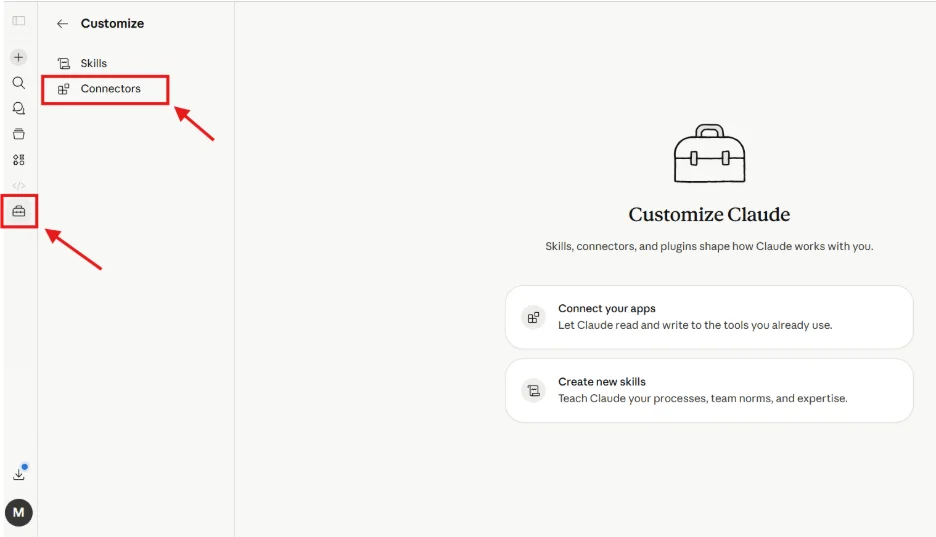
- Open Claude: Navigate to your dashboard and click "Customize" in the sidebar.
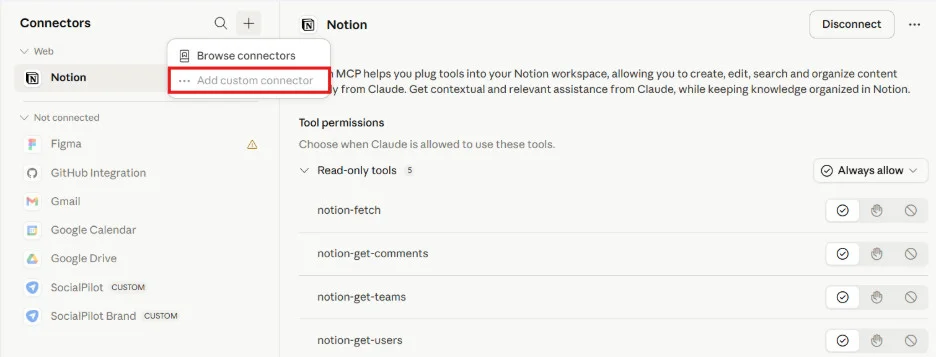
- Add Connector: Select "Connectors" and click the "+" icon.
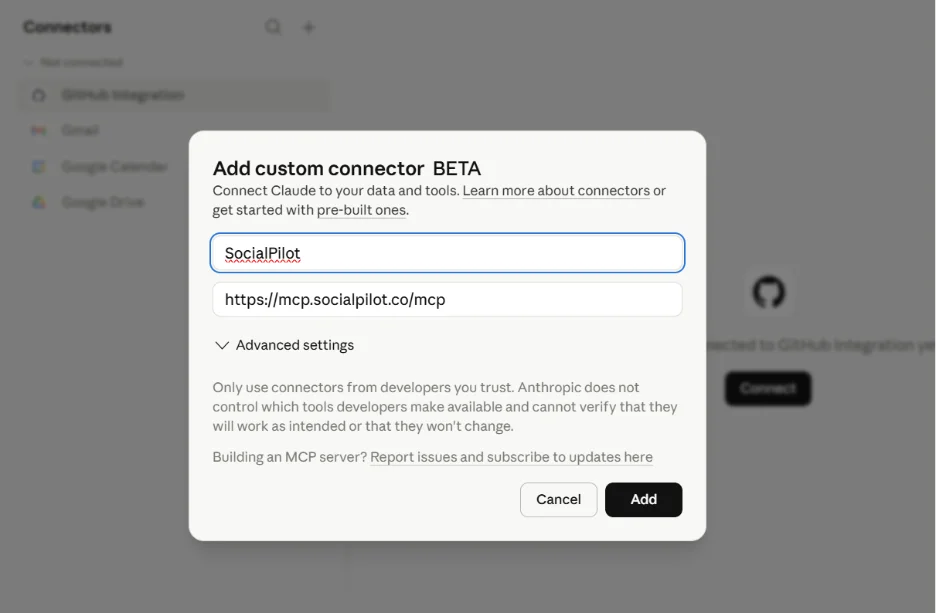
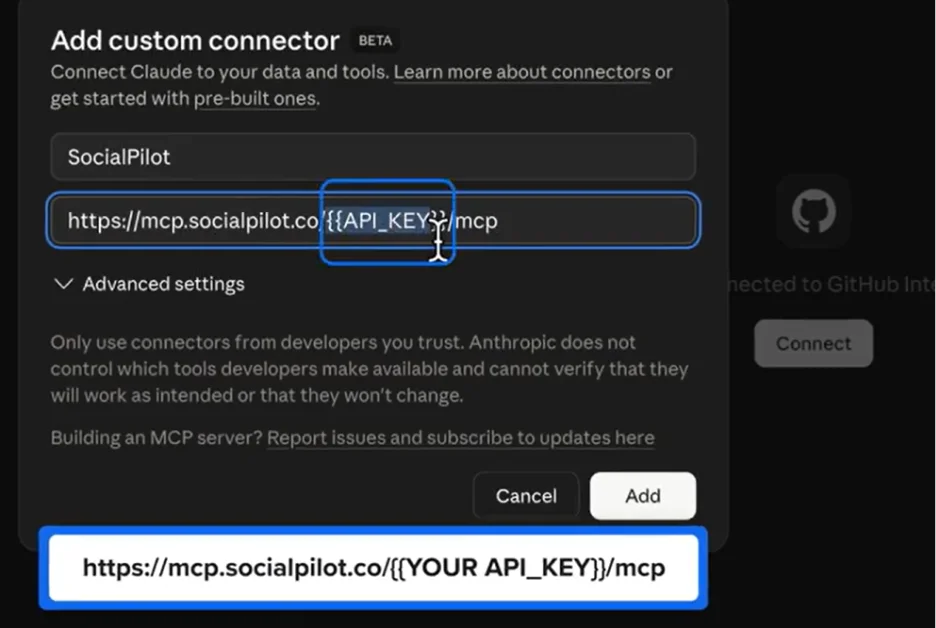
- Configure: Choose "Add Custom Connector." Give it a name (e.g., "SocialPilot") and paste the official URL:
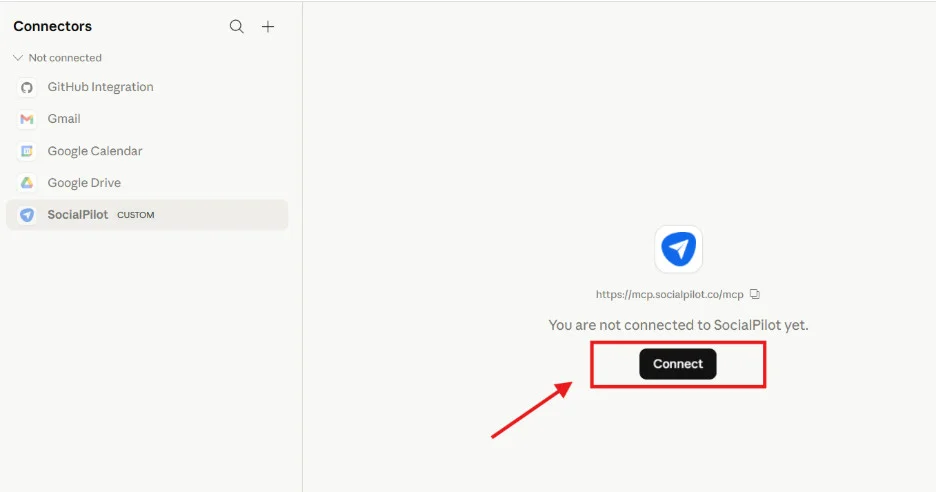
https://mcp.socialpilot.co/mcp. - Authenticate: Once added, select the connector and click "Connect." A browser window will prompt you to log in to your SocialPilot account.
- Go Live: Once authorized, the connector is active. You can now use natural language to interact with your accounts.
Method 2: API Key Authentication (For Advanced Users)
If you are working in a developer environment or need more control:
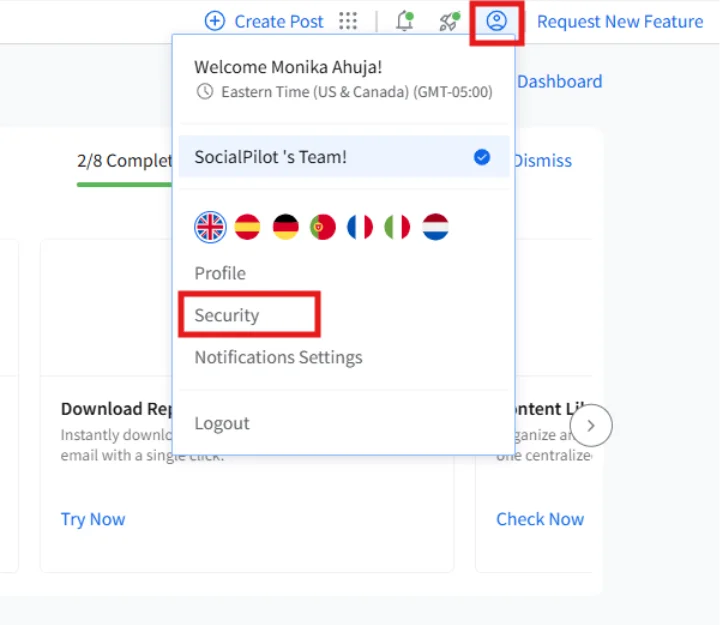
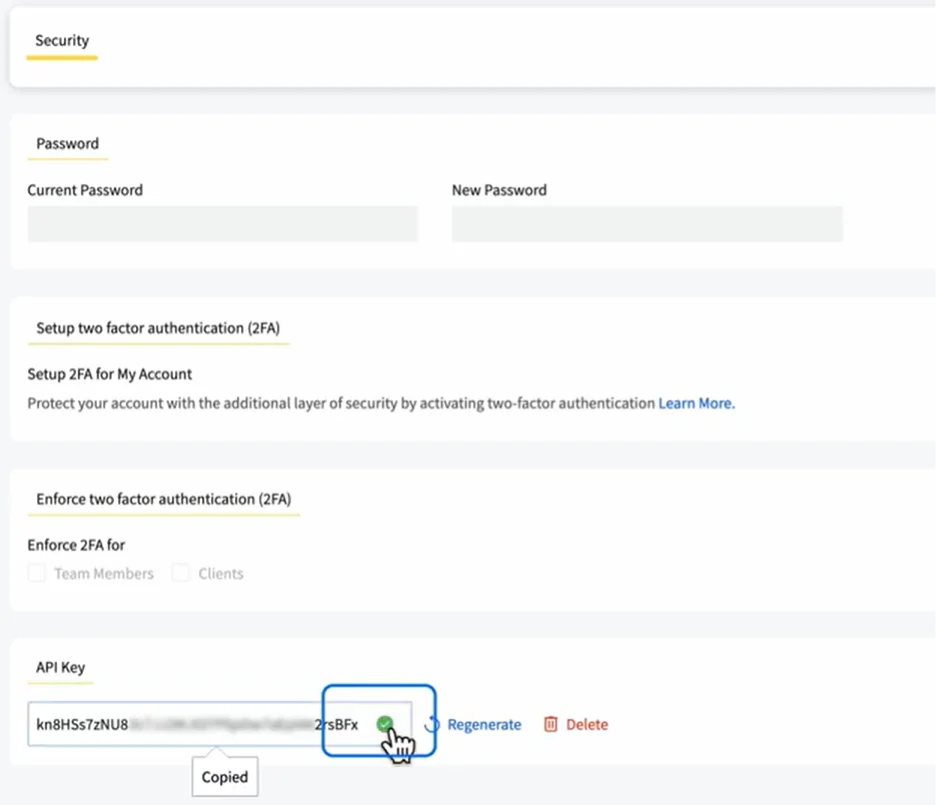
- Retrieve Key: Log into your SocialPilot account, navigate to "Settings" -> "Security," and copy your API key.
- Connect: When adding the custom connector in Claude, use the formatted URL:
https://mcp.socialpilot.co/YOUR_API_KEY/mcp. - Verify: The connector will authenticate via your key, bypassing the browser login.
Setting Up via ChatGPT
- Settings: Open ChatGPT and go to "Settings."
- Developer Mode: Navigate to "Apps" -> "Advanced Settings" and toggle "Developer Mode" to "On."
- Create App: Click "Create App," paste the MCP server URL, and complete the authorization.
- Execute: Your AI is now ready to manage your SocialPilot scheduling operations.
Conclusion: The Future is Agentic
The Model Context Protocol represents a maturation of the AI industry. We have moved past the "wow" factor of generative text and into the "how" factor of functional execution. By connecting your AI directly to your publishing platform, you are not just saving time—you are eliminating the friction that keeps your agency from scaling.
As we look toward the future, the agencies that adopt these agentic workflows will be the ones that spend less time managing software and more time managing strategy. The tool is ready; the question is, how will you use it?


 Reynand Wu
 Iffa Jayyana
 Raul Delapena Setiawan

 Sagoh
Sagoh

 Azzam Bilal Chamdy
 Ali Ikhwan