
 Ammar Sabilarrohman
In modern cloud-native architectures, we often treat infrastructure settings as "set it and forget it" configurations. We define CPU limits in our Kubernetes manifests or Docker Compose files and assume the runtime will handle the rest. However, a recent experimental study has uncovered a critical, often-overlooked trap: relying on CPU-based concurrency defaults can lead to catastrophic performance degradation and unstable system behavior when downstream dependencies are involved.
The findings demonstrate that changing a container’s CPU limit—from two CPUs to one—nearly doubled the processing time for a batch of 200 records, jumping from 42.1 seconds to 83.6 seconds. This slowdown occurs not because the CPU is inherently unable to handle the load, but because many runtimes use the CPU limit as a proxy to determine how many asynchronous operations should run in parallel. When you restrict the CPU, you inadvertently restrict your I/O concurrency, throttling your application’s ability to communicate with external services.
The Chronology of a Performance Degradation
The issue begins with the common pattern of using Parallel.ForEachAsync in .NET (or similar constructs in other languages). By default, these methods often tie their concurrency limit to Environment.ProcessorCount.
On Linux, macOS, and modern Windows environments, ProcessorCount is not a static reflection of the underlying hardware; it is dynamically calculated based on the process’s CPU affinity and utilization limits. If you cap a container at one CPU, the runtime reports one processor. If you cap it at a half-CPU, it rounds up to one. This value is fixed at the moment the process starts and remains immutable throughout the lifecycle of that process.
In the lab experiment, the researcher utilized a standard processing pattern:
await Parallel.ForEachAsync(records, cancellationToken, async (record, ct) =>

    await ProcessAsync(record, ct);
);
Because no explicit concurrency limit was set, the runtime defaulted to the CPU count. When the container was limited to one CPU, the code was effectively serialized, allowing only one record to be processed at a time. This created a massive, invisible bottleneck. The batch finished, and every record was eventually written, leading developers to mistake the massive latency for "ordinary service latency" rather than a configuration error.
Supporting Data: When Efficiency Becomes a Liability
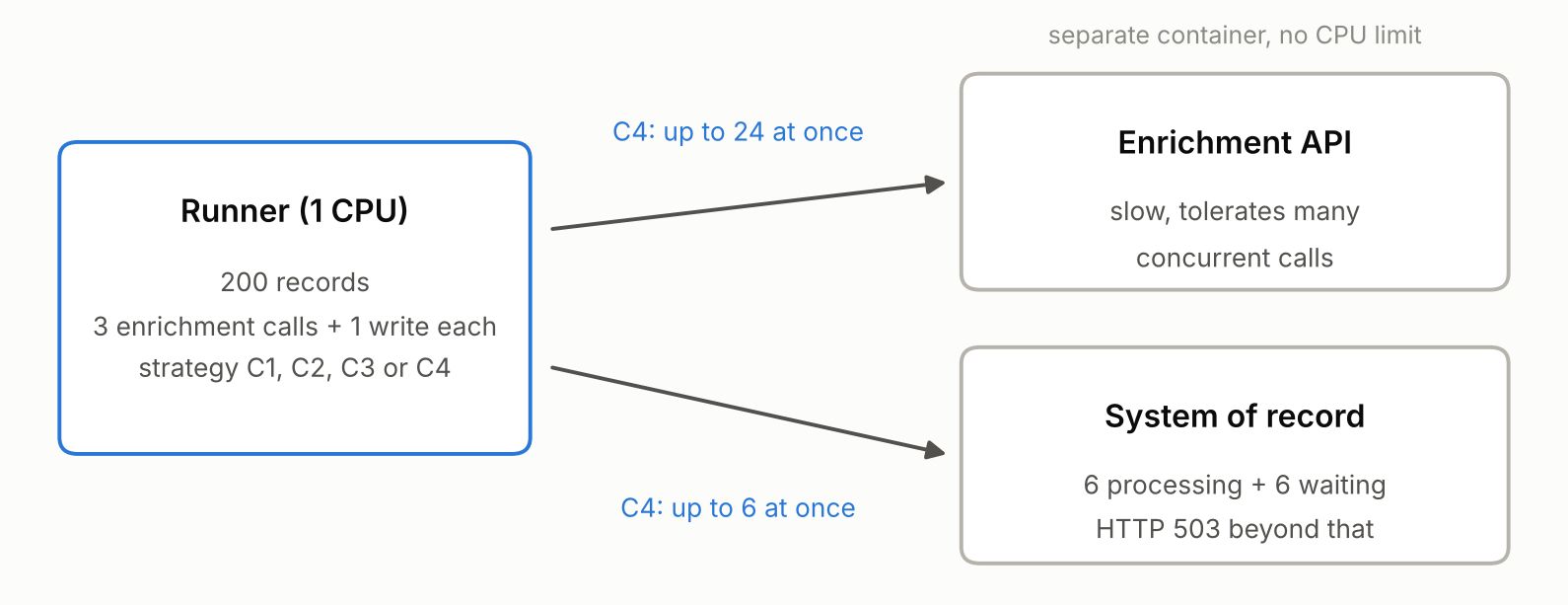
To understand the scope of this issue, the lab established a controlled experiment with two simulated dependencies: an enrichment API capable of handling high concurrency and a "System of Record" (SoR) that was strictly rate-limited—capable of handling six concurrent requests with a small buffer, after which it returned HTTP 503 errors.
The experiment compared three configurations:
- C2 (Single Limit): Used the default CPU-bound concurrency.
- C3 (Shared Limiter): Used a shared semaphore across all calls.
- C4 (Per-Dependency Budgets): Implemented an explicit
DependencyBudgetsclass that enforced independent limits for the enrichment API and the SoR.
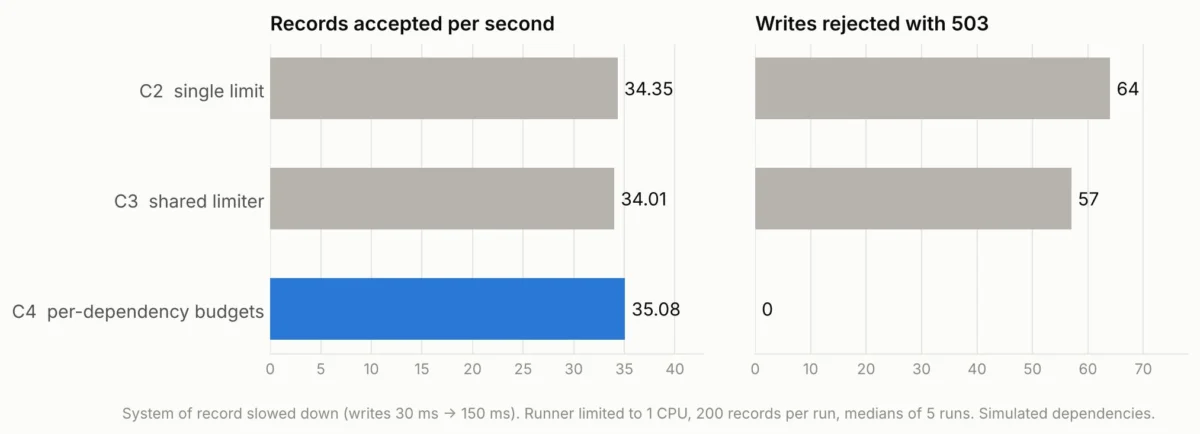
The data revealed that while C2 and C3 achieved slightly higher "raw" throughput during healthy periods, they were significantly more fragile under stress. When the write latency increased from 30ms to 150ms, C2 and C3 suffered from excessive HTTP 503 rejections (64 and 57, respectively). Configuration C4, by contrast, throttled the requests to the SoR specifically, resulting in zero rejections.
While C4 appeared slower on paper—taking 5.7 seconds to complete compared to 4.2 seconds for C3—the "useful throughput" was superior. In a real-world system, rejected writes are expensive; they necessitate retry logic, error handling, and potential data inconsistency. C4 proved that by sacrificing a small percentage of peak throughput, one can achieve a vastly more reliable system.
Implications for System Design and Backpressure
The core implication of this research is that concurrency and throughput are not the same thing. Relying on CPU-derived values for I/O-bound tasks is a fundamental anti-pattern.
The Problem with Single-Limit Semaphores
Many developers attempt to fix this by wrapping all outbound calls in a single SemaphoreSlim. While this prevents the application from overwhelming the network, it fails to account for the heterogeneous nature of downstream services. A slow dependency will hold onto the shared permits longer, effectively starving other, faster services of their ability to process requests. This is the "noisy neighbor" problem within your own application’s internal request queue.
Implementing Explicit Budgets
To solve this, developers must move toward independent dependency budgets. By defining explicit concurrency limits for each external service, you decouple your infrastructure limits (CPU) from your application’s logic. This requires:
- Service-Aware Configuration: Asking service owners for their maximum concurrent request capacity.
- Explicit Validation: Validating these budgets at startup to ensure they aren’t relying on volatile environment variables.
- Backpressure Monitoring: Recognizing that when a dependency budget is reached, work will naturally queue up upstream. This "backpressure" is a feature, not a bug; it forces the system to signal that it is at capacity rather than attempting to push requests into a failing service.
Official Responses and Industry Trends
The industry is beginning to recognize the dangers of "container-aware" defaults. Go 1.25, for example, has moved to use cgroup CPU limits to set GOMAXPROCS defaults, and the JVM has long supported container detection. However, these tools are designed to optimize CPU scheduling, not to manage application-level I/O.
The consensus among systems architects is clear: do not assume that a framework’s default behavior is "smart" enough to manage your specific dependency profile. The runtime does not know that your "System of Record" is an aging database component that can only handle six requests. It only knows how many cores you have allocated.
Conclusion: Designing for Reliability
The experiment serves as a stark reminder that in a distributed system, your performance is only as good as your most fragile dependency. If you rely on CPU-based defaults, a simple infrastructure resize can ripple outward, turning a stable system into one that floods its own downstream services with requests they cannot handle.
Moving forward, teams should:
- Avoid implicit concurrency: Never use
ProcessorCountor defaultParallel.ForEachAsynclimits for I/O-bound work. - Isolate dependencies: Use distinct semaphore budgets for every outbound service call.
- Measure and Adjust: Use test environments to identify the "knee" in the latency curve for every dependency. If a service starts showing increased latency, your budget is likely too high.
- Separate Timeouts: Implement distinct timeouts for waiting for a permit versus waiting for the actual network call to complete.
By treating concurrency as an explicit, configuration-driven requirement rather than a side effect of infrastructure sizing, developers can build systems that are not only faster but significantly more resilient to the inevitable fluctuations of the cloud environment. The goal is not just to finish the batch, but to ensure that the batch is processed reliably, predictably, and without inadvertently causing a self-inflicted denial-of-service attack on your own infrastructure.


 Azzam Bilal Chamdy

 Lina Hope


 Asro
 Suro Senen
