
 Iffa Jayyana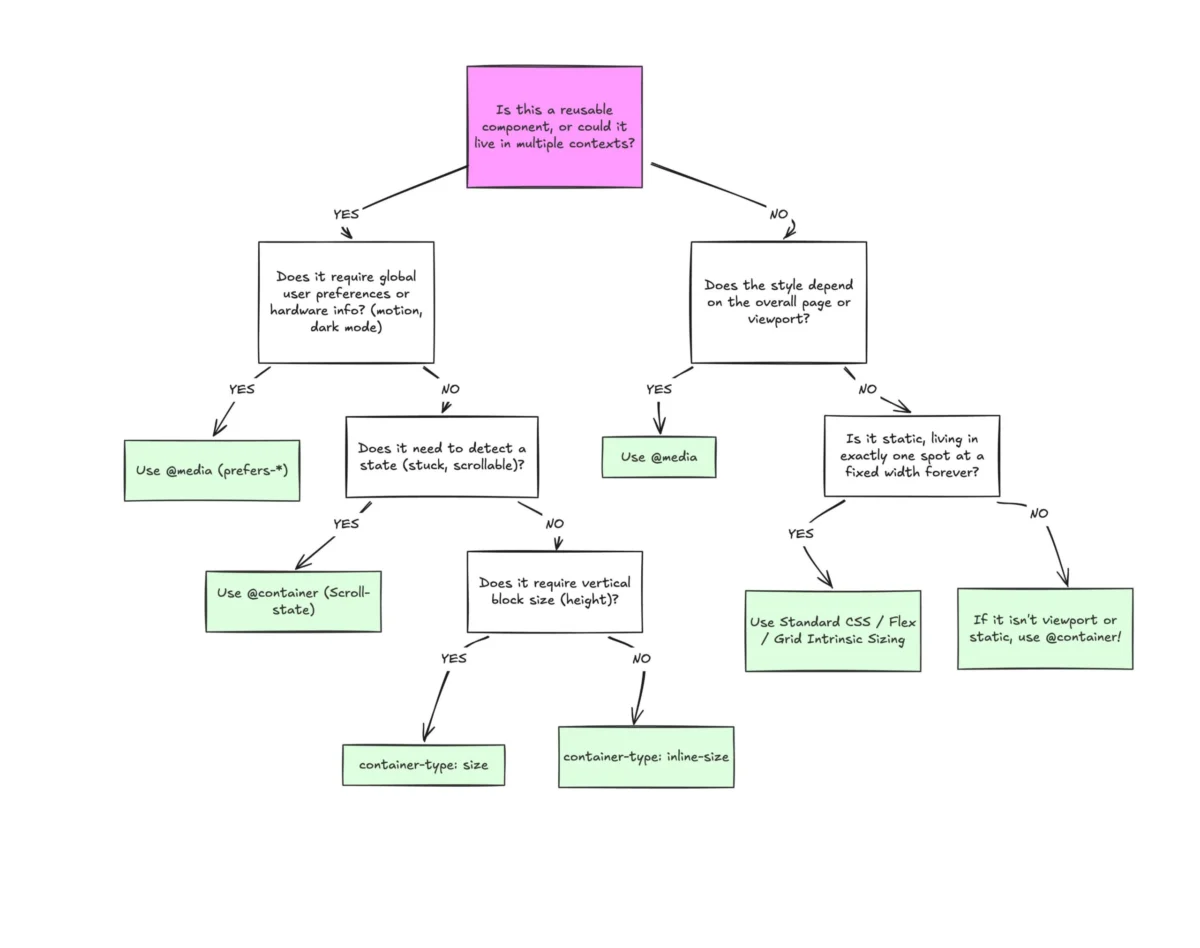
Despite widespread browser support and a massive potential to improve the modularity of modern web development, CSS Container Queries remain one of the most underutilized and misunderstood features in the front-end landscape. While nearly 94% of modern browsers support the specification, adoption lags significantly behind its promise.
To understand why this gap exists, we must dismantle the common misconception that container queries are simply "media queries for elements." They are, in fact, a fundamental shift in how we approach responsive design, moving the intelligence of layout logic from the global browser window to the individual component.
The Chronology of a Misunderstood Feature
For years, the web development community placed "container queries" at the very top of CSS wishlists. The logic was simple: we were tired of "viewport-centric" design. We wanted components—cards, widgets, and sidebars—that knew how much space they were actually occupying, rather than relying on the arbitrary width of the screen.
When the specification finally landed in browsers, many developers—the author included—greeted the news with a healthy dose of skepticism: "Why do I need this when media queries already exist?" This reaction, while honest, was rooted in a decade of conditioning. We spent years training ourselves to think in terms of min-width and max-width relative to the screen.
The data confirms this inertia. According to the 2025 State of CSS survey, 86% of developers are aware of container queries, yet only 41.4% have implemented them in production. Even prominent voices in the industry, such as Kevin Powell, have noted at conferences like SmashingConf Amsterdam 2026 that the adoption curve has been "terrible." We are currently in a transition period where the industry understands the what but has yet to fully grasp the why.
The Fallacy of the Viewport as a Proxy
To understand why media queries are increasingly inadequate for modern interfaces, we have to recognize that the viewport has always been a proxy. When you write @media (min-width: 1024px), you are essentially asking the browser one question: "How wide is the screen?"
This worked in the early days of mobile-first design, where a page was either a single column or a multi-column layout. But as modern applications become increasingly complex, a single component might exist in a main content area, a narrow sidebar, or a dynamic grid.
Consider a .card component. If it is placed inside a 300px-wide grid cell on a 1920px desktop monitor, a media query checking for a "desktop" width will trigger, potentially causing the card to expand or display elements that simply do not fit the 300px of allocated space. The viewport is "dumb"—it has no insight into the component’s internal constraints. As Kevin Powell aptly put it, "Media queries don’t know very much. In fact, most people assume that they know more than they do."
Macro Layouts vs. Micro Layouts: Defining the Divide
The most effective way to distinguish between the two technologies is to categorize them by the "scale" of the design:
- Macro Layouts (Media Queries): These look outward. They are responsible for the page-level structure—the main grid, the header, the footer, and system-wide settings like
prefers-color-schemeor device capabilities. They define the "container" of the entire application. - Micro Layouts (Container Queries): These look inward. They are responsible for the component’s internal adaptation. When a component needs to change its layout based on the space allocated to it by its parent, a container query is the appropriate tool.
By thinking in terms of "page layout" versus "component layout," developers can stop forcing elements to conform to "tablet-sized" or "mobile-sized" definitions. Instead, a component should transition its layout naturally whenever it reaches a threshold of space, regardless of whether that space is on a phone or inside a desktop dashboard.
Supporting Data and the Myth of Universal Breakpoints
If we still need further evidence that viewport-based design is a losing game, consider the state of modern hardware. There are now over 2,300 unique viewport sizes identified on the modern web. The idea that we can create a sustainable, scalable design system by hard-coding breakpoints for "iPhone," "iPad," and "Desktop" is a fallacy that breaks down under the weight of current device fragmentation.
By shifting to container queries, we move toward a "content-out" design methodology. When we rely on the content’s container to determine the layout, the component becomes inherently reusable. It becomes a plug-and-play unit that behaves correctly in any environment.

Advanced Implementations: Beyond Basic Layouts
The power of container queries extends beyond simply changing flex-direction.
Fluid Typography
Traditionally, developers used vw units to scale text. However, this creates a dependency on the viewport that often ruins text scaling when a component is moved to a sidebar. By using container query units—specifically cqi (container query inline-size)—and the clamp() function, we can create truly fluid, context-aware typography:
.card-title
  font-size: clamp(1rem, .5rem + 3cqi, 2rem);
This ensures the text size is always proportional to its parent, not the screen.
Flexbox Wrap Detection
One of the most persistent "holy grails" of CSS has been detecting when flex items wrap to a new line. Media queries cannot see internal changes. However, by nesting a container query inside a flex item, we can effectively create a "wrap-aware" component. As the parent container shrinks, the flex items wrap; the container query then detects the new, smaller inline size of the item and triggers the necessary layout shift. This removes the need for heavy JavaScript ResizeObserver solutions, keeping the logic strictly within CSS.
The Necessary Precautions: Caveats and Side Effects
While container queries are powerful, they are not a silver bullet. Developers must navigate several technical limitations:
- The Self-Querying Limitation: A container cannot query itself. If you define a container and attempt to style that same element based on its own query, you create an infinite logic loop. You must always query a parent-child relationship.
- Layout Collapse: Querying the
size(block/vertical dimension) can cause a container to collapse to 0px because the browser calculates the container size without looking at its children. Always preferinline-sizeunless vertical querying is strictly required. - Custom Property Constraints: You currently cannot use custom properties (CSS variables) directly within a container query. Because variables cascade, allowing them in queries would create complex dependency loops that could break rendering performance.
Implications for the Future of Web Design
The shift toward container queries marks the end of the "viewport-dependent" era of CSS. The implication is a move toward a more robust, component-driven architecture.

Design systems will become more resilient. Developers will no longer need to maintain bloated CSS files filled with nested media queries attempting to patch the layout for every conceivable screen size. Instead, we can build a catalog of components that are "environmentally aware."
Conclusion: A Shift in Mindset
The primary reason container queries are underused is not their complexity, but our collective familiarity with the limitations of media queries. We have spent years treating them as the universal solution for responsive design, even as the web moved toward more modular, component-based architectures.
Container queries are not merely an "add-on" to media queries; they are a superior, context-aware alternative for component styling. By recognizing the clear separation between macro page-level layouts and micro component-level layouts, developers can build interfaces that are cleaner, more maintainable, and infinitely more capable of surviving the chaotic landscape of modern device fragmentation. It is time to stop looking at the viewport and start looking at the container.


 Nila Kartika Wati
 Sagoh
Sagoh
 Ammar Sabilarrohman
 Asep Darmawan
 Asro
Asro
 Layla Zulfa

 Muslim