
 Dwi Wanna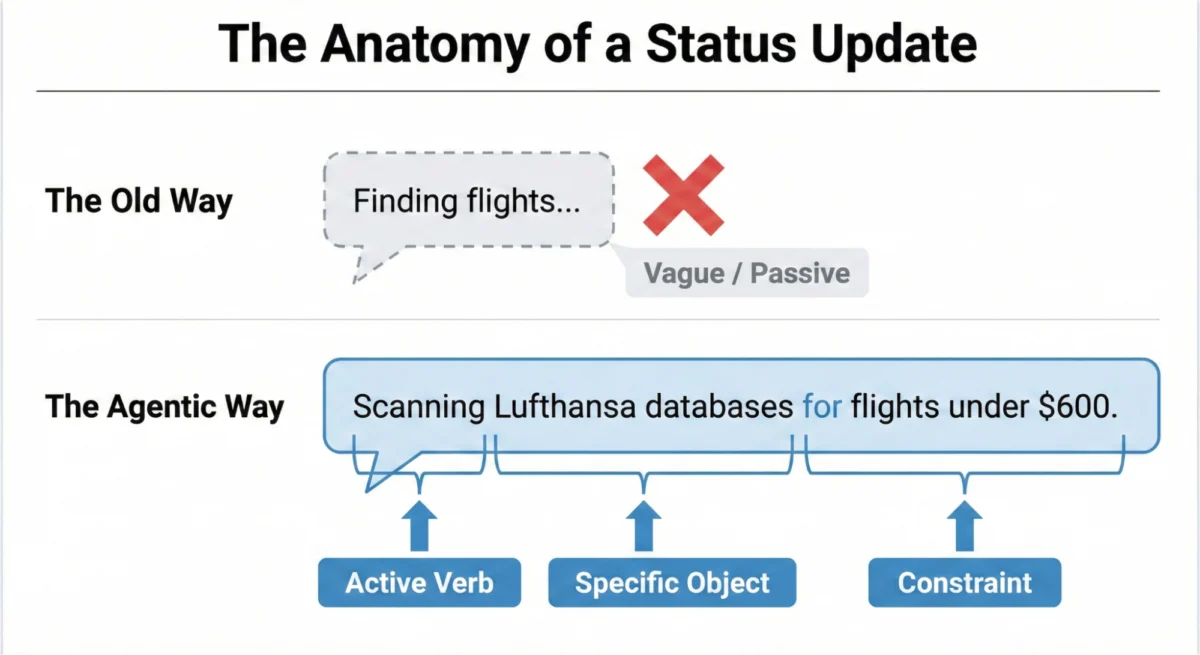
For three decades, the digital interface has relied on a singular, comforting shorthand for latency: the "spinner." Whether it’s a spinning wheel, a throbber, or a progress bar, these visual cues serve a specific purpose. They inform the user that a system is retrieving data, and that the delay is merely a byproduct of bandwidth constraints or file size. However, the rise of agentic AI has rendered this legacy pattern obsolete.
When an AI agent pauses for twenty seconds, it is not simply downloading a file; it is "thinking." It is navigating complex decision trees, weighing probabilistic outcomes, and synthesizing vast datasets to fulfill a request. When designers continue to use a generic loading spinner for these cognitive tasks, they trigger user anxiety. The user is left in the dark, unable to distinguish between a system that is diligently processing a complicated request and one that has crashed. To foster genuine user trust, we must move beyond the "passive wait" and transition toward "active transparency."
The Anatomy of the Decision Node Audit
The transition toward transparent AI begins long before the UI is rendered. In the first phase of this design evolution, teams must conduct a Decision Node Audit. By mapping the internal logic of the AI system, developers can identify the precise moments where the model pivots based on probabilistic data.
These nodes are the critical transparency points. They represent the "why" behind an AI’s output. Once these nodes are identified, the next step is building a Transparency Matrix—a structural guide that determines which behind-the-scenes API calls necessitate a status update and which can remain abstracted. This audit is not merely a technical requirement; it is the foundational step in ensuring that the system communicates its agency rather than just its latency.
Writing for Agency: The New Status Formula
Transparency is often misconstrued as a visual design challenge, but it is fundamentally a linguistic one. Generic microcopy—such as "Loading…" or "Working…"—are remnants of static software. They offer zero value to the user and erode trust by masking the AI’s actual progress.
To build an interface that feels reliable, we must employ an Agentic Update Formula. This formula requires three distinct components:

- A Strong Action Word: Describe exactly what the system is doing (e.g., "Analyzing," "Comparing," "Verifying").
- The Specific Item: Identify the subject of the action (e.g., "the Q3 financial ledger" rather than "the data").
- The Limits or Rules: Clarify the parameters (e.g., "using your updated tax policy").
For instance, an AI tasked with travel planning should not merely state "Searching for flights." A superior, trust-building update would read: "Querying airline APIs for flights under $600 between London and New York, departing Tuesday." This provides the user with the assurance that the agent understands the task’s specific constraints.
Matching Tone to the Risk Matrix
A critical design consideration is the AI’s "personality." Should it sound like a helpful assistant or a precise machine? The answer lies in the Impact/Risk Matrix derived from the Decision Node Audit.
For low-stakes tasks—such as drafting a friendly email or organizing a personal calendar—a conversational, helpful tone is appropriate. The user is looking for a seamless experience that reduces cognitive load. However, for high-stakes operations, such as financial transfers or database migrations, playfulness is a liability. In these scenarios, users prioritize precision. Language should be mechanical and direct, focusing on verification rather than "thought processes."

Ultimately, the determination of tone should not be based on developer preference but on rigorous user research. By testing how different demographics perceive specific terminology in varying risk contexts, designers can calibrate the AI’s voice to meet user expectations.
Interface Patterns: A Library for AI Transparency
Once the language is defined, the delivery system must be built. The goal is to match the visibility of the UI to the weight of the task. A minor background task should be subtle, while a multi-step, high-stakes process demands a robust, persistent container.
The Living Breadcrumb
For background tasks, such as an AI silently tidying files, we recommend the Living Breadcrumb. This pattern moves away from static icons and instead uses a pulse-based UI that cycles through text updates: "Reading files," "Categorizing by date," "Moving to archive." It provides quiet assurance that the system is functioning without demanding the user’s immediate attention.

The Dynamic Checklist
For complex workflows, the Dynamic Checklist is the gold standard. This pattern maps out every planned step of the agent’s task. As the agent completes each phase, it marks the item as finished and highlights the current step. This is a profound improvement over progress bars because it manages unpredictable time. If a specific step (e.g., "Currency Conversion") takes longer than usual, the user remains calm because they can see exactly where the agent is in the process and why the delay is occurring.
The Thinking Toggle
For users who require deep transparency, the Thinking Toggle provides an optional "view into the engine." By clicking a "View Logs" button, the user can see sanitized, high-level logic logs. This is essential for building trust among technical users, as it proves the system is not hiding its internal reasoning. However, this pattern comes with a caveat: raw logs must be strictly sanitized to prevent the exposure of proprietary business logic, sensitive data structures, or security tokens.
Designing for Partial Success
Standard software design is often binary: a task either succeeds or fails. AI agents, however, exist in the gray. An agent might successfully book a flight but fail to reserve the requested seat.

A binary error message like "Request Failed" is a trust-killer, as it invalidates the 90% of the work the agent did correctly. Instead, interfaces should support Partial Success. By clearly distinguishing between the accomplished tasks and the failed components, the UI allows the user to intervene only where necessary. This granular reporting keeps the user in control and maintains the value of the agent’s overall contribution.
The Audit Trail: Trust After the Fact
Real-time transparency is vital, but it is fleeting. If a user steps away, they may miss the progress updates. To solve this, every agentic workflow must include a persistent Audit Trail.
This "Show Work" feature acts as a receipt for the AI’s actions. It allows the user to click a link at any time to review the logic path taken. The very existence of this audit trail functions as a significant trust signal; it suggests that the system is confident enough in its output to stand by its reasoning. This addresses the issues seen in systems like ChatGPT, where hidden "memory" or undocumented instructions can lead to confusing results. By providing a clear, plain-language log of why a decision was made, we transition from blind faith to informed collaboration.

Implications for Enterprise Adoption
In enterprise settings, where professionals handle high volumes of tasks, the interface must account for the "ignored UI." Many experts perform tasks so frequently that they rely on muscle memory and expect specific results. They do not watch progress bars.
When these users encounter a result that deviates from their expectations, their immediate reaction is to distrust the system. If the AI provides no way to see why it reached a specific conclusion, the user will revert to manual methods, rendering the AI useless. The Audit Trail is the critical mechanism that prevents this. By allowing users to investigate discrepancies, the AI provides a path to reconciliation rather than immediate dismissal.
Conclusion: Building Colleagues, Not Magic Tricks
We are not building magic tricks; we are building digital colleagues. A magic trick relies on misdirection, but a colleague relies on communication. By integrating Living Breadcrumbs, Dynamic Checklists, Thinking Toggles, and Audit Trails, we transform the AI from an opaque "black box" into a transparent partner.

The ultimate goal of these interface patterns is to achieve a state of "informed confidence." By explicitly communicating the AI’s process, status, and limitations, we empower users to understand their tools deeply. This transparency does not just improve the user experience; it establishes the foundation for a professional, reliable, and sustainable relationship between humans and the agentic systems they employ.

 Sagoh
Sagoh
 Asep Darmawan
 Raul Delapena Setiawan
 Reynand Wu


 Azzam Bilal Chamdy
 Ali Ikhwan