
 Sagoh
Sagoh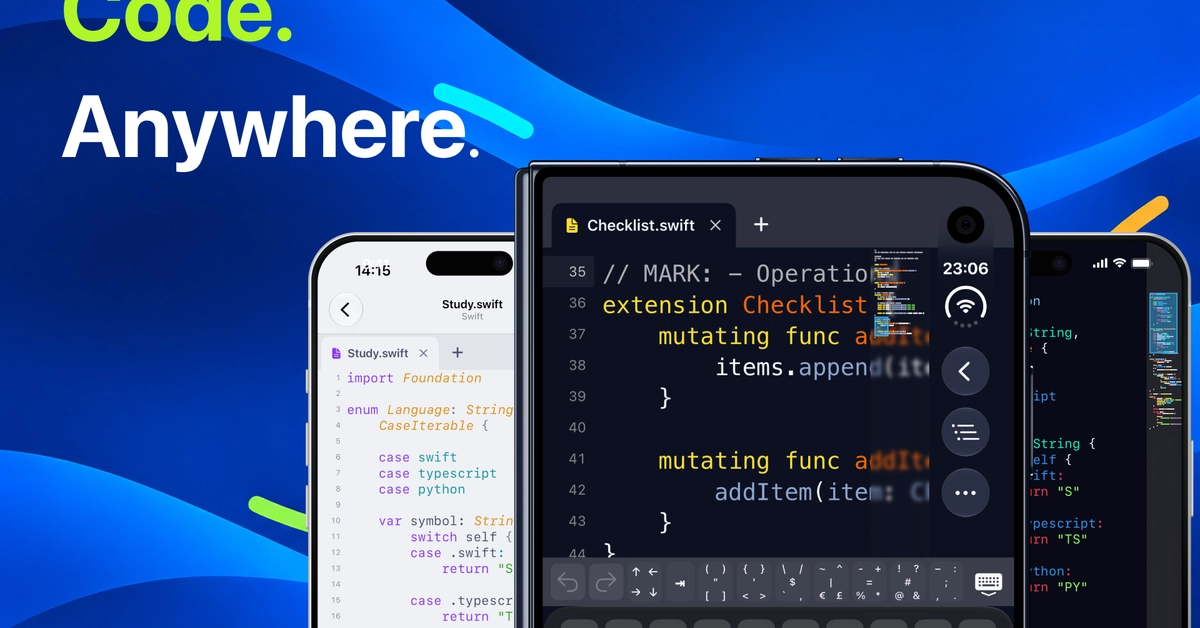
In the modern era of software engineering, the "desk-bound" developer is becoming a relic of the past. As remote work, global collaboration, and the rise of mobile-first lifestyles reshape the industry, the necessity for powerful tools that function outside the confines of a traditional workstation has never been greater. Enter CodeMate, a newly released native code editor for iOS and iPadOS designed to bridge the gap between high-powered desktop IDEs and the portability of mobile hardware.
CodeMate is not attempting to replace industry titans like Xcode or Visual Studio Code. Instead, it carves out a specific, high-utility niche: providing a seamless, focused environment for reading, navigating, and performing lightweight edits on source code while away from the terminal.
Main Facts: What is CodeMate?
At its core, CodeMate is a mobile-native application built specifically for the iPhone and iPad. Unlike generalized text editors that lack language-specific intelligence, CodeMate offers a refined environment optimized for the specific challenges of coding on a touch screen.
Key Capabilities
The application boasts a suite of features designed to make code inspection and minor refactoring as frictionless as possible:
- Extensive Syntax Highlighting: Supporting over 200 file formats—including modern staples like Swift, Python, TypeScript, Rust, JavaScript, and even structured formats like JSON and Markdown—the app ensures that readability is never compromised, regardless of the language.
- Navigation Tools: Recognizing that developers often deal with massive codebases, the app integrates a minimap for high-level visualization, multi-tab support for multitasking, and precise jump-to-line functionality.
- File System Integration: By leveraging the native iOS Files app, CodeMate allows users to work directly with files stored in iCloud Drive, Dropbox, and other cloud-syncing providers.
- Web Development Previews: For front-end developers, the app includes a dedicated previewer for local HTML files, allowing for the immediate rendering of pages with associated CSS and JavaScript.
- Local Project Transfers: Recognizing that some users prefer not to rely on cloud storage, CodeMate facilitates the transfer of ZIP archives over a local network, enabling offline project management.
Chronology: The Evolution of Mobile Development Tools
The journey toward a capable mobile IDE has been long and fraught with technical challenges. Historically, mobile devices were seen as "consumption" devices, not "creation" devices.
The Early Days (2010–2015)
Initial attempts at mobile code editors were largely primitive. They acted as glorified text editors, often failing to handle syntax highlighting or file management. Developers viewed these tools as toys, incapable of handling real-world project structures.
The Rise of the Cloud (2016–2020)
As cloud IDEs began to gain traction, the focus shifted away from local device capability toward remote rendering. While these tools were powerful, they required a constant, stable internet connection and often suffered from latency—a non-starter for developers commuting or traveling.
The Modern Era: Native Performance (2021–Present)
The release of CodeMate marks a pivot back to local-first architecture. By prioritizing native code execution, the app avoids the "lag" associated with web-based IDEs. Its development represents a synthesis of modern mobile hardware capabilities—such as the high-performance chips found in iPads—and the refined user interface patterns that developers have come to expect from desktop environments.
Supporting Data: Why Mobile Coding Matters
The demand for mobile development tools is not merely a convenience feature; it is driven by shifts in how software is created.
The AI Coding Revolution
The surge in AI-assisted coding tools (such as GitHub Copilot and ChatGPT) has changed the developer workflow. Developers now generate code faster than ever, but this shift creates a new problem: the "review bottleneck." Developers often find themselves needing to audit, tweak, or debug generated code while on the go. CodeMate serves as the perfect companion for this workflow, allowing developers to review AI-generated pull requests or code snippets during transit or downtime.
The "Always-On" Developer
According to recent industry surveys, over 65% of professional developers report checking their code or documentation outside of standard working hours. While they may not be compiling massive binaries, they are frequently performing "micro-tasks"—fixing a CSS alignment issue, checking a variable name in a configuration file, or reviewing a documentation update. CodeMate captures this segment of the workflow, preventing the need to boot up a full laptop for what are essentially five-minute tasks.
Official Developer Perspective: A Conversation on Design
The developer of CodeMate has been transparent about the app’s purpose and limitations, which is a rare and welcome level of candor in the App Store ecosystem.
Intent vs. Reality
In an official statement, the developer clarified: "CodeMate isn’t intended to replace Xcode, VS Code, or a full development environment. It doesn’t provide a general-purpose compiler or terminal."
This distinction is vital. By stripping away the bloat of a full-scale IDE, the developer has created a tool that is lightning-fast and focused. The "official" philosophy behind CodeMate is to provide the best possible reading experience on mobile. The developer invites feedback, positioning the app as a living project that grows alongside the needs of its community.
Design Philosophy
The UI/UX design choices reflect this focused approach. The ability to adjust fonts, themes, and spacing acknowledges that coding is a visual task. For developers who spend eight hours a day in a dark-mode IDE, the transition to a mobile device must be visually consistent. By offering deep customization, CodeMate ensures that the "context switching" between desktop and mobile remains as low-friction as possible.
Implications: The Future of the Mobile Workspace
The emergence of tools like CodeMate signals a broader trend: the "De-tethering" of the developer.
The iPad as a Pro Tool
For years, the iPad Pro has been marketed as a replacement for the laptop, but the software ecosystem lagged behind. With apps like CodeMate filling the gap for high-quality, professional-grade utilities, the iPad is finally becoming a viable tool for technical workflows. As Apple continues to enhance its silicon and iPadOS multitasking features, we can expect the line between a "viewer" and an "editor" to continue to blur.
Workflow Efficiency and Burnout
There is a nuanced implication regarding developer mental health. By allowing developers to make quick, targeted changes on the go, CodeMate may actually reduce stress. The anxiety of needing to reach a physical desk to fix a minor bug in a production environment is a significant pain point for many. CodeMate empowers developers to address these issues immediately, providing them with more freedom to disconnect once the workday is truly done.
The Open Ecosystem
CodeMate’s support for standard file formats and its integration with the iOS Files app suggests a commitment to an open, interoperable ecosystem. It does not lock the user into a proprietary format or a walled-garden cloud service. This "open-file" philosophy is essential for the developer community, which relies on Git, SSH, and standardized file systems to maintain sanity across complex projects.
Conclusion: A New Tool for the Toolkit
CodeMate is not a panacea for the complexities of modern software development. It does not promise to turn an iPhone into a server-grade machine, nor does it attempt to handle massive compilation tasks that require dedicated cooling and multi-core processing power.
Instead, it succeeds by knowing exactly what it is: a specialized, high-performance utility for the modern developer. It addresses the reality that code is now a fluid, constant part of the digital lifecycle. Whether you are a student learning Python on the bus, a senior engineer reviewing code during a flight, or a freelancer making a quick tweak to a website from a café, CodeMate provides the necessary bridge to your work.
As development continues to evolve, the tools we use must be as agile as the methodologies we employ. CodeMate represents a significant step forward in mobile development utility, proving that with the right focus and design, a touch screen can be just as effective as a mechanical keyboard for the tasks that matter most.
For those interested in exploring the tool, the developer has made the app available on the Apple App Store, and further documentation and updates can be found on their official website at codemateapp.net. The developer’s open invitation for feedback underscores a commitment to refining the mobile-editing experience, ensuring that CodeMate will likely remain a staple on the home screens of developers for years to come.


 Jia Lissa
 Nila Kartika Wati
 Raul Delapena Setiawan
 Reynand Wu


 Azzam Bilal Chamdy
 Ali Ikhwan