
 Ammar Sabilarrohman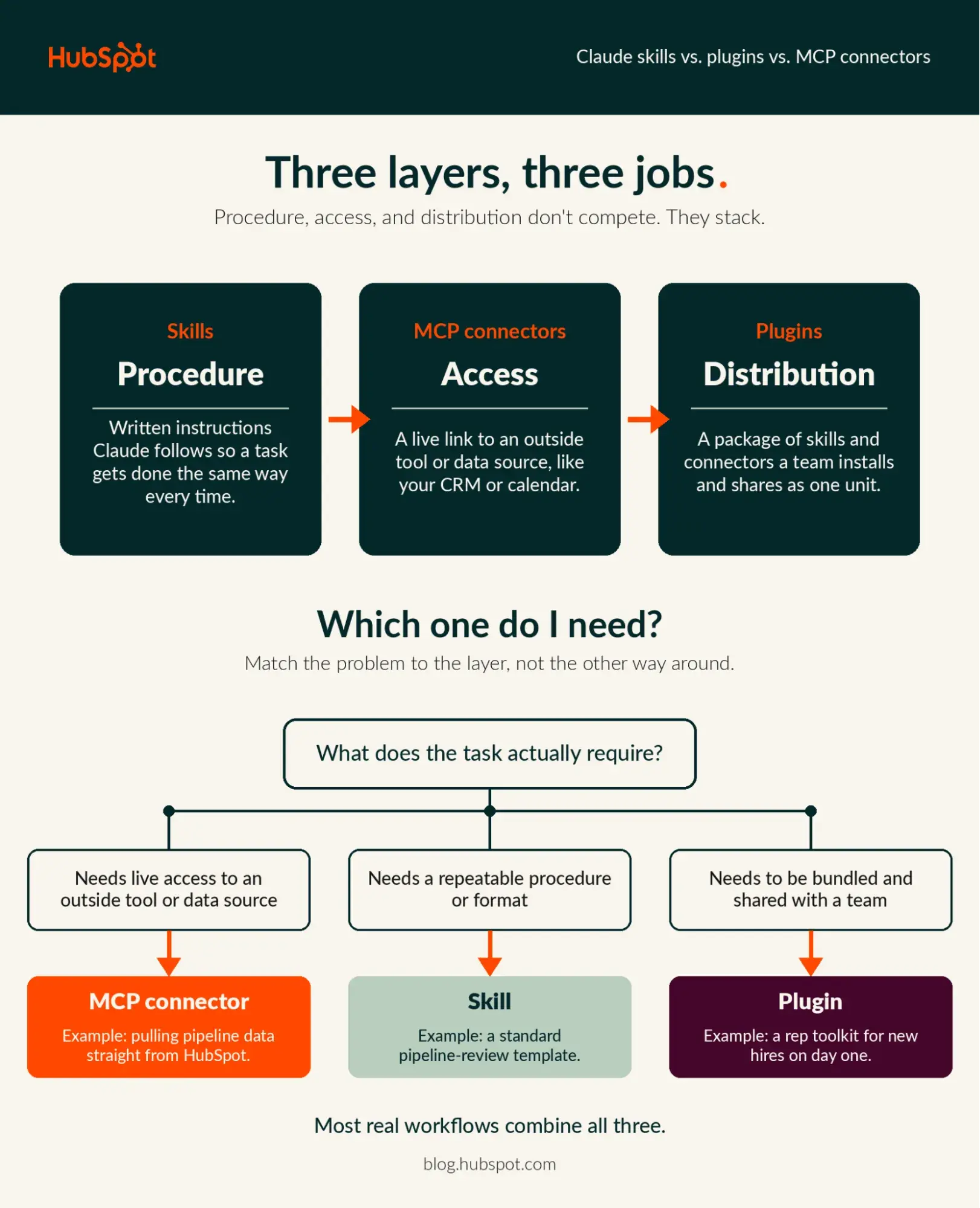
If you have spent time navigating Claude’s "Customize" settings, you have likely encountered a trio of terms that often leave users scratching their heads: Skills, Plugins, and MCP Connectors. While they are frequently used interchangeably in casual tech discourse, they represent distinct architectural layers within the Anthropic ecosystem.
For businesses attempting to integrate AI into their daily operations, understanding these distinctions is no longer a luxury—it is a necessity for scaling productivity. This guide demystifies these components, providing a framework for when to use each, how they interact, and how to govern them within an enterprise environment.
The Core Distinction: Access, Procedure, and Distribution
To keep these concepts straight, think of them in terms of their primary function: Access, Procedure, and Distribution.
MCP Connectors: The "Access" Layer
Model Context Protocol (MCP) connectors serve as the bridge between Claude and the outside world. An MCP server—typically run by the service provider (like HubSpot, GitHub, or your internal database)—acts as an intermediary. When you activate a connector, you are granting Claude authorized access to read from or take actions within an external tool, all while respecting your existing security permissions. The connector is the "hand" that reaches into your CRM or project management software.
Skills: The "Procedure" Layer
A "Skill" is a set of defined instructions, scripts, and reference files that Claude loads to handle specific tasks. It is the "brain" of the operation. A skill defines the how: the specific report format, the tone of voice for customer emails, or the mandatory checklist for a code review. A skill can guide Claude on how to interpret data, but it cannot access external services on its own. It relies on the connector for the raw material.
Plugins: The "Distribution" Layer
Plugins are the delivery vehicle. A plugin bundles skills, MCP connectors, commands, and sub-agents into a single, cohesive package. Instead of requiring every team member to manually configure their setup, an administrator can distribute a plugin that installs everything in one step. It is the packaging solution that turns individual configurations into a standardized enterprise toolset.
A Chronology of Integration: How the Ecosystem Evolved
The evolution of these tools reflects the broader shift in AI from "chatbots" to "agents."

- Phase One (Early LLMs): AI was largely siloed. Users had to copy and paste data into the chat window, manually providing context.
- Phase Two (The Introduction of Skills): Users began creating "system prompts" or custom instructions. These were the precursors to modern Skills, allowing users to define persona and output format, though the AI remained blind to real-time external data.
- Phase Three (MCP and Connectivity): With the arrival of the Model Context Protocol (MCP), Claude gained the ability to interact with live APIs. This allowed for real-time data retrieval—the missing link for professional workflows.
- Phase Four (Standardized Packaging): As teams began scaling these integrations, the need for centralized management led to the rise of Plugins. This allowed IT departments to govern how employees use AI, ensuring that everyone on the team is working with the same data access and procedural standards.
Supporting Data: Why Context Matters
Recent industry reports, including data from HubSpot’s recent connector announcements, indicate that over 50% of professional teams are already utilizing multiple LLMs to manage their workflows. This fragmentation creates a massive challenge: data silos.
When a sales team uses a CRM, a marketing team uses an email platform, and an engineering team uses a ticket tracker, the AI must be able to move between these silos seamlessly. The "three-layer model" (Skill/Connector/Plugin) provides a roadmap for this:
- The Connector provides the context (the CRM data).
- The Skill provides the strategy (the sales pitch template).
- The Plugin provides the scale (ensuring the whole sales team uses the same approach).
Case Study: The Weekly Pipeline Review
Consider a scenario where a sales manager wants to automate a weekly pipeline review.
- The Connector: By turning on the HubSpot Claude connector, Claude is granted permission to pull deal stages, engagement history, and recent activity directly from the CRM.
- The Skill: The manager writes a skill that instructs Claude: "Identify deals that have been stagnant for more than 14 days, flag them as ‘needs attention,’ and draft a personalized follow-up email based on the last interaction."
- The Plugin: Rather than emailing instructions to the team, the manager packages the connector and the skill into a single Plugin. They roll it out to the entire department. Now, every sales rep has the same "Pipeline Review" tool available in their Claude dashboard.
Official Guidelines and Governance
When deploying these tools at scale, Anthropic and its partners emphasize security and auditability.
Security and Authorization
Connectors do not bypass existing permissions. If a user does not have permission to view a specific deal in HubSpot, the Claude connector will not show that data. Administrators can set tool-level permissions—such as "Always Allow" or "Needs Approval"—for individual actions, ensuring that AI agents do not perform unauthorized changes in your CRM.
Verification and Trust
While public directories for plugins feature automated security scans and human review, organizations should be cautious with unofficial sources.
- Always audit local files: Only install plugins from trusted internal sources or official marketplaces.
- Pilot programs: Use Enterprise-tier features to share plugins with a small pilot group before a company-wide rollout.
- Audit logs: For compliance-heavy industries, Enterprise plans provide access to audit logs via the Compliance API, allowing teams to feed usage data into their own security monitoring tools.
Implications for the Future of Work
The shift toward this modular AI architecture has profound implications for the workplace. We are moving away from the era of "prompt engineering" as a hobby and toward "AI systems engineering" as a core business function.

Standardizing vs. Customizing
A common mistake for teams is to over-engineer a plugin when a single skill would suffice. The rule of thumb is simple: Start small. If a specific format works for you, save it as a skill. Only when that skill is needed by multiple users—or when it relies on complex external data—should you elevate it to a plugin.
The Role of the Human
Despite the sophisticated nature of these tools, the human element remains paramount. Skills require regular updates to reflect changing brand voices or market strategies. MCP connectors require periodic re-authorization. Plugins require version control. The "agentic" future of work is not about replacing the employee, but about building an ecosystem of tools that empowers the employee to perform at a higher level of consistency and efficiency.
Frequently Asked Questions
Do I need a developer to use these?
No. Adding a connector or installing a plugin is a "point-and-click" process. Writing a skill is akin to writing a structured document. You only need a developer if you are building a custom MCP server from scratch.
Can I roll back changes if a plugin breaks a workflow?
Yes. Organization admins on Team and Enterprise plans can view the version history of a plugin and revert to a previous, stable state without losing data.
How do these compare to "Slash Commands"?
Think of a slash command as a "trigger." A skill is the instruction set, while a slash command is the shortcut you type in the chat to activate it. They are complementary, not competing.
Conclusion: Solve with the Right Tool
Skills, plugins, and MCP connectors are not competing tiers of a hierarchy; they are distinct jobs. By identifying whether your challenge is one of access, procedure, or distribution, you can avoid the common trap of over-complication. As you build out your internal AI stack, remember that the goal is not to have the most plugins, but to have the most effective workflows.
Start by connecting your primary data source, define your most repetitive process as a skill, and only when you’re ready to share that success with your team, wrap it in a plugin. This incremental approach ensures that your transition to an AI-augmented workspace is both sustainable and secure.


 Siti Muinah
 Jia Lissa
 Layla Zulfa
 Nana
Nana
 Pevita Pearce
 Rifan Muazin

 Iffa Jayyana