
 Nila Kartika Wati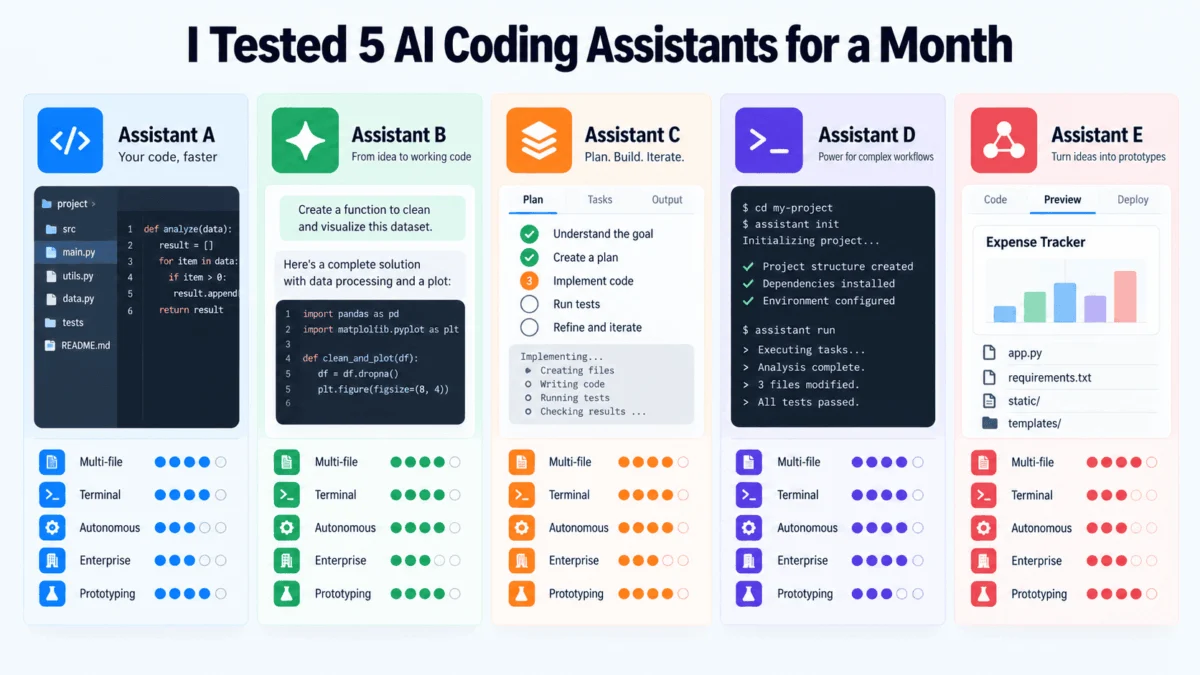
The promise of modern AI coding assistants is seductive: articulate a requirement in plain English, watch the code materialize, and ship your product at record speed. However, after a rigorous month-long evaluation—spanning legacy system refactors, greenfield API architecture, and high-stakes debugging—the reality is far more nuanced than the polished marketing demos suggest.
The software development landscape is currently undergoing a structural shift. We have moved beyond simple autocomplete suggestions into the era of "agentic" development, where AI assistants are not just predicting tokens, but executing, testing, and iterating on entire modules.
The Core Philosophy: Five Paths to Code
The market has fractured into five distinct ideologies, each betting on a different vision of the developer’s workstation:
- Cursor: Rebuilding the IDE from the ground up for an AI-native experience.
- GitHub Copilot: Enhancing existing industry-standard environments.
- Claude Code: Elevating the terminal into an autonomous reasoning engine.
- Windsurf (Devin Desktop): Prioritizing long-term context and workspace continuity.
- Replit Agent: Abstracting the entire deployment stack into a browser-based workflow.
These are not merely feature differences; they are competing visions of how software engineering will function by 2030.
Chronology of a Developer’s Month
To test these tools, I integrated them into a professional workflow. The experiment was designed to mirror the lifecycle of a software project:
- Week 1 (Legacy Refactor): Focused on renaming data models in a complex Django project and propagating changes across views, serializers, and tests.
- Week 2 (Greenfield Build): Tasked each assistant with constructing a REST API from scratch, requiring adherence to strict architectural constraints.
- Week 3 (Debugging Sessions): Introduced intentional, subtle bugs into an existing codebase to gauge "reasoning" capabilities versus "pattern matching."
- Week 4 (End-to-End Deployment): Used the tools to take a project from a blank file to a live, production-ready URL.
The result? No single tool emerged as a "silver bullet." The effectiveness of each assistant was tethered directly to the complexity and nature of the task at hand.
Technical Deep-Dive and Performance Metrics
Cursor: The AI-Native Powerhouse
Cursor functions as a fork of VS Code, but the similarity is superficial. Its "Composer" and "Agent" modes represent a radical departure from standard editing.
- Multi-File Mastery: Cursor’s strongest asset is its cross-file coherence. During my Django refactor, it navigated the interplay between migrations, tests, and models with remarkable accuracy.
- The Trade-off: Its autonomy is a double-edged sword. While it excels at defined tasks, it can suffer from "silent over-editing"—making changes in peripheral files that were not explicitly requested.
- Verdict: Ideal for power users working in large, complex codebases who view the AI as a co-pilot rather than a junior developer.
GitHub Copilot: The Enterprise Incumbent
As the veteran of the group, Copilot’s greatest strength is its deep integration into the existing Microsoft/GitHub ecosystem.
- The "Ask, Plan, Act" Workflow: Copilot’s recent updates, including its "Plan" feature, allow for a more structured approach to coding. However, compared to Cursor, the transition between chat and execution feels less seamless.
- The Ecosystem Advantage: Its ability to draw context from GitHub issues, PR history, and repository structure is a moat that standalone tools have yet to replicate.
- Verdict: The safest bet for enterprise teams where security, compliance, and integration with existing CI/CD pipelines are non-negotiable.
Claude Code: The Terminal-First Reasoner
Claude Code is a paradigm shift for developers who prefer the command line. It operates without a GUI, focusing purely on reasoning and terminal-based iteration.
- Logic over Speed: During my API extension task, Claude Code demonstrated superior reasoning. It encountered a dependency error in a mid-step, paused, analyzed the logs, and corrected the issue without human intervention.
- The Learning Curve: Because there is no visual interface, it requires a high degree of technical literacy to "steer" the agent.
- Verdict: A powerful tool for "terminal-dwellers" and systems engineers who value granular control and deep reasoning over visual hand-holding.
Windsurf: The Persistent Workspace
Acquired by Cognition, Windsurf (formerly Devin Desktop) introduces the "Cascade" feature, which maintains continuous awareness of the developer’s workspace.
- Context Persistence: Unlike other tools that require constant re-prompting, Windsurf remembers the state of your project over hours of development. This is a game-changer for long, multi-stage feature development.
- The Risk of Drift: Over extended sessions, Windsurf occasionally exhibits "architectural drift," where it drifts away from the project’s original design patterns in favor of "easier" but less consistent solutions.
- Verdict: Best for sustained feature development where keeping the "big picture" in the AI’s context window is essential.
Replit Agent: The Rapid Prototype Engine
Replit is the most ambitious, attempting to collapse the distance between an idea and a deployed application into a single browser tab.
- Prototyping Speed: I managed to build and deploy a functional expense-tracking application in under 60 minutes.
- The Scaling Wall: The tool is incredibly effective for MVPs, but as soon as the project moves beyond "straightforward," the limitations of the environment become apparent.
- Verdict: Unbeatable for founders, educators, and rapid prototyping, but currently limited for complex production engineering.
Implications for the Future of Work
What does this month of testing imply for the industry?
- The Death of the "Generalist" AI: We are seeing the rise of "specialized agentic workflows." We will likely see developers using multiple tools—Cursor for the heavy lifting, Claude for terminal logic, and Replit for quick experimentation.
- The Shift from Coding to "Reviewing": The bottleneck in software development is no longer the speed of writing code; it is the speed of human verification. As these agents become more autonomous, the role of the senior developer is shifting toward that of a "Code Architect/Reviewer."
- Cost Predictability: We are moving from flat-rate subscription models to consumption-based pricing. Companies must now account for "AI compute" as a primary line item in their engineering budgets.
Official Stances and Industry Outlook
While vendors like Anthropic and Microsoft emphasize productivity, they are increasingly cautious about the "Black Box" nature of their agents. The consensus among the developers I interviewed is clear: Autonomous coding is not a replacement for human oversight.
Companies that attempt to use these tools to replace senior engineers rather than augment them will likely face significant technical debt. The most successful teams are those that treat these agents as highly capable, yet occasionally fallible, junior engineers who require constant supervision.
Conclusion: How to Choose
The question to ask yourself is not "Which AI is the best?" but "Which tool matches my specific mental model of software development?"
- If you live in the Terminal: Adopt Claude Code.
- If you are an Enterprise Developer: Stay with GitHub Copilot.
- If you are a Full-Stack Product Builder: Use Cursor or Windsurf.
- If you need a prototype in an hour: Use Replit Agent.
The AI-assisted future is not a monolith. It is a diverse ecosystem of tools. The developers who thrive in the next decade will be those who curate their "AI stack" with the same care they apply to their choice of programming language or cloud provider.
About the Author
Vinod Chugani is an AI and data science educator specializing in agentic workflows and machine learning applications. With a background in quantitative finance and technical mentorship, he bridges the gap between emerging AI research and practical, high-stakes engineering.


 Nana Wu

 Muslim

 Neng Nana