
 Lina Hope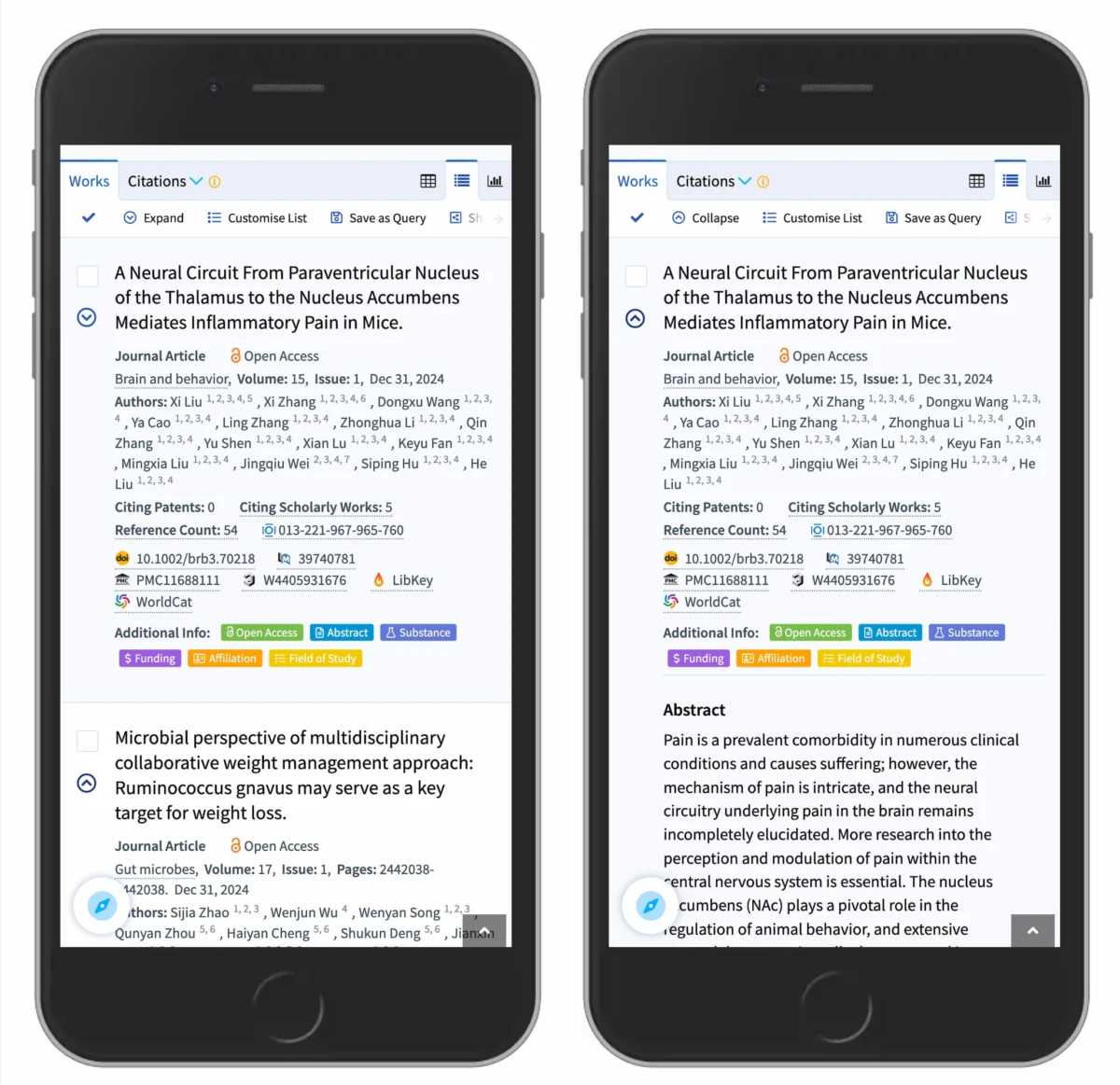
In the modern digital landscape, user interface (UI) design is often a battleground between aesthetic preference and functional clarity. One of the most ubiquitous elements of web and mobile navigation is the "accordion"—a vertically stacked list of headers that users can click to reveal or hide associated content. While seemingly simple, recent research from the Nielsen Norman Group (NN/g) suggests that the small, unassuming icons we use to signal these interactions are often sources of significant user friction.
From the subtle differences between carets and chevrons to the catastrophic usability failure of "split menus," designers are increasingly finding that the most effective UI is often the one that adheres to the strictest conventions.
Main Facts: The Anatomy of a Successful Accordion
The fundamental challenge of an accordion is communication. A designer must signal two things to a user: that the element is interactive and that it will expand rather than navigate to a new page.

The core findings of recent usability studies are stark:
- The Power of the Caret: The caret (the angular, triangle-like symbol) is the most reliable signifier for expansion and collapse.
- The "No-Icon" Default: When no icon is present, users overwhelmingly assume that clicking a label will trigger a page navigation, not an expansion.
- The "Link" Rule: If an element is a hyperlink to a new destination, avoid decorative icons entirely. The most effective way to communicate a link is a simple underline.
- The Danger of Split Menus: Interfaces that attempt to separate the action (a label that links to a page and an icon that expands the menu) create "split-button" patterns that cause significant user confusion and high error rates.
A Chronology of Interface Evolution
To understand why we have arrived at this confusion, one must look at the evolution of web navigation. In the early 2000s, "drill-down" menus were often represented by folder icons or simple text-based indicators. As mobile-first design took hold in the 2010s, the space constraints of smartphones forced designers to rely more heavily on iconography.
- The "Plus" Era: Initially, the plus (+) and minus (-) symbols were the industry standard. They were borrowed from desktop operating systems like Windows and macOS, where they represented tree-view structures.
- The Rise of the Arrow: As flat design became popular, designers moved toward arrows, attempting to provide a more intuitive "direction" for the user. However, this introduced ambiguity—an arrow pointing right often implies "next page," while an arrow pointing down implies "expand."
- The Current Standardization: We are currently in a phase of refinement. UX researchers have analyzed thousands of interaction points, discovering that while users can adapt to almost any icon, they perform best with those that carry the least cognitive load—specifically, the caret.
Supporting Data: Why Small Icons Lead to Big Problems
The NN/g research provides a data-backed breakdown of how different icons affect user behavior. One of the most revealing findings is that users don’t just click the icon; they click the entire hit area.

When participants were presented with various designs, the "hit area" behavior remained consistent across labels and icons, but the expectation of what would happen upon clicking varied wildly. For example, when a "plus" icon is used, users may hesitate because the icon is semantically overloaded. In e-commerce, a plus sign usually means "add to cart." In a document editor, it might mean "insert." When used for an accordion, it forces the user to pause and analyze the context.
Furthermore, the data shows that "split menus"—where a user must aim for a tiny icon to open a menu while avoiding the main text—are a major accessibility failure. Not only do they create a poor experience for users with motor impairments, but even for neurotypical, able-bodied users, they lead to "miss-clicks" where the user ends up on a category page they didn’t intend to visit.
Industry Perspectives and Best Practices
Leading design authorities, including the team at Smashing Magazine, have coalesced around a set of best practices that prioritize clarity over "clever" design.

Avoid Overcomplication:
Many designs fall into the trap of using dynamic icons that rotate, flip, or change shape based on the state of the menu. While this provides visual feedback, it is often unnecessary. A static, clear caret that simply points down to show "closed" and up to show "open" is sufficient.
The Case for Underlining:
There is a modern trend of removing underlines from hyperlinks to keep the UI "clean." However, the data is clear: if a user needs to know they can click a word to navigate to a new page, an underline is the universal signifier. By removing it, you force the user to guess. By keeping it, you align with decades of established web behavior.
The DHL Model:
The navigation strategy of major logistics platforms like DHL is often cited as a benchmark. These interfaces avoid unnecessary arrows and "split-button" trickery. Instead, they provide a clean "Overview" link within the expanded menu. This separates the act of navigation from the act of exploration, ensuring that the user is never surprised by the result of their click.

Implications: The Future of Accessible Design
The implications of these findings extend far beyond simple aesthetics. For developers and designers, the takeaway is that predictability is the highest form of usability.
1. Reducing Cognitive Load
When a user visits a website, they are subconsciously looking for patterns they have seen before. If every website uses a different icon for an accordion—some use plus signs, others use chevrons, some use dots—the user must learn a new "language" for every site they visit. Standardizing on the caret reduces this cognitive tax, allowing the user to focus on the content rather than the interface.
2. Accessibility and Inclusion
"Split menus" are notoriously difficult for users relying on screen readers or those with tremor-related disabilities. A single, unified click target (the entire row) is significantly more accessible than a split target. By simplifying the interaction, we make the web more inclusive for everyone.

3. Mobile Optimization
On mobile devices, the margin for error is razor-thin. Fitts’s Law—a principle of human-computer interaction—states that the time required to move to a target is a function of the target’s distance and size. By making the entire accordion row a clickable target, rather than just the small icon, we dramatically improve the mobile experience.
Conclusion: Simpler is Always Better
As the digital landscape becomes increasingly complex, the most effective design choices are often the ones that feel invisible. Research confirms that we do not need to reinvent the wheel when it comes to accordion navigation.
To create a high-performing, user-friendly interface:

- Use the caret to indicate expandable content.
- Use the underline to indicate a link to a new page.
- Avoid split buttons that confuse the user’s intent.
- Treat the entire row as a single, intuitive hit area.
In the end, the goal of any interface is to get out of the way of the user. By adhering to these data-driven standards, designers can build experiences that are not only more professional and polished but also fundamentally more usable. The web is a collaborative project, and by sharing these insights, we can continue to refine the digital spaces we occupy together.
Editor’s Note: At Smashing Magazine, our mission is to foster a web that is accessible, usable, and beautiful. We believe that by understanding the "why" behind these design choices, we can all contribute to a more intuitive online world. For those looking to dive deeper into these topics, our ongoing series of online workshops and expert-led guides remain the best way to keep your skills sharp. Let’s keep building better things together.

 Sagoh
Sagoh
 Asep Darmawan
 Raul Delapena Setiawan
 Reynand Wu


 Azzam Bilal Chamdy
 Ali Ikhwan