
 Ammar Sabilarrohman
In the modern landscape of cloud-native development, the friction between local development environments and automated build pipelines is a frequent source of frustration. A common scenario arises when a project, developed within a browser-hosted IDE or a specialized internal development environment, fails to compile once it is migrated to a standard containerized build process—such as those found in Azure Container Registry or GitHub Actions.
One of the most cryptic errors developers encounter during this transition is the sudden report that vite: not found during the build phase, despite the package clearly appearing in the devDependencies of the package.json file. This article explores the root cause of this failure, the mechanics of how it breaks containerized environments, and a robust, scalable strategy to ensure your build pipelines remain portable and resilient.
The Anatomy of the Failure: A Disconnected Pipeline
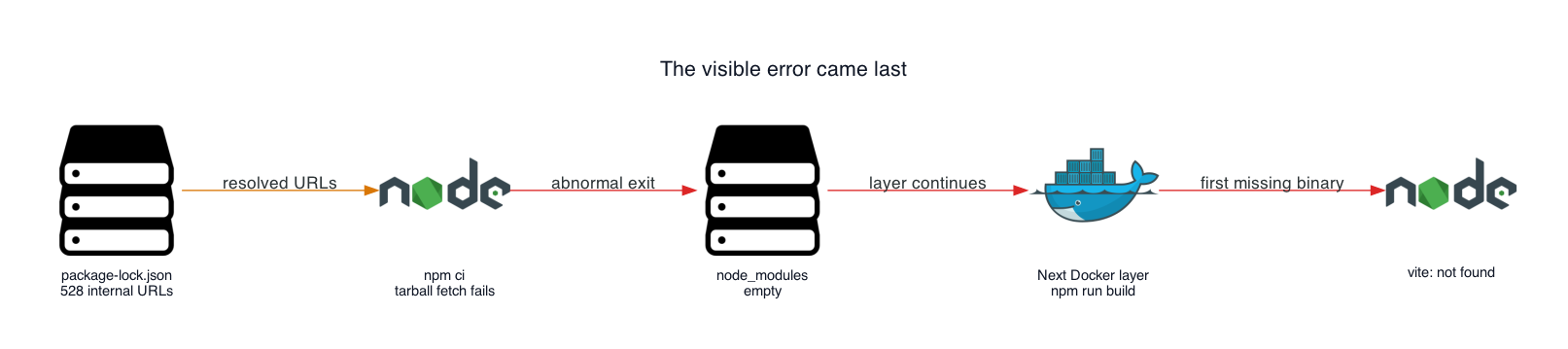
The error sh: 1: vite: not found is rarely the true culprit. It is almost always the "last gasp" of a build process that has already suffered a silent, catastrophic failure during the dependency installation phase.
In many development environments, particularly those provided by managed browser-based IDEs, the platform acts as a transparent proxy for public npm packages. When a developer runs an installation command, the environment intercepts these requests and directs them toward an internal, private registry. When the project’s package-lock.json is generated, it captures these internal URLs within the resolved field for every dependency.
When this project is moved to an Azure Container Registry (ACR) or any standard CI environment, the npm ci command attempts to fetch packages from these hardcoded internal URLs. Because the build runner does not have access to that internal, browser-hosted proxy, the downloads fail. Crucially, in many older or specific configurations of npm, this failure does not trigger a hard stop. Instead, it results in an "Exit handler never called!" message, leaving the node_modules directory empty or incomplete. The subsequent npm run build step then fails because it cannot locate the Vite executable that was supposed to be installed moments earlier.

Chronology of the Build Collapse
Understanding the timeline of this failure is essential for debugging. The issue unfolds in three distinct stages:
- The Lockfile Poisoning: The project’s
package-lock.jsonis generated within a constrained development environment. It stores URLs that are only resolvable within that specific network boundary. - The Silent Dependency Failure: During the
npm ciphase in the Docker build, the environment attempts to reach those hardcoded URLs. The registry is unreachable, causing the download process to hang or exit prematurely without properly populating thenode_modulesfolder. - The Cascading Build Error: The Docker layer proceeds to the
npm run buildcommand. Since the previous step failed to place thevitebinary intonode_modules/.bin/, the shell returns thevite: not founderror, effectively masking the true origin of the problem.
Supporting Data: Inventorying the Damage
To confirm if your project is suffering from this specific issue, you must move beyond the surface-level error and perform a data-driven audit of your lockfile. The resolved field in package-lock.json is the definitive source of truth.
Using a simple script, developers can inventory their dependencies to see exactly how many packages are pointing to unreachable hosts. By running a Node.js utility to parse the lockfile, you can group all resolved URLs by their hostname:
const fs = require('node:fs');
const lock = JSON.parse(fs.readFileSync('package-lock.json', 'utf8'));
const hosts = ;

for (const entry of Object.values(lock.packages ?? ))
  if (!entry.resolved?.startsWith('http')) continue;
  const host = new URL(entry.resolved).host;
  hosts[host] = (hosts[host] ?? 0) + 1;

console.table(hosts);
In many real-world cases, this reveals that hundreds of entries are pointing to an internal proxy host, while only a few might be legitimately internal. This data allows you to distinguish between packages that require a URL rewrite and those that are genuinely private.
Remediation: The Strategy of URL Normalization
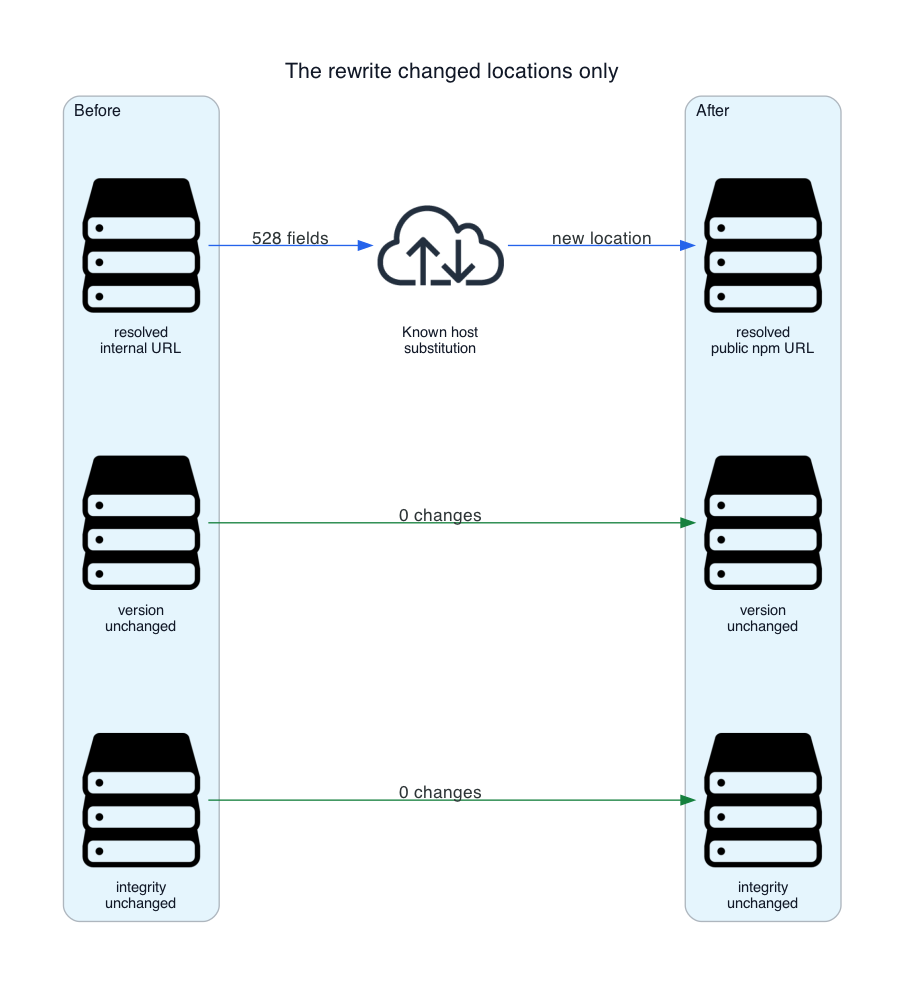
The most effective solution is to normalize the package-lock.json file to point to the public npm registry (https://registry.npmjs.org/) while strictly preserving the existing package versions and integrity hashes.
Implementing the Rewrite
A robust approach involves creating a rewrite-lockfile.cjs script that targets only the affected URL prefixes. By replacing the internal hostname with the public registry URL, you restore the portability of the project without compromising security or dependency integrity.
The Script Requirements:
- Targeted Replacement: Only replace the specific internal prefix identified during your audit.
- Integrity Verification: Ensure that every package entry retains its
integrityhash to prevent supply chain vulnerabilities. - Safety Checks: Add assertions to ensure that no unexpected URLs remain after the rewrite process is complete.
Implications for CI/CD Architecture
The primary implication of this failure is that dependency resolution is a core part of the build environment. Relying on a lockfile that is "environment-locked" is a common anti-pattern.
Moving Toward Multi-Stage Docker Builds
To build resilient images, you must isolate the dependency installation from the source code. This prevents source code changes from triggering a re-installation of dependencies, but more importantly, it allows you to introduce "guardrails" during the install process.
# Stage 1: Dependency Installation
FROM node:24-slim AS dependencies
WORKDIR /app
COPY package.json package-lock.json rewrite-lockfile.cjs ./
RUN node rewrite-lockfile.cjs &&
    npm ci --include=dev &&
    test -x node_modules/.bin/vite

# Stage 2: Application Build
FROM node:24-slim AS build
WORKDIR /app
COPY . .
COPY --from=dependencies /app/node_modules ./node_modules
RUN npm run build
This multi-stage structure ensures that if the dependency installation fails, the build stops immediately at the first stage. The inclusion of the test -x command acts as a final sanity check, ensuring the binary is present and executable before the heavier compilation stage begins.
Security Considerations and Best Practices
While URL rewriting solves the connectivity issue, it introduces a trust boundary that must be managed.
- Public vs. Private: Never blindly rewrite URLs if your project relies on proprietary, private packages. If you have internal packages, these must be hosted on a persistent, reachable registry (such as Artifactory or a private npm scope) with appropriate build-time authentication.
- The
.dockerignoreFactor: Ensure that your.dockerignorefile includesnode_modules. This is vital because if a developer accidentally copies their localnode_modulesinto the build context, the container will use local artifacts instead of the clean, verified install generated by the pipeline. - Integrity Validation: Always verify that the
integrityhashes in your lockfile remain intact. Because npm uses these to verify the contents of the downloaded tarballs, they provide a safeguard that ensures your rewrite hasn’t introduced malicious or corrupted code.
Conclusion: Building for Portability
The "Vite: Not Found" error serves as a cautionary tale about the portability of development artifacts. By treating the package-lock.json as a mutable asset that can be safely normalized for different environments, teams can eliminate the "works on my machine" syndrome that plagues so many containerized workflows.
As projects grow in complexity, the ability to audit dependency locations and enforce strict installation sequences will become a baseline requirement for DevOps maturity. By implementing URL normalization and explicit build-time guards, developers can ensure their pipelines are as robust as the applications they deliver. Ultimately, the goal is a pipeline that is agnostic of the environment in which the lockfile was generated, ensuring a seamless journey from the local IDE to the production cluster.


 Jia Lissa
 Nila Kartika Wati
 Raul Delapena Setiawan
 Reynand Wu
 Sagoh
Sagoh

 Azzam Bilal Chamdy
 Ali Ikhwan